Prerequisites
You should have working MCP tools from Section 12.2 and be familiar with pytest. This section assumes you have Docker installed for the sandboxing examples. The testing patterns build on the software engineering principles from Chapter 8 and connect to the broader testing strategies covered in Chapter 18: AI Assisted Testing and QA.
An untested MCP server is a liability. When an AI agent calls your
search_pubchem tool mid-experiment and gets back malformed JSON, the
entire reasoning chain collapses. Testing MCP servers requires three layers:
unit tests that verify individual tool logic with mocked APIs,
integration tests that validate real API interactions, and
end-to-end tests that exercise the full JSON-RPC (JSON Remote Procedure Call) protocol through the
MCP inspector. Beyond testing, production servers need authentication (who can call
your tools?), sandboxing (what can your tools access?), and packaging (how do users
install your server?). This section covers all three concerns.
1. Unit Testing with Mocked APIs
Your search_pubchem tool passes every test on your laptop, you ship it on Friday afternoon, and by Monday morning an agent pipeline has silently returned empty results for 200 experiments because PubChem renamed a JSON field over the weekend. How do you build a test suite that would have caught that before the damage spread?
A server that ships without layered tests is one upstream API change away from silent data corruption, where an agent pipeline keeps running but every result it returns is wrong. The testing strategy in this section exists precisely to close that gap before it costs you weeks of contaminated experiments.
Mocking substitutes a real dependency (an HTTP client, a database connection, a file system call) with a controlled stand-in that returns predetermined responses. Scientific MCP tools typically depend on external APIs such as PubChem or OpenAlex. Calling those APIs in every test run introduces network latency, rate limit risk, and nondeterministic behavior when upstream data changes. Python's unittest.mock.patch intercepts the dependency's import path at runtime and replaces it with a Mock or AsyncMock object whose return values you define in the test. Use mocking for unit tests where you need speed and reproducibility; switch to live API calls (integration tests) when you need to verify that your code still matches the real service's current contract.
MCP tool testing operates at two levels. First, we test the tool function directly by calling it as a regular Python async function with mocked dependencies. Second, we test the JSON-RPC layer by constructing protocol messages and sending them through the server's message handler. The first level catches logic bugs; the second catches serialization and schema validation bugs. In short: if your tests never speak the same JSON-RPC protocol your agent speaks, you are testing a different system than the one running in production.
Common Misconception
A common misconception is that full unit test coverage with mocked APIs guarantees your MCP server works correctly in production. It does not. Mocks freeze the API contract at the moment you recorded them; if the upstream service renames a JSON field, changes a status code, or adds a required parameter, every mocked test still passes while the live server silently breaks. Mocks verify your logic, not the integration; you always need a separate layer of live API tests (Section 2) to catch contract drift.
"""Unit tests for PubChem MCP tools."""
import json
import pytest
from unittest.mock import AsyncMock, patch

# Import the tool function directly
from science_mcp.tools.pubchem import search_pubchem, compute_descriptors


# --- Fixtures ---

@pytest.fixture
def mock_pubchem_search_response():
    """Pre-recorded PubChem search response for 'aspirin'."""
    return {
        "IdentifierList": {
            "CID": [2244, 71364, 71365]
        }
    }

@pytest.fixture
def mock_pubchem_properties_response():
    """Pre-recorded PubChem properties response for aspirin (CID 2244)."""
    return {
        "PropertyTable": {
            "Properties": [
                {
                    "CID": 2244,
                    "IUPACName": "2-acetyloxybenzoic acid",
                    "MolecularFormula": "C9H8O4",
                    "MolecularWeight": 180.16,
                    "CanonicalSMILES": "CC(=O)OC1=CC=CC=C1C(=O)O",
                }
            ]
        }
    }


# --- Tool logic tests ---

class TestSearchPubChem:
    """Tests for the search_pubchem tool."""

    @pytest.mark.asyncio
    async def test_successful_search(
        self, mock_pubchem_search_response, mock_pubchem_properties_response
    ):
        """A valid search returns structured compound data."""
        mock_responses = [
            AsyncMock(status_code=200, json=lambda: mock_pubchem_search_response),
            AsyncMock(status_code=200, json=lambda: mock_pubchem_properties_response),
        ]

        with patch("science_mcp.tools.pubchem.httpx.AsyncClient") as mock_client:
            mock_client.return_value.__aenter__ = AsyncMock(return_value=mock_client.return_value)
            mock_client.return_value.__aexit__ = AsyncMock(return_value=False)
            mock_client.return_value.get = AsyncMock(side_effect=mock_responses)

            result = await search_pubchem("aspirin", search_type="name", max_results=1)

        data = json.loads(result)
        assert "compounds" in data
        assert len(data["compounds"]) >= 1
        assert data["compounds"][0]["cid"] == 2244
        assert data["compounds"][0]["formula"] == "C9H8O4"
        assert data["source"] == "PubChem"

    @pytest.mark.asyncio
    async def test_compound_not_found(self):
        """A search for a nonexistent compound returns empty results."""
        mock_resp = AsyncMock(status_code=404)
        mock_resp.raise_for_status = AsyncMock(side_effect=None)

        with patch("science_mcp.tools.pubchem.httpx.AsyncClient") as mock_client:
            mock_client.return_value.__aenter__ = AsyncMock(return_value=mock_client.return_value)
            mock_client.return_value.__aexit__ = AsyncMock(return_value=False)
            mock_client.return_value.get = AsyncMock(return_value=mock_resp)

            result = await search_pubchem("xyznonexistent12345")

        data = json.loads(result)
        assert data["compounds"] == []
        assert data["total_count"] == 0

    @pytest.mark.asyncio
    async def test_invalid_max_results(self):
        """max_results outside allowed range raises ValueError."""
        with pytest.raises(ValueError, match="max_results must be 1-25"):
            await search_pubchem("aspirin", max_results=100)


class TestComputeDescriptors:
    """Tests for the compute_descriptors tool (no mocking needed)."""

    @pytest.mark.asyncio
    async def test_aspirin_descriptors(self):
        """Aspirin descriptors match known values."""
        result = await compute_descriptors("CC(=O)OC1=CC=CC=C1C(=O)O")
        data = json.loads(result)

        assert "descriptors" in data
        desc = data["descriptors"]
        assert 180 < desc["molecular_weight"] < 181  # ~180.16
        assert desc["hydrogen_bond_donors"] == 1
        assert desc["hydrogen_bond_acceptors"] == 4
        assert data["lipinski_rule_of_five"]["drug_like"] is True

    @pytest.mark.asyncio
    async def test_invalid_smiles(self):
        """Invalid SMILES returns a structured error, not an exception."""
        result = await compute_descriptors("not_a_molecule!!!")
        data = json.loads(result)

        assert "error" in data
        assert "Invalid SMILES" in data["error"]
        assert "suggestion" in data
lipinski_rule_of_five assertion checks Lipinski's Rule of Five, a set of four molecular property thresholds (molecular weight, lipophilicity, hydrogen bond donors, and acceptors) that predict whether a compound is likely to be orally active as a drug. Note that test_invalid_smiles verifies the tool returns a structured error rather than raising an exception.MCP tools have two consumers: the LLM (which reads the description and calls the tool) and the test suite (which verifies the tool's behavior). Both consumers care about the contract: given this input, the tool returns this output structure. Neither consumer cares about internal implementation details (which HTTP library you use, how you parse the response). Structure your tests around the contract: valid inputs produce expected output shapes, invalid inputs produce structured errors, edge cases produce defined behavior. This mirrors the testing philosophy from Chapter 18, where we treat AI-generated code the same way: test behavior, not mechanics.
2. Integration Testing Against Live APIs
Unit tests with mocks verify logic, but they cannot catch API changes (a renamed field, a new rate limit, a deprecated endpoint). Integration tests call the real API, but they are slower, non-deterministic, and require network access. Run integration tests in CI (Continuous Integration) on a schedule (nightly, not on every push) and mark them so developers can skip them locally.
"""Integration tests against live scientific APIs."""
import json
import pytest

from science_mcp.tools.pubchem import search_pubchem
from science_mcp.tools.literature import search_literature

# Mark all tests in this module as integration tests
pytestmark = pytest.mark.integration


class TestPubChemIntegration:
    """Live API tests for PubChem tools."""

    @pytest.mark.asyncio
    async def test_aspirin_search_live(self):
        """Search for aspirin returns the expected CID from live PubChem."""
        result = await search_pubchem("aspirin", search_type="name", max_results=3)
        data = json.loads(result)

        assert data["total_count"] >= 1
        cids = [c["cid"] for c in data["compounds"]]
        assert 2244 in cids, "Aspirin (CID 2244) should appear in results"

    @pytest.mark.asyncio
    async def test_smiles_search_live(self):
        """SMILES search returns matching compounds from live PubChem."""
        # Ethanol SMILES
        result = await search_pubchem("CCO", search_type="smiles", max_results=1)
        data = json.loads(result)

        assert data["total_count"] >= 1
        assert data["compounds"][0]["formula"] == "C2H6O"


class TestOpenAlexIntegration:
    """Live API tests for OpenAlex tools."""

    @pytest.mark.asyncio
    async def test_literature_search_live(self):
        """Search for a well-known topic returns results from live OpenAlex."""
        result = await search_literature(
            "transformer attention mechanism", max_results=5
        )
        data = json.loads(result)

        assert data["total_count"] > 0
        assert len(data["papers"]) <= 5
        # At least one paper should have a title
        assert any(p["title"] for p in data["papers"])

    @pytest.mark.asyncio
    async def test_date_filter_live(self):
        """Date filtering works correctly with live OpenAlex."""
        result = await search_literature(
            "CRISPR", max_results=3, year_from=2023, year_to=2024
        )
        data = json.loads(result)

        for paper in data["papers"]:
            if paper["year"]:
                assert 2023 <= paper["year"] <= 2024
@pytest.mark.integration so they can be run selectively: pytest -m integration runs only these; pytest -m "not integration" skips them.
Configure pytest to recognize the custom marker in pyproject.toml:
[tool.pytest.ini_options]
markers = [
    "integration: tests that call live external APIs (deselect with '-m not integration')",
]
asyncio_mode = "auto"
asyncio_mode = "auto" setting eliminates the need for @pytest.mark.asyncio decorators on every async test.3. End-to-End Testing with the MCP Inspector
The MCP Inspector is a developer tool that connects to your server as a client and lets you interactively browse tools, call them, and inspect responses. It validates the JSON-RPC protocol, checks schema compliance, and displays the raw JSON-RPC message exchange. For automated end-to-end testing, we can script the inspector or use the MCP Python SDK's client to drive the server programmatically.
Mental Model
Think of the three test layers like quality checks at a restaurant. Unit tests are the chef tasting each ingredient before cooking: is the salt pure, is the cream fresh? Integration tests are cooking a dish with the real ingredients and checking that it tastes right: did the supplier change the recipe for the soy sauce? End-to-end protocol tests are a mystery diner ordering from the menu, eating the meal, and paying the bill: does the full experience work, from menu description through kitchen to table? A chef who only tastes ingredients (unit tests with mocks) will miss a broken ordering system, a mislabeled menu, or a waiter who garbles the order. Each layer catches a different class of failure, and skipping any one of them leaves a blind spot.
"""End-to-end tests using the MCP client SDK."""
import json
import pytest
from mcp import ClientSession, StdioServerParameters
from mcp.client.stdio import stdio_client


@pytest.fixture
async def mcp_session():
    """Start the MCP server and connect a test client."""
    server_params = StdioServerParameters(
        command="python",
        args=["-m", "science_mcp.server"],
    )
    async with stdio_client(server_params) as (read, write):
        async with ClientSession(read, write) as session:
            await session.initialize()
            yield session


class TestMCPProtocol:
    """End-to-end tests exercising the full JSON-RPC protocol."""

    @pytest.mark.asyncio
    async def test_list_tools(self, mcp_session):
        """Server advertises expected tools during capability negotiation."""
        tools = await mcp_session.list_tools()
        tool_names = {t.name for t in tools.tools}

        assert "search_pubchem" in tool_names
        assert "search_literature" in tool_names
        assert "compute_descriptors" in tool_names

    @pytest.mark.asyncio
    async def test_tool_schemas_valid(self, mcp_session):
        """Every advertised tool has a valid JSON Schema for its inputs."""
        tools = await mcp_session.list_tools()

        for tool in tools.tools:
            schema = tool.inputSchema
            assert schema.get("type") == "object", (
                f"Tool '{tool.name}' schema must have type 'object'"
            )
            assert "properties" in schema, (
                f"Tool '{tool.name}' schema must define properties"
            )

    @pytest.mark.asyncio
    async def test_call_compute_descriptors(self, mcp_session):
        """Calling compute_descriptors through the protocol returns valid JSON."""
        result = await mcp_session.call_tool(
            "compute_descriptors",
            arguments={"smiles": "CCO"},  # ethanol
        )

        # MCP returns content as a list of content blocks
        assert len(result.content) >= 1
        text = result.content[0].text
        data = json.loads(text)

        assert "descriptors" in data
        assert data["descriptors"]["molecular_weight"] > 0

    @pytest.mark.asyncio
    async def test_call_with_invalid_input(self, mcp_session):
        """Calling a tool with invalid input returns a structured error."""
        result = await mcp_session.call_tool(
            "compute_descriptors",
            arguments={"smiles": "NOT_VALID!!!"},
        )

        text = result.content[0].text
        data = json.loads(text)
        assert "error" in data
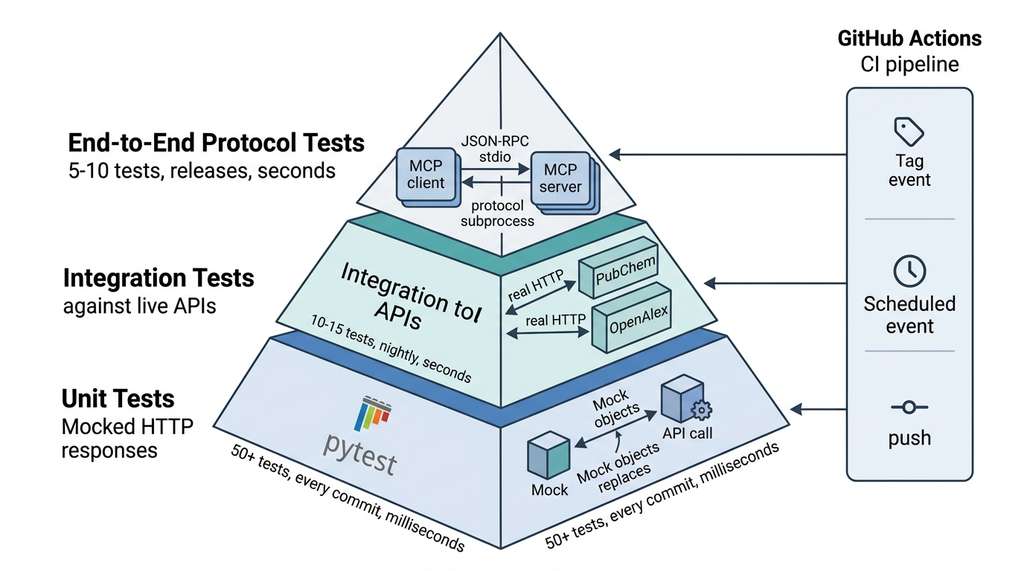
The three test layers form a pyramid (Figure 12.3): a broad base of fast unit tests, a narrower band of integration tests, and a small cap of end-to-end protocol tests. Each layer trades speed for realism, and skipping any one of them leaves an entire class of failure undetected.
For a scientific MCP server with 10 tools, a healthy test distribution looks like this: 50+ unit tests (fast, mocked, run on every commit), 10-15 integration tests (live API, run nightly), and 5-10 end-to-end tests (full protocol, run on releases). The unit tests catch logic bugs in minutes. The integration tests catch API drift overnight. The end-to-end tests catch protocol-level regressions before users see them. This pyramid mirrors the testing strategies discussed in Chapter 18, and the CI/CD patterns from Chapter 21. Figure 12.3.1 illustrates MCP server three-layer test pyramid and CI pipeline.
Checkpoint
So far: you have three test layers for MCP servers (unit tests with mocks for speed, integration tests against live APIs for contract fidelity, and end-to-end protocol tests for JSON-RPC correctness), each catching a distinct class of failure that the others miss.
4. Authentication and Authorization
Passing all three test layers confirms that your server behaves correctly, but correctness alone is not enough once the server is exposed beyond your local machine.
A scientific MCP server may expose tools that access proprietary databases, consume paid API quotas, or control expensive instruments. Authentication verifies who is connecting; authorization determines what they can do.
For stdio transport, authentication is implicit: the host spawns the server as a child process, and only the host can communicate with it. The server inherits the host's environment variables, which is the standard mechanism for passing API keys:
"""Authentication via environment variables (stdio transport)."""
import os
from mcp.server import Server

server = Server("authenticated-science")

def get_api_key(service: str) -> str:
    """Retrieve an API key from environment variables.

    Raises RuntimeError if the key is not set, with instructions
    for the user to configure it.
    """
    env_var = f"{service.upper()}_API_KEY"
    key = os.environ.get(env_var)
    if not key:
        raise RuntimeError(
            f"Missing {env_var} environment variable. "
            f"Set it in your MCP client configuration: "
            f'"env": {{"{env_var}": "your-key-here"}}'
        )
    return key

@server.tool()
async def search_proprietary_db(query: str) -> str:
    """Search a proprietary compound database (requires API key).

    Args:
        query: Search term for the database.
    """
    api_key = get_api_key("PROPRIETARY_DB")
    # Use the key to authenticate with the database
    async with httpx.AsyncClient() as client:
        resp = await client.get(
            "https://api.proprietary-db.example.com/search",
            params={"q": query},
            headers={"Authorization": f"Bearer {api_key}"},
        )
        resp.raise_for_status()
        return resp.text
For HTTP transports (SSE (Server-Sent Events), Streamable HTTP), the server is a network service that anyone might attempt to reach. Here you need explicit authentication. The MCP specification recommends OAuth (Open Authorization) 2.0 for remote servers, with the host handling the OAuth flow and including the access token in HTTP headers.
The standard approach uses a bearer token (a credential string the client presents in an HTTP header to prove it has been authorized) validated by middleware that runs before the request reaches your tool handler.
"""Token-based auth middleware for HTTP-transport MCP servers."""
from functools import wraps
from starlette.requests import Request
from starlette.responses import JSONResponse

def require_auth(allowed_scopes: list[str]):
    """Middleware that validates OAuth bearer tokens and scopes.

    Args:
        allowed_scopes: List of OAuth scopes required to access this endpoint.
    """
    def decorator(func):
        @wraps(func)
        async def wrapper(request: Request, *args, **kwargs):
            auth_header = request.headers.get("Authorization", "")
            if not auth_header.startswith("Bearer "):
                return JSONResponse(
                    {"error": "Missing or invalid Authorization header"},
                    status_code=401,
                )

            token = auth_header[7:]
            # Validate the token (in production, verify the JWT (JSON Web Token) signature and claims)
            # validate_token is an application-specific function you implement
            # to decode the JWT, check its signature, and return the claims dict
            claims = await validate_token(token)
            if claims is None:
                return JSONResponse(
                    {"error": "Invalid or expired token"},
                    status_code=401,
                )

            # Check scopes
            token_scopes = set(claims.get("scope", "").split())
            if not token_scopes.issuperset(allowed_scopes):
                return JSONResponse(
                    {"error": f"Insufficient scope. Required: {allowed_scopes}"},
                    status_code=403,
                )

            return await func(request, *args, **kwargs)
        return wrapper
    return decorator
5. Sandboxing with Docker
Authentication controls who can reach your server, but it does not limit what a legitimately authenticated request can do to the host system.
MCP servers that execute user-provided input (SMILES strings, search queries, code snippets) should run in a sandbox. Docker enforces process isolation, filesystem and network restrictions, and resource limits, preventing the container from reaching the host filesystem, making arbitrary connections, or consuming unbounded CPU and memory.
# Dockerfile for a sandboxed scientific MCP server
FROM python:3.12-slim

# Install system dependencies for RDKit
RUN apt-get update && apt-get install -y --no-install-recommends \
    libxrender1 libxext6 \
    && rm -rf /var/lib/apt/lists/*

# Create non-root user
RUN useradd --create-home --shell /bin/bash mcpuser
WORKDIR /home/mcpuser/app

# Install Python dependencies
COPY requirements.txt .
RUN pip install --no-cache-dir -r requirements.txt

# Copy server code
COPY src/ ./src/

# Switch to non-root user
USER mcpuser

# Run server on stdio (default) or HTTP
ENV MCP_TRANSPORT=stdio
ENTRYPOINT ["python", "-m", "science_mcp.server"]
# docker-compose.yml for MCP server with resource limits
services:
  science-mcp:
    build: .
    environment:
      - PUBCHEM_API_KEY=${PUBCHEM_API_KEY}
      - OPENALEX_EMAIL=${OPENALEX_EMAIL}
    deploy:
      resources:
        limits:
          cpus: "2.0"
          memory: 1G
        reservations:
          cpus: "0.5"
          memory: 256M
    # Restrict network access to only scientific APIs
    networks:
      - science-apis
    # Read-only filesystem except for tmp
    read_only: true
    tmpfs:
      - /tmp:size=100M

networks:
  science-apis:
    driver: bridge
Writing Dockerfiles and compose configurations by hand works but is verbose. The
mcp CLI tool (installed with the MCP Python SDK) can generate container configurations automatically:
mcp build --docker typically produces a Dockerfile from your
pyproject.toml, and mcp run --container launches the server
in an isolated Docker container with stdio piped back to the host. Check the SDK documentation for the exact flags available in your version. For Claude Desktop,
the configuration is a single entry:
{"command": "docker", "args": ["run", "-i", "science-mcp:latest"]}.
This reduces the 30-line Dockerfile and 20-line compose file to a one-liner.
6. Publishing and Distribution
A well-tested, sandboxed MCP server is ready for distribution. The MCP ecosystem supports several distribution channels:
PyPI (Python Package Index) is the standard channel for Python packages. Package your server as a
regular Python package with pyproject.toml, and users install it with
pip install science-mcp. The entry point should be a console script
that starts the server on stdio. To publish, build the distribution with python -m build and upload it with twine upload dist/*; both tools are installable via pip install build twine.
# pyproject.toml for an MCP server package
[project]
name = "science-mcp"
version = "1.0.0"
description = "MCP server for scientific discovery workflows"
requires-python = ">=3.11"
dependencies = [
    "mcp>=1.0.0",
    "httpx>=0.27.0",
    "pydantic>=2.0",
    "pubchempy>=1.0.4",
]

[project.optional-dependencies]
chemistry = ["rdkit-pypi>=2024.3.1"]
all = ["science-mcp[chemistry]"]

[project.scripts]
science-mcp = "science_mcp.server:main_sync"

[build-system]
requires = ["hatchling"]
build-backend = "hatchling.build"
science-mcp lets users start the server directly. Optional dependencies (RDKit) are separated so users who only need literature search skip the chemistry installation.Claude Desktop configuration is where most users will connect to your server. The configuration file maps server names to launch commands:
{
  "mcpServers": {
    "science-mcp": {
      "command": "science-mcp",
      "env": {
        "OPENALEX_EMAIL": "researcher@university.edu"
      }
    },
    "science-mcp-docker": {
      "command": "docker",
      "args": ["run", "-i", "--rm", "science-mcp:latest"],
      "env": {
        "OPENALEX_EMAIL": "researcher@university.edu"
      }
    }
  }
}
As of 2026, MCP server discovery is largely manual: users find servers through
GitHub searches, documentation links, and word of mouth. Emerging
MCP registries aim to solve this with searchable catalogs of servers,
including verified schemas, security audits, and compatibility matrices. A significant
step in this direction is the MCP Specification v2025-03-26, which formalized
the Streamable HTTP transport, structured tool annotations (including
readOnlyHint and destructiveHint metadata), and an OAuth 2.1
authorization framework for remote servers (Anthropic, 2025). These protocol-level
additions make automated trust verification possible: a registry can now programmatically
check whether a server's tools declare their side effects, whether its transport layer
supports the latest authentication standard, and whether its schemas pass validation
against the canonical JSON Schema specification. For scientific workflows,
domain-specific registries could catalog servers by research area (chemistry, genomics,
climate science), enabling agents to dynamically discover and connect to new
capabilities while verifying safety annotations before granting access. This connects
to the
multi-agent discovery
vision in Chapter 54, where agents compose tool ecosystems on the fly.
7. Continuous Integration Pipeline
With the server packaged and listed in a registry, the final piece is automating the test and release cycle so that every change is validated before it reaches users.
A complete CI pipeline for an MCP server runs unit tests on every push, integration tests nightly, and end-to-end protocol tests on every release. Here is a GitHub Actions workflow that implements this:
# .github/workflows/test.yml
name: Test MCP Server

on:
  push:
    branches: [main]
  pull_request:
  schedule:
    - cron: "0 2 * * *"  # Nightly at 2 AM UTC

jobs:
  unit-tests:
    runs-on: ubuntu-latest
    steps:
      - uses: actions/checkout@v4
      - uses: actions/setup-python@v5
        with:
          python-version: "3.12"
      - run: pip install -e ".[all]" && pip install pytest pytest-asyncio
      - run: pytest -m "not integration" --tb=short

  integration-tests:
    if: github.event_name == 'schedule' || github.event_name == 'push'
    runs-on: ubuntu-latest
    steps:
      - uses: actions/checkout@v4
      - uses: actions/setup-python@v5
        with:
          python-version: "3.12"
      - run: pip install -e ".[all]" && pip install pytest pytest-asyncio
      - run: pytest -m integration --tb=short
        env:
          OPENALEX_EMAIL: ci@example.com

  protocol-tests:
    if: startsWith(github.ref, 'refs/tags/v')
    runs-on: ubuntu-latest
    steps:
      - uses: actions/checkout@v4
      - uses: actions/setup-python@v5
        with:
          python-version: "3.12"
      - run: pip install -e ".[all]" && pip install pytest pytest-asyncio mcp
      - run: pytest tests/test_protocol.py --tb=short
Try It: Build and Test a Minimal MCP Server
Build a complete test suite for a single-tool MCP server in five steps, using only
Python standard libraries plus mcp and pytest:
1. Create a file echo_server.py with a single MCP tool called
reverse_text that takes a string and returns it reversed. Use the
mcp SDK's @server.tool() decorator and add a
main_sync() entry point that runs the server on stdio.
2. Write three unit tests in test_echo_unit.py: one that verifies
reverse_text("hello") returns "olleh", one that verifies an
empty string returns an empty string, and one that verifies a Unicode string
(e.g., with accented characters) round-trips correctly.
3. Write two end-to-end tests in test_echo_protocol.py using the
MCP client SDK: one that connects to the server via stdio_client, calls
list_tools(), and asserts reverse_text appears; and one that
calls reverse_text through the protocol and checks the JSON-RPC response
content.
4. Add a pyproject.toml with a [project.scripts] entry
pointing to your server's main_sync, then run
pip install -e . so the console script is available.
5. Run pytest test_echo_unit.py test_echo_protocol.py -v and
confirm all five tests pass. Then intentionally break the tool (e.g., return the
string unchanged) and verify that the tests catch the regression.
Exercise 12.3.1
You have an MCP server with a search_literature tool that queries the
OpenAlex API. You write a unit test that mocks the HTTP response and verifies the tool
returns a list of papers. The test passes. A week later, OpenAlex renames the JSON field
results to works in their response payload. Your unit test
still passes. Why? Describe the specific change you would add to your CI pipeline to
catch this category of failure within 24 hours.
Hint
Consider which test layer (unit, integration, or end-to-end) is sensitive to changes
in the upstream API's response format, and how the pytest.mark.integration
marker combined with a scheduled CI job (the cron trigger in GitHub Actions)
addresses exactly this gap.
Step-Through: MCP End-to-End Test Lifecycle
Trace through the lifecycle of a single end-to-end test calling compute_descriptors("CCO")
(ethanol) via the MCP protocol:
Step 1 (Spawn): The mcp_session fixture launches
python -m science_mcp.server as a subprocess. The server starts, opens
stdin/stdout for JSON-RPC, and waits. Elapsed: ~500 ms.
Step 2 (Initialize): The test client sends
{"jsonrpc":"2.0","method":"initialize","id":1,...}. The server responds with
its capabilities (tools, resources). The handshake completes. Message count: 2.
Step 3 (Call): The client sends
{"jsonrpc":"2.0","method":"tools/call","params":{"name":"compute_descriptors","arguments":{"smiles":"CCO"}},"id":2}.
The server deserializes the request, invokes the tool function, computes molecular weight
= 46.07, H-bond donors = 1, H-bond acceptors = 1. Elapsed: ~50 ms. (The actual science takes 50 ms; the protocol lifecycle around it takes ten times longer, which is why end-to-end tests expose latency and serialization costs that unit tests never see.)
Step 4 (Response): The server wraps the result as a content block:
{"content":[{"type":"text","text":"{\"descriptors\":{\"molecular_weight\":46.07,...}}"}]}.
The JSON-RPC response reaches the client. Message count: 4 total.
Step 5 (Assert): The test parses result.content[0].text,
deserializes the inner JSON, and asserts data["descriptors"]["molecular_weight"] > 0.
Test passes. The fixture tears down the subprocess.
Real-World Application: Anthropic's MCP Registry and Smithery
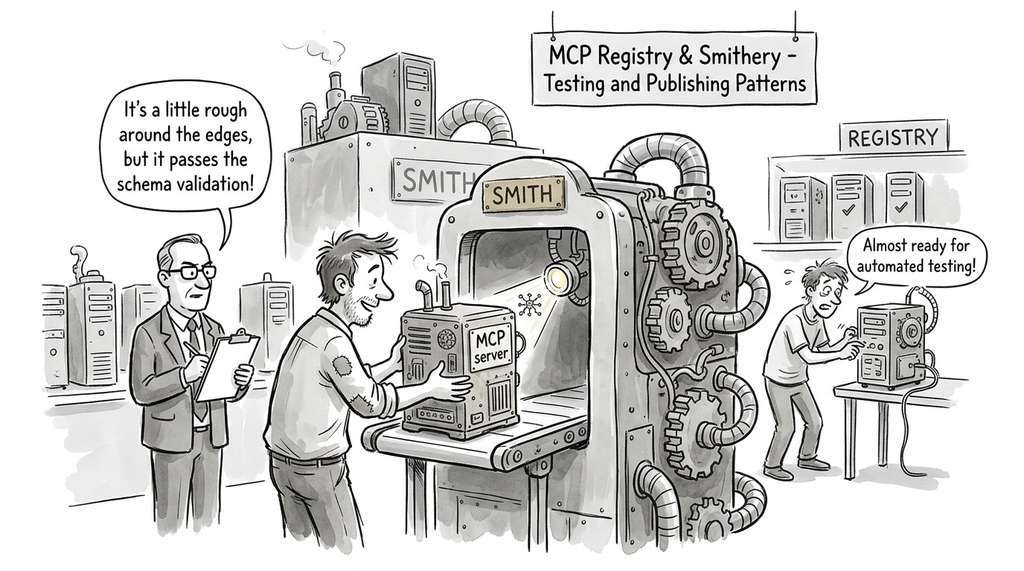
The testing and publishing patterns in this section mirror the workflow used by
Smithery, one of the earliest public MCP server registries. As of early 2026, Smithery
typically requires submitted servers to pass automated schema validation (every tool must declare
a valid JSON Schema for its inputs), a protocol compliance check (the server must
respond correctly to initialize and tools/list), and a
sandboxing audit (Docker packaging with non-root execution). Servers that fail any
check are rejected before they appear in the catalog, so agents connecting
through the registry are more likely to encounter well-tested, safely packaged tools.
The Billion-Dollar Mock
In 2012, a Knight Capital trading algorithm lost \$440 million in 45 minutes because a deployment script reactivated dead code on one of eight servers, and the test suite had verified the new behavior only against mocked market feeds. The mocks faithfully confirmed the code was correct; the live market feed exposed a catastrophic mismatch between the mock contract and the real data format. The incident is now a canonical case study in why integration tests against live services are not optional, no matter how comprehensive the mocked unit tests appear.
Lab: Build a Three-Layer Test Suite for a Weather MCP Server
Goal: Experience the difference between mocked unit tests, live integration
tests, and full protocol end-to-end tests by building all three layers for a single
MCP tool.
Tools needed: Python 3.11+, mcp SDK, pytest,
pytest-asyncio, httpx, and the free Open-Meteo API (no key
required).
Setup (5 min): Create a minimal MCP server with one tool,
get_temperature(latitude: float, longitude: float), that calls
https://api.open-meteo.com/v1/forecast?latitude=...&longitude=...¤t_weather=true
and returns the current temperature.
Layer 1, Unit (5 min): Write two unit tests that mock the HTTP response and
verify the tool parses the temperature correctly from the JSON payload. Intentionally
return a response with a renamed field and confirm the test still passes (demonstrating
the mock's blind spot).
Layer 2, Integration (5 min): Write one integration test (marked with
@pytest.mark.integration) that calls the live Open-Meteo API for
coordinates (48.8566, 2.3522) (Paris) and asserts the temperature is between
-40 and 60 degrees Celsius.
Layer 3, Protocol (10 min): Write two end-to-end tests using
stdio_client: one that verifies get_temperature appears in
list_tools(), and one that calls the tool through the protocol and checks
the response content block contains a numeric temperature.
What to vary: Try renaming a field in the Open-Meteo response mock and observe
which test layer catches it. Try returning malformed JSON from the tool and observe
which layer catches it.
What to observe: Note how fast each layer runs. Unit tests should complete in
under 1 second; integration tests take 1 to 3 seconds (network round-trip); protocol
tests take 2 to 5 seconds (subprocess startup plus network).
Exercises
- Conceptual: Explain why end-to-end MCP protocol tests are necessary in addition to unit tests that call tool functions directly. What class of bugs can protocol tests catch that unit tests cannot? Give two concrete examples.
-
Coding: Write a pytest fixture that records HTTP responses from PubChem
to JSON files on the first run, then replays them on subsequent runs (a "cassette"
pattern, named by analogy with recording and replaying audio cassettes). Use the
pytest-recordingorvcrpylibrary, or implement it from scratch withhttpxevent hooks. Verify that yoursearch_pubchemtests produce identical results in both live and replay modes. -
Analysis: The Docker configuration in this section limits the server to
1 GB of memory. Estimate the maximum number of concurrent
compute_descriptorscalls the server can handle before hitting this limit, assuming each RDKit molecule object consumes approximately 5 KB of memory and each call holds the molecule for 200 ms. What happens when the limit is exceeded, and how should the server handle it?
What's Next
With individual MCP tools tested and packaged, Section 12.4: Building a Scientific MCP Server combines PubChem, OpenAlex, and a vector database into a complete server, adds resource subscriptions and prompt templates, and integrates the server into the Discovery Workbench.