Prerequisites
In Section 28.2 you worked with molecule-text and protein-text models that align structured scientific data with natural language. This section extends multimodal alignment to a different modality pair: scientific documents (PDFs with text, figures, tables, and equations) paired with natural language questions. Familiarity with retrieval-augmented generation (RAG) from Chapter 37 will provide additional context, though this section is self-contained. The Chapter 26 discussion of dense retrieval provides the embedding search foundations.
Scientific papers are inherently multimodal: they contain prose, mathematical equations, data tables, charts, microscopy images, molecular structure diagrams, and citation networks. Traditional NLP systems process only the text, losing the information encoded in figures and tables. Scientific Document AI treats each paper as a multimodal object, extracting and indexing all modalities for retrieval and question answering. PaperQA2 (Skarlinski et al., 2024) represents the state of the art: an agentic system that retrieves relevant papers, reads their full text, examines figures and tables, and synthesizes cited answers. This section covers the components needed to build such a system: document parsing, figure understanding, dense retrieval over heterogeneous content, and answer generation with source attribution.
1. The Document Understanding Pipeline
Somewhere in a stack of 500 clinical trial PDFs sits a dose-response curve on page 14 that contradicts the headline claim of a competing study, but no text-only search will ever surface it. Extracting that kind of evidence requires a pipeline with several stages: layout analysis (identifying text blocks, figures, tables, equations), text extraction (optical character recognition (OCR) for scanned documents, direct extraction for digital PDFs), figure captioning (understanding what a chart or microscopy image shows), table parsing (converting visual tables to structured data), and equation recognition (converting rendered math to LaTeX or MathML).
Checkpoint
So far: a scientific document AI pipeline has five extraction stages (layout detection, OCR, figure captioning, table parsing, equation recognition), each converting a different modality into machine-readable text so that downstream models can search and reason over the full content of a paper.
A document understanding pipeline chains machine learning and rule-based components to transform a raw PDF (a stream of characters, vector graphics, and embedded images with no semantic markup) into structured, queryable content. Every text paragraph, figure, table, and equation becomes individually typed, located, and ready for downstream embedding or generation. Scientific PDFs frequently encode a substantial portion of their key findings in non-text elements (figures, tables, equations); without explicit extraction, those findings stay invisible to language models. A layout detector (typically a vision transformer trained on document page images) classifies rectangular regions by type. Modality-specific extractors (OCR for text, image cropping for figures, cell parsers for tables) then convert each region into a machine-readable representation. Figure 28.3 illustrates this flow from raw PDF through layout detection, modality-specific extraction, embedding, and unified retrieval. Use a full document understanding pipeline when your corpus contains scanned or figure-heavy documents; for born-digital, text-only papers, simpler PDF text extraction (such as PyMuPDF or pdfplumber) is sufficient and much faster.
Modern document AI models handle many of these stages jointly. LayoutLMv3 (Huang et al., 2022) is a multimodal transformer that jointly processes text tokens and image patches from document pages, learning to classify regions as text, table, figure, or equation. Nougat (Blecher et al., 2023) takes a different approach: it treats the entire PDF page as an image and uses a vision encoder-decoder to output Markdown text, preserving equations and structure without explicit layout analysis. As of 2025, Marker v2 and Docling provide faster, more accurate PDF-to-structured-text conversion and have largely replaced Nougat in production pipelines. In short: every figure, table, and equation in a PDF is invisible to a language model until the document understanding pipeline converts it to searchable text.
import fitz  # PyMuPDF
from dataclasses import dataclass, field
from pathlib import Path


@dataclass
class DocumentChunk:
    """A chunk of content extracted from a scientific document.

    Chunks can be text paragraphs, figure descriptions,
    table contents, or equations.
    """
    content: str
    chunk_type: str       # "text", "figure", "table", "equation"
    page_number: int
    source_file: str
    section_title: str = ""
    caption: str = ""     # for figures and tables
    metadata: dict = field(default_factory=dict)


def parse_scientific_pdf(pdf_path: str,
                         chunk_size: int = 500) -> list[DocumentChunk]:
    """Extract structured chunks from a scientific PDF.

    Uses PyMuPDF for text extraction with page-level
    layout awareness. Figures are identified by image blocks.

    Parameters
    ----------
    pdf_path : str
        Path to the PDF file.
    chunk_size : int
        Target number of characters per text chunk.
    """
    doc = fitz.open(pdf_path)
    chunks = []

    for page_num, page in enumerate(doc):
        # Extract text blocks with position info
        blocks = page.get_text("dict")["blocks"]

        current_text = ""
        for block in blocks:
            if block["type"] == 0:  # text block
                for line in block["lines"]:
                    line_text = " ".join(
                        span["text"] for span in line["spans"]
                    )
                    current_text += line_text + " "

                    # Chunk when we reach target size
                    if len(current_text) >= chunk_size:
                        chunks.append(DocumentChunk(
                            content=current_text.strip(),
                            chunk_type="text",
                            page_number=page_num + 1,
                            source_file=str(pdf_path),
                        ))
                        current_text = ""

            elif block["type"] == 1:  # image block
                chunks.append(DocumentChunk(
                    content=f"[Figure on page {page_num + 1}]",
                    chunk_type="figure",
                    page_number=page_num + 1,
                    source_file=str(pdf_path),
                    metadata={
                        "width": block.get("width", 0),
                        "height": block.get("height", 0),
                    },
                ))

        # Flush remaining text
        if current_text.strip():
            chunks.append(DocumentChunk(
                content=current_text.strip(),
                chunk_type="text",
                page_number=page_num + 1,
                source_file=str(pdf_path),
            ))

    doc.close()
    return chunks
2. Vision-Language Models for Scientific Figures
Scientific figures encode critical information that text alone cannot capture: dose-response curves, phylogenetic trees, crystal structure visualizations, and experimental setup photographs. Understanding these figures requires vision-language models (VLMs) trained on scientific imagery.
General-purpose VLMs like GPT-4V and Claude can interpret many scientific figure types, but specialized models typically perform better on domain-specific tasks. MatSci-NLP (a language model fine-tuned on materials science literature) processes materials science charts. ChartQA answers questions about data visualizations. The practical strategy uses a VLM to generate text descriptions of figures, which are then indexed alongside the paper's text for retrieval.
import torch
from transformers import (
    AutoProcessor, AutoModelForVision2Seq,
)
from PIL import Image


class ScientificFigureCaptioner:
    """Generate text descriptions of scientific figures.

    Uses a vision-language model to produce detailed captions
    that describe the figure's content, axes, trends, and
    key findings for indexing and retrieval.
    """

    def __init__(self, model_name: str = "Salesforce/blip2-opt-2.7b"):
        self.processor = AutoProcessor.from_pretrained(model_name)
        self.model = AutoModelForVision2Seq.from_pretrained(
            model_name, torch_dtype=torch.float16,
        )
        self.model.eval()

    def caption_figure(self, image_path: str,
                       context: str = "") -> str:
        """Generate a detailed caption for a scientific figure.

        Parameters
        ----------
        image_path : str
            Path to the figure image file.
        context : str
            Surrounding text from the paper (section title,
            nearby paragraphs) to guide the captioning.
        """
        image = Image.open(image_path).convert("RGB")

        prompt = (
            "This is a figure from a scientific paper. "
            "Describe what the figure shows, including axes, "
            "data trends, and key findings."
        )
        if context:
            prompt += f" Context from the paper: {context}"

        inputs = self.processor(
            images=image, text=prompt, return_tensors="pt"
        ).to(self.model.device)

        with torch.no_grad():
            output_ids = self.model.generate(
                **inputs, max_new_tokens=256,
            )

        caption = self.processor.decode(
            output_ids[0], skip_special_tokens=True
        )
        return caption


def enrich_chunks_with_figure_captions(
    chunks: list[DocumentChunk],
    captioner: ScientificFigureCaptioner,
    figure_dir: str,
) -> list[DocumentChunk]:
    """Add AI-generated captions to figure chunks.

    Replaces placeholder figure content with detailed
    VLM-generated descriptions for better retrieval.
    """
    enriched = []
    for chunk in chunks:
        if chunk.chunk_type == "figure":
            # Find the corresponding image file
            img_path = f"{figure_dir}/page{chunk.page_number}_fig.jpg"
            try:
                caption = captioner.caption_figure(img_path)
                chunk.content = caption
                chunk.caption = caption
            except FileNotFoundError:
                pass  # keep placeholder
        enriched.append(chunk)
    return enriched
A materials scientist asks: "Which paper reports the highest thermoelectric figure of merit for bismuth telluride at room temperature?" The answer is in a figure (a ZT vs. temperature plot, where ZT is the dimensionless thermoelectric figure of merit) in one of 500 indexed papers. Without figure captioning, the text retriever finds papers mentioning "bismuth telluride" and "thermoelectric" but cannot identify which figure contains the specific ZT value. With VLM-generated captions ("Figure 3 shows ZT as a function of temperature for Bi2Te3 samples, with peak ZT = 1.86 at 300 K"), the retriever matches the question directly to the relevant figure and its source paper.
Once figures have been converted to searchable text descriptions, the next challenge is orchestrating retrieval and reasoning across an entire corpus of papers, not just individual figures or chunks.
3. PaperQA2: Agentic Question Answering Over Literature
When a researcher asks "What is the recommended dose adjustment for patients with renal impairment?" and the answer lives in a table on page 47 of one paper, contradicted by a figure in another, no single retrieval pass will reconcile the evidence; the system must search, read, re-search, and reason across sources. PaperQA2 (Skarlinski et al., 2024) is an agentic RAG system (one that autonomously decides which tools to invoke in a loop, rather than making a single retrieval pass) designed specifically for scientific literature. Unlike single-pass RAG pipelines, PaperQA2 operates as a multi-step agent that iteratively gathers evidence. It searches for papers, reads relevant sections, gathers supporting passages, scores their relevance, and synthesizes a cited answer. On the LitQA2 benchmark of biomedical questions, it produced answers approaching the quality of human subject-matter experts.
The PaperQA2 architecture consists of several agent actions. Figure 28.3.1 illustrates PaperQA2 agentic document QA pipeline.
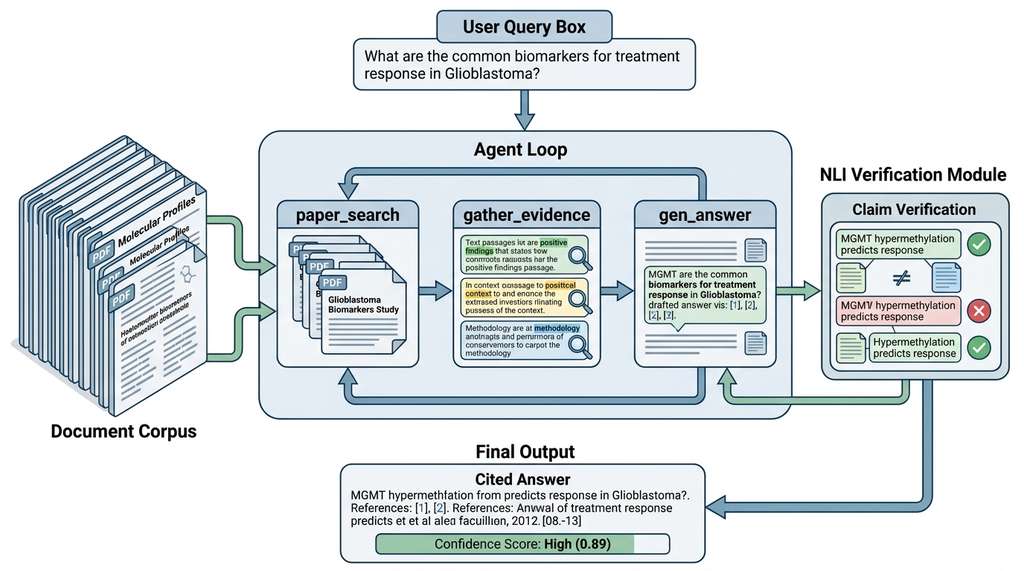
- paper_search: Query a corpus (local PDFs, Semantic Scholar, PubMed) to find relevant papers.
- gather_evidence: Read retrieved papers and extract passages relevant to the question.
- gen_answer: Synthesize an answer from gathered evidence with inline citations.
# PaperQA2 usage via the paper-qa package
# pip install paper-qa

from paperqa import Settings, ask
from paperqa.settings import AgentSettings
from pathlib import Path


async def answer_research_question(
    question: str,
    paper_directory: str,
    max_sources: int = 10,
) -> dict:
    """Answer a scientific question using PaperQA2.

    Searches a local directory of PDFs, extracts evidence,
    and generates a cited answer.

    Parameters
    ----------
    question : str
        The scientific question to answer.
    paper_directory : str
        Path to directory containing PDF papers.
    max_sources : int
        Maximum number of papers to consult.
    """
    settings = Settings(
        agent=AgentSettings(
            agent_type="fake",  # use "OpenAIFunctionsAgent" in prod
            max_search_queries=3,
        ),
        answer=Settings.AnswerSettings(
            evidence_k=max_sources,
            answer_max_sources=5,
        ),
        paper_directory=paper_directory,
    )

    result = await ask(
        question,
        settings=settings,
    )

    return {
        "answer": result.answer,
        "references": [
            {
                "title": ref.title,
                "authors": ref.authors,
                "year": ref.year,
                "key_passage": ref.text,
                "relevance_score": ref.score,
            }
            for ref in result.references
        ],
        "confidence": result.confidence,
    }


# Usage example (requires asyncio event loop)
# import asyncio
# result = asyncio.run(answer_research_question(
#     "What is the binding affinity of nirmatrelvir to SARS-CoV-2 Mpro?",
#     paper_directory="./papers/covid_antivirals/",
# ))
# print(result["answer"])
# for ref in result["references"]:
#     print(f"  [{ref['year']}] {ref['title']}: {ref['key_passage'][:100]}...")
A standard RAG pipeline (retrieve chunks, concatenate, generate answer) makes a single pass: it retrieves once and answers once. PaperQA2's agentic approach makes multiple passes: it searches, reads, re-searches based on what it found, gathers more evidence, and only then answers. This iterative process is critical for scientific questions where the answer depends on synthesizing information across multiple papers. A question like "How do the binding affinities of first-generation and second-generation EGFR (epidermal growth factor receptor, a protein kinase target in cancer therapy) inhibitors compare?" requires finding papers on both generations, extracting binding data from each, and comparing. No single retrieval step returns all needed information. The agentic loop, covered in depth in Chapter 40: Research Agents, is what makes PaperQA2 competitive with human experts.
4. Dense Retrieval for Heterogeneous Scientific Content
Scientific documents mix text, figures, tables, and equations, so a retrieval system must handle all four modalities. The strategy embeds every chunk into a single dense vector space (a high-dimensional numeric representation where semantically similar content maps to nearby points) for nearest-neighbor search: text chunks go directly to the encoder, figure chunks use VLM-generated captions as a proxy, table chunks are serialized to Markdown or CSV, and equation chunks use their LaTeX source.
Mental Model
Think of a public library where books, DVDs, vinyl records, and maps are all shelved separately. If a patron asks "What do we have about the history of the Silk Road?", the librarian must search four separate catalogs. A smarter library writes a short text summary card for every item (a paragraph for each book, a plot synopsis for each DVD, a tracklist description for each album, a caption for each map) and files all the cards in one unified card catalog sorted by topic. Now a single search finds relevant books, documentaries, music, and maps together. Dense retrieval over heterogeneous scientific content works the same way: each non-text element (figure, table, equation) is converted to a text description, embedded in the same vector space as the text chunks, and retrieved by one query. The conversion to text is the "summary card"; the shared embedding space is the "unified catalog."
import numpy as np
from sentence_transformers import SentenceTransformer
from typing import Optional


class ScientificRetriever:
    """Dense retrieval over heterogeneous scientific content.

    Embeds text, figures (via captions), tables (via serialization),
    and equations (via LaTeX) into a single vector space for
    unified cross-modal search.
    """

    def __init__(self, model_name: str = "BAAI/bge-base-en-v1.5"):
        self.encoder = SentenceTransformer(model_name)
        self.chunks: list[DocumentChunk] = []
        self.embeddings: Optional[np.ndarray] = None

    def index_documents(self, chunks: list[DocumentChunk]) -> None:
        """Build a dense index from document chunks.

        Each chunk (text, figure, table, equation) is embedded
        as text for unified retrieval.
        """
        self.chunks = chunks

        # Convert all chunk types to text for embedding
        texts = []
        for chunk in chunks:
            if chunk.chunk_type == "text":
                texts.append(chunk.content)
            elif chunk.chunk_type == "figure":
                # Use VLM caption or original caption
                texts.append(
                    f"Figure: {chunk.caption or chunk.content}"
                )
            elif chunk.chunk_type == "table":
                texts.append(f"Table: {chunk.content}")
            elif chunk.chunk_type == "equation":
                texts.append(f"Equation: {chunk.content}")
            else:
                texts.append(chunk.content)

        self.embeddings = self.encoder.encode(
            texts, show_progress_bar=True,
            normalize_embeddings=True,
        )

    def search(self, query: str, top_k: int = 10,
               chunk_type: Optional[str] = None) -> list[dict]:
        """Retrieve chunks most relevant to a query.

        Parameters
        ----------
        query : str
            Natural language query.
        top_k : int
            Number of results to return.
        chunk_type : str, optional
            Filter results by type ("text", "figure", "table").
        """
        q_emb = self.encoder.encode(
            [query], normalize_embeddings=True
        )
        scores = (q_emb @ self.embeddings.T).squeeze()

        # Apply type filter if specified
        if chunk_type:
            mask = np.array([
                c.chunk_type == chunk_type for c in self.chunks
            ])
            scores = np.where(mask, scores, -np.inf)

        top_indices = np.argsort(-scores)[:top_k]

        return [
            {
                "rank": rank + 1,
                "score": float(scores[idx]),
                "content": self.chunks[idx].content[:300],
                "type": self.chunks[idx].chunk_type,
                "page": self.chunks[idx].page_number,
                "source": self.chunks[idx].source_file,
            }
            for rank, idx in enumerate(top_indices)
        ]
Retrieving the right chunks is only half the problem; the system must also ensure that the answers it generates from those chunks are faithful to the sources rather than fabricated.
5. Hallucination Detection and Source Attribution
Scientific question answering has a unique challenge: hallucinated answers can propagate false claims into the research record. A model that confidently states "compound X has IC50 (half-maximal inhibitory concentration, the drug concentration needed to inhibit a biological target by 50%) = 3.2 nM against target Y" when no source supports this claim is dangerous. PaperQA2 addresses this with source attribution: every statement in the generated answer must be traceable to a specific passage in a specific paper, and the system assigns a confidence score reflecting how well the evidence supports the claim.
Common Misconception
A frequent misunderstanding is that retrieval-augmented generation cannot hallucinate because it grounds answers in real documents. In practice, RAG systems hallucinate in at least three ways: the model may fabricate details not present in any retrieved passage, it may incorrectly combine facts from different passages (conflation), or it may cite a real passage that does not actually support the stated claim (misattribution). Retrieval reduces hallucination relative to pure generation, but it does not eliminate it; explicit claim verification (as shown below) remains necessary.
from dataclasses import dataclass
import re


@dataclass
class CitedClaim:
    """A claim extracted from a generated answer with its source."""
    claim_text: str
    source_passage: str
    source_paper: str
    source_page: int
    support_score: float  # 0-1, how well the passage supports the claim


def extract_and_verify_claims(
    answer: str,
    evidence_passages: list[dict],
    verifier_model,
) -> list[CitedClaim]:
    """Extract claims from an answer and verify source support.

    Uses a natural language inference (NLI) model, where NLI is
    the task of determining whether a premise sentence entails
    (logically implies), contradicts, or is neutral toward a
    hypothesis sentence.

    Parameters
    ----------
    answer : str
        Generated answer with inline citations like [1], [2].
    evidence_passages : list[dict]
        Retrieved passages with paper metadata.
    verifier_model : callable
        NLI model that scores (premise, hypothesis) pairs.
        Returns probability that premise entails hypothesis.
    """
    # Split answer into individual claims (sentences)
    sentences = re.split(r'(?<=[.!?])\s+', answer)

    verified_claims = []
    for sentence in sentences:
        # Extract citation markers [N]
        citations = re.findall(r'\[(\d+)\]', sentence)
        clean_claim = re.sub(r'\[\d+\]', '', sentence).strip()

        if not clean_claim or not citations:
            continue

        # Verify each cited source supports the claim
        best_score = 0.0
        best_source = None
        for cite_num in citations:
            idx = int(cite_num) - 1
            if idx < len(evidence_passages):
                passage = evidence_passages[idx]
                # NLI: does the passage entail the claim?
                score = verifier_model(
                    premise=passage["text"],
                    hypothesis=clean_claim,
                )
                if score > best_score:
                    best_score = score
                    best_source = passage

        if best_source:
            verified_claims.append(CitedClaim(
                claim_text=clean_claim,
                source_passage=best_source["text"][:200],
                source_paper=best_source.get("title", "Unknown"),
                source_page=best_source.get("page", 0),
                support_score=best_score,
            ))

    return verified_claims


def flag_unsupported_claims(
    claims: list[CitedClaim],
    threshold: float = 0.5,
) -> list[CitedClaim]:
    """Flag claims with insufficient source support.

    Returns claims where the best supporting evidence
    falls below the entailment threshold, where entailment
    means the evidence logically implies the claim.
    """
    return [c for c in claims if c.support_score < threshold]
PaperQA2 achieved 85.2% accuracy on the LitQA2 benchmark (circa 2024), outperforming human PhD-level respondents. Building on this, VERITAS (Li et al., 2024) introduced a fine-grained scientific claim verification framework that decomposes generated answers into atomic claims and checks each against structured evidence (tables, figures, and equations), not just text passages. VERITAS shows that roughly 40% of hallucinations in scientific QA involve numerical values (dosages, binding constants, p-values) drawn from tables or figures, and that text-only NLI verification misses these because the source data is in a non-textual modality. Concurrently, ScholarQABench (Agarwal et al., 2025) provides a multi-paper QA benchmark requiring synthesis across 10+ sources per question, revealing that even state-of-the-art systems drop to ~50% accuracy when answers demand cross-paper numerical comparison. These results highlight the need for modality-aware verification that goes beyond textual entailment to include table cell matching, chart value extraction, and equation consistency checks.
6. Building a Document Retrieval Pipeline
Combining the components above, we can build a complete pipeline that ingests scientific PDFs, extracts and indexes all modalities, and answers questions with cited sources. This pipeline forms the document understanding layer of the multimodal research assistant built in Section 28.4.
from pathlib import Path
import json


class ScientificDocumentPipeline:
    """End-to-end pipeline for scientific document understanding.

    Combines PDF parsing, figure captioning, dense retrieval,
    and answer generation with source attribution.
    """

    def __init__(self, paper_dir: str,
                 embedding_model: str = "BAAI/bge-base-en-v1.5"):
        self.paper_dir = Path(paper_dir)
        self.retriever = ScientificRetriever(embedding_model)
        self.all_chunks: list[DocumentChunk] = []
        self._indexed = False

    def ingest_papers(self, chunk_size: int = 500) -> int:
        """Parse all PDFs in the paper directory.

        Returns the total number of chunks extracted.
        """
        pdf_files = list(self.paper_dir.glob("*.pdf"))
        print(f"Found {len(pdf_files)} PDF files")

        for pdf_path in pdf_files:
            chunks = parse_scientific_pdf(
                str(pdf_path), chunk_size=chunk_size
            )
            self.all_chunks.extend(chunks)

        print(f"Extracted {len(self.all_chunks)} chunks "
              f"({sum(1 for c in self.all_chunks if c.chunk_type == 'text')} text, "
              f"{sum(1 for c in self.all_chunks if c.chunk_type == 'figure')} figures)")
        return len(self.all_chunks)

    def build_index(self) -> None:
        """Build the dense retrieval index over all chunks."""
        self.retriever.index_documents(self.all_chunks)
        self._indexed = True
        print(f"Indexed {len(self.all_chunks)} chunks")

    def query(self, question: str, top_k: int = 10,
              chunk_type: str = None) -> list[dict]:
        """Search the indexed documents.

        Parameters
        ----------
        question : str
            Natural language query.
        top_k : int
            Number of results.
        chunk_type : str, optional
            Filter by "text", "figure", or "table".
        """
        if not self._indexed:
            raise RuntimeError("Call build_index() before querying")

        return self.retriever.search(question, top_k, chunk_type)

    def answer(self, question: str,
               max_sources: int = 5) -> dict:
        """Generate a cited answer from the document corpus.

        Retrieves evidence, synthesizes answer, and provides
        source attribution for each claim.
        """
        evidence = self.query(question, top_k=max_sources * 2)

        # Format evidence for answer generation
        context = "\n\n".join(
            f"[{i+1}] (p.{e['page']}, {Path(e['source']).stem}): "
            f"{e['content']}"
            for i, e in enumerate(evidence[:max_sources])
        )

        return {
            "question": question,
            "evidence": evidence[:max_sources],
            "context_for_llm": context,
            "num_sources": len(evidence[:max_sources]),
        }


# Usage
# pipeline = ScientificDocumentPipeline("./papers/kinase_inhibitors/")
# pipeline.ingest_papers()
# pipeline.build_index()
#
# results = pipeline.query(
#     "What is the selectivity profile of lapatinib?",
#     top_k=5,
# )
# for r in results:
#     print(f"  [{r['type']}] p.{r['page']} score={r['score']:.3f}")
#     print(f"    {r['content'][:100]}...")
answer method formats retrieved evidence with bracketed citation markers for downstream LLM answer generation.The from-scratch pipeline above is approximately 250 lines. PaperQA2 provides production-grade equivalents for all components (PDF parsing, chunking, dense retrieval, agentic search, answer generation, citation verification) in a single package:
# Full PaperQA2 pipeline (replaces ~250 lines with ~10)
from paperqa import Settings, ask

result = await ask(
    "What is the binding affinity of erlotinib to EGFR?",
    settings=Settings(paper_directory="./papers/"),
)

print(result.answer)          # cited answer
print(result.confidence)      # 0-1 confidence score
for ref in result.references:
    print(f"  {ref.title}: {ref.text[:100]}...")
ask call that handles parsing, retrieval, evidence gathering, and cited answer generation internally.PaperQA2 handles PDF parsing (including figures and tables), hybrid retrieval (sparse + dense), iterative evidence gathering, answer synthesis with citations, and confidence scoring internally. Line count reduction: approximately 25x. Use the from-scratch approach when you need custom indexing strategies, domain-specific figure understanding, or integration with non-standard document formats.
When testing PaperQA2 on a corpus that includes the PaperQA2 paper itself, the system will sometimes cite its own paper to answer questions about its own architecture. This is technically correct (the best kind of correct) but creates an amusing circularity: the system's answer about how it works is sourced from the paper describing how it works. More practically, self-citation bias in document QA systems is a known issue. If your corpus overrepresents a particular research group, the QA system will overrepresent that group's claims in its answers.
7. Evaluation: Answer Quality and Attribution Fidelity
Evaluating a scientific document QA system requires two orthogonal measurements: answer correctness (does the answer match the ground truth?) and attribution fidelity (do the cited sources actually support the claims?). A system can produce a correct answer with wrong citations (lucky guess), or a well-cited answer that is factually wrong (the source was misinterpreted).
from dataclasses import dataclass


@dataclass
class DocumentQAMetrics:
    """Evaluation metrics for scientific document QA systems.

    Measures both answer quality and source attribution.
    """

    @staticmethod
    def answer_accuracy(predictions: list[str],
                        ground_truths: list[str],
                        exact_match: bool = False) -> float:
        """Fraction of answers that match the ground truth.

        Uses exact string match or fuzzy substring match.
        """
        correct = 0
        for pred, truth in zip(predictions, ground_truths):
            if exact_match:
                if pred.strip().lower() == truth.strip().lower():
                    correct += 1
            else:
                # Fuzzy: truth appears as substring in prediction
                if truth.strip().lower() in pred.strip().lower():
                    correct += 1
        return correct / len(predictions) if predictions else 0.0

    @staticmethod
    def citation_precision(cited_passages: list[list[str]],
                           relevant_passages: list[list[str]]) -> float:
        """Fraction of cited passages that are actually relevant.

        High precision means the system does not cite irrelevant sources.
        """
        total_cited = 0
        relevant_cited = 0
        for cited, relevant in zip(cited_passages, relevant_passages):
            for c in cited:
                total_cited += 1
                if any(r in c or c in r for r in relevant):
                    relevant_cited += 1
        return relevant_cited / total_cited if total_cited else 0.0

    @staticmethod
    def citation_recall(cited_passages: list[list[str]],
                        relevant_passages: list[list[str]]) -> float:
        """Fraction of relevant passages that are actually cited.

        High recall means the system does not miss important sources.
        """
        total_relevant = 0
        recalled = 0
        for cited, relevant in zip(cited_passages, relevant_passages):
            for r in relevant:
                total_relevant += 1
                if any(r in c or c in r for c in cited):
                    recalled += 1
        return recalled / total_relevant if total_relevant else 0.0
Try It: Build a Mini Scientific QA System
Build a working document QA pipeline over open-access papers in under an hour.
(1) Download 5 open-access PDFs from arXiv on a single topic (for example, search
"graph neural networks for drug discovery" and grab the top 5 results as PDFs into a
folder called papers/).
(2) Install dependencies: pip install pymupdf sentence-transformers numpy.
Copy the DocumentChunk, parse_scientific_pdf, and
ScientificRetriever classes from this section into a file called
mini_qa.py.
(3) Write a short driver script that calls parse_scientific_pdf on each PDF,
collects all chunks, indexes them with ScientificRetriever, and exposes a
search(query) function.
(4) Write 5 questions whose answers you can verify by reading the papers (for example,
"What dataset did the authors use for molecular property prediction?"). Run each query,
inspect the top-3 retrieved chunks, and manually judge whether the correct passage
appears.
(5) Compute precision@3 (the fraction of the top-3 retrieved results that are relevant to the query) and recall@3
(fraction of questions where the correct passage appears in the top 3). Experiment with
chunk sizes of 300, 500, and 800 characters and compare how retrieval quality changes.
Exercise 28.3.1
A scientific PDF corpus contains 1,200 text chunks, 180 figure chunks (with VLM captions), and 90 table chunks (serialized as Markdown). You embed all 1,470 chunks using a single text encoder and build a cosine-similarity index. A user queries: "Show me the dose-response curve for imatinib." The top-5 results contain 3 text chunks discussing imatinib pharmacology and 2 figure chunks whose captions mention dose-response data. Compute the precision@5 for the "figure" chunk type only (treating only figure chunks as relevant for this visual query). Then explain one concrete strategy to boost the ranking of figure chunks for queries that explicitly request visual content.
Hint
Of the 5 returned results, only 2 are figure chunks, so figure-type precision@5 = 2/5 =
0.4. To boost figure ranking, consider a query classifier that detects visual intent
(keywords like "show me," "plot," "curve," "diagram") and applies a score bonus to figure
chunks, or use the optional chunk_type filter in
ScientificRetriever.search() to restrict retrieval to figures when visual
intent is detected.
Step-Through: NLI Claim Verification Scoring
Trace through the extract_and_verify_claims function with a tiny example.
Suppose the generated answer is: "Erlotinib has an IC50 of 2 nM against EGFR [1].
It is selective over HER2 [2]." The evidence passages are:
[1] "Erlotinib inhibits EGFR with IC50 = 2.0 nM in cell-free kinase assays."
[2] "Erlotinib showed moderate activity against HER2 (IC50 = 350 nM)."
Step 1: Split the answer into sentences. Sentence A = "Erlotinib has an IC50 of 2 nM against EGFR", citations = [1]. Sentence B = "It is selective over HER2", citations = [2].
Step 2: For Sentence A, run NLI(premise=passage[1], hypothesis="Erlotinib has an IC50 of
2 nM against EGFR"). The premise directly states IC50 = 2.0 nM, so the entailment score
is high: 0.94. This becomes support_score = 0.94.
Step 3: For Sentence B, run NLI(premise=passage[2], hypothesis="It is selective over
HER2"). The premise says "moderate activity against HER2 (IC50 = 350 nM)", which
contradicts selectivity. The entailment score is low: 0.18.
support_score = 0.18.
Step 4: With threshold = 0.5, flag_unsupported_claims returns Sentence B
(0.18 < 0.5). The system correctly flags the selectivity claim as unsupported: the
cited source actually shows erlotinib is NOT selective over HER2.
Real-World Application: Elicit (Ought)
Elicit, originally developed by the nonprofit Ought and spun out as an independent company in 2023, applies the Scientific Document AI pipeline at scale to help researchers conduct systematic literature reviews. Users pose a research question, and Elicit searches millions of papers via Semantic Scholar, extracts structured data from each (sample size, methods, key findings), and presents a filterable table of evidence across studies, automating a process central to literature mining. The system uses dense retrieval over full-text chunks combined with LLM extraction to surface answers that would take a human reviewer weeks to compile manually.
Lab: Chunk Size vs. Retrieval Quality
Goal: Measure how text chunk size affects retrieval precision for
scientific document search.
Tools: Python, PyMuPDF (pip install pymupdf),
sentence-transformers (pip install sentence-transformers), and 5 open-access
PDFs from arXiv on a single topic (for example, "transformer architectures").
Procedure: (1) Parse all 5 PDFs using parse_scientific_pdf
at three chunk sizes: 200, 500, and 1000 characters. (2) Build a separate
ScientificRetriever index for each chunk size. (3) Write 5 factual questions
whose answers you can verify by reading the papers. (4) For each chunk size, query all 5
questions and record precision@3 (fraction of top-3 results containing the answer).
What to vary: Chunk size (200, 500, 1000). Optionally also vary the
embedding model (try all-MiniLM-L6-v2 vs. bge-base-en-v1.5).
What to observe: Small chunks (200 chars) produce precise matches but may
split key sentences across boundaries. Large chunks (1000 chars) capture more context but
dilute the embedding signal with irrelevant text. Plot precision@3 vs. chunk size and
identify the sweet spot for your topic. Budget: 15 to 25 minutes.
Exercises
- Conceptual. Explain why PaperQA2's agentic approach (iterative search, gather, re-search) produces better answers than single-pass RAG for scientific questions. Give a specific example of a question that requires multiple retrieval rounds and explain what each round contributes to the final answer.
- Coding. Build a minimal scientific document pipeline using the
ScientificDocumentPipelineclass above. Index 5 to 10 open-access papers from arXiv (download PDFs manually). Implement a simple evaluation: write 10 questions whose answers you know, query the pipeline, and measure answer accuracy and retrieval precision@5. Compare results with and without figure captioning enabled. - Analysis. The hallucination detection approach in this section uses NLI to verify that cited passages entail the generated claims. What are the limitations of NLI for scientific claim verification? Consider: (a) claims involving numerical comparisons, (b) claims that require multi-hop reasoning across passages, (c) claims about statistical significance. For each limitation, propose an alternative verification strategy.