Prerequisites
This section opens the chapter. You should be comfortable with Python async programming and have read Chapter 10: Prompting to Programming for the basics of tool calling. Familiarity with HTTP APIs and JSON is assumed. Chapter 11: Context Engineering explains why delivering structured context to an LLM matters; this section builds the infrastructure that makes it possible.
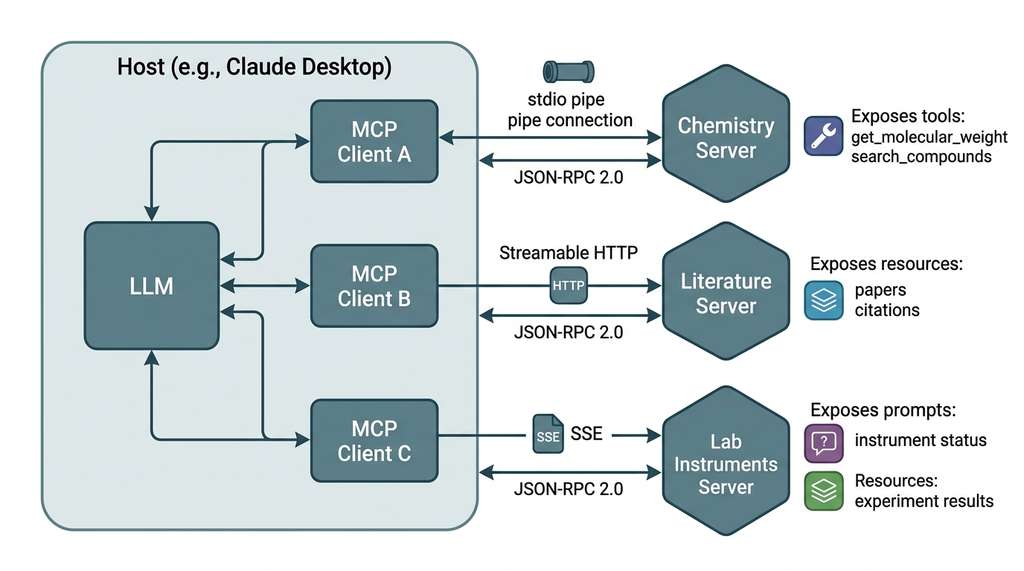
An AI agent that can only read and write text is like a scientist who can think but has no hands, no instruments, and no access to the library. The Model Context Protocol (MCP) gives agents structured access to the outside world through a standardized interface. Just as the Language Server Protocol (LSP) let every editor talk to every language compiler through a single integration, MCP lets every AI host talk to every tool server. This section builds your mental model of the protocol from the ground up: the actors (hosts, clients, servers), the messages (JSON-RPC), the transports (stdio, HTTP), and the three primitive types (tools, resources, prompts) that a server can expose. Figure 12.1.1 illustrates MCP Host-Client-Server Architecture with Transports.
1. Why a Protocol?
When every agent framework talks to every tool through its own custom glue code, a single schema change in one tool can silently break many of your pipelines, and the damage may go unnoticed until an experiment returns nonsense results. The cost of not having a protocol is not just engineering hours; it is corrupted science.
Imagine you run a discovery platform that needs five agent frameworks to talk to twelve scientific tools: that is sixty bespoke integrations to write, test, and maintain, and every new tool multiplies the burden again. If you had \(m\) agent frameworks and \(n\) tools, you needed \(O(m \times n)\) integrations. MCP reduces this to \(O(m + n)\): each agent framework implements the MCP client once, each tool implements the MCP server once, and they all interoperate. (Five frameworks and twelve tools: 60 bespoke integrations without a protocol, just 17 with one, and the gap widens with every addition.)
A protocol is a shared contract specifying how two pieces of software exchange messages. It defines the message format, the message order, and what each side must do when it receives one. Protocols decouple producers from consumers. The chemistry tool does not need to know whether the agent is Claude, GPT, or a custom research framework; it only needs to know that the agent speaks MCP. Both sides agree on JSON-RPC 2.0 (where JSON-RPC is a lightweight remote procedure call protocol that encodes requests, responses, and errors as JSON objects) as the message envelope and negotiate capabilities at connection time. They then exchange typed request/response pairs over a transport (stdio or HTTP). Use a protocol instead of ad-hoc integration whenever you have more than one agent, more than one tool, or when different teams maintain the agent and tool.
A scientific discovery platform might need to query PubChem, search OpenAlex, control a liquid handler, log to a LIMS (Laboratory Information Management System, the database that tracks samples, experiments, and results across a lab), and run GPU simulations. Without a protocol, each integration is bespoke. With MCP, the agent discovers tools at runtime, reads their schemas, and calls them through a uniform interface, collapsing the integration space from combinatorial to linear (as analyzed in Chapter 1).
2. The Three Actors: Host, Client, Server
That linear integration cost does not appear by magic; it falls out of a clean separation of responsibilities among three distinct roles that participate in every MCP interaction. Figure 12.1 shows how these roles relate: a single host contains multiple clients, each maintaining a dedicated connection to one server.
The host is the user-facing application: Claude Desktop, a VS Code extension, a Jupyter notebook, or a custom research agent built with the framework from Chapter 17. The host manages the user session, enforces security policies, and coordinates AI/LLM interactions. A host may connect to multiple servers simultaneously, giving the agent access to many tools at once.
The client lives inside the host and maintains a stateful, one-to-one connection with a single MCP server. Each client-server pair negotiates capabilities independently (that is, each side declares what features it supports, as detailed in Section 4 below): one client might connect to a chemistry server that exposes molecular property tools, while another connects to a literature server exposing search resources. The client translates between the host's internal representation and the MCP wire protocol.
The server is the process that exposes tools, resources, and prompts. It runs in its own process (or container, or remote machine) and communicates with exactly one client. A server might wrap a REST API (PubChem), a local database (SQLite, Chroma), a command-line tool (RDKit), or a physical instrument (a plate reader connected via serial port). The server is responsible for input validation, error handling, and rate limiting. In short: three actors, one protocol, and every new tool plugs in without touching the others.
Mental Model
Think of MCP's host/client/server architecture like a law firm handling multiple cases. The host is the senior partner who coordinates everything and talks to the actual client (the user). Each MCP client is a junior associate assigned to exactly one outside expert: one associate works with the forensic accountant, another with the medical examiner, a third with the private investigator. Each server is that outside expert, accepting requests only through its assigned associate. The senior partner never calls the experts directly, and no expert talks to another expert. If the forensic accountant makes a mistake, the medical examiner's work is unaffected, because they operate through separate associates with separate communication channels. This is why MCP enforces one-to-one client-server pairs: isolation through dedicated intermediaries.
The one-to-one relationship between client and server is a deliberate design choice. It means each server connection has its own lifecycle, its own capability set, and its own security boundary. A host that needs five tools from five different services runs five clients, each in its own connection. This isolation prevents a misbehaving chemistry server from interfering with the literature search server. The pattern mirrors microservice architecture: small, focused servers composed at the host level.
3. Transports: How Messages Move
MCP is transport-agnostic. The protocol defines the message format (JSON-RPC 2.0) but not how those messages reach the server. The specification defines three standard transports:
stdio (standard input/output) is the simplest transport. The host spawns the server as a child process and communicates over standard input/output. Each JSON-RPC message is a single line of JSON followed by a newline. This transport is ideal for local development: no network configuration, no ports to open, no TLS certificates to manage. Most MCP servers start here.
Server-Sent Events (SSE) uses HTTP for client-to-server messages (POST requests) and SSE for server-to-client messages (a long-lived event stream). This transport works through firewalls and reverse proxies, making it suitable for remote servers. (As of 2025, the MCP specification deprecated the standalone SSE transport in favor of Streamable HTTP, described below, which subsumes its capabilities while also supporting stateless operation.)
Streamable HTTP is the newest transport, using standard HTTP POST requests with optional streaming responses via SSE. It supports both stateful (session-based) and stateless operation, making it the most flexible option for production deployments. The server can optionally upgrade a response to an SSE stream when it needs to send multiple messages (progress updates, partial results).
"""Minimal MCP server using stdio transport."""
from mcp.server import Server
from mcp.server.stdio import stdio_server

# Create a server with a descriptive name
server = Server("chemistry-tools")

@server.tool()
async def get_molecular_weight(smiles: str) -> str:
    """Calculate molecular weight from a SMILES string.

    Args:
        smiles: A valid SMILES molecular notation string.
                Example: 'CCO' for ethanol.
    """
    from rdkit import Chem
    from rdkit.Chem import Descriptors
    mol = Chem.MolFromSmiles(smiles)
    if mol is None:
        raise ValueError(f"Invalid SMILES string: {smiles}")
    weight = Descriptors.MolWt(mol)
    return f"Molecular weight of {smiles}: {weight:.2f} g/mol"

async def main():
    async with stdio_server() as (read, write):
        await server.run(read, write, server.create_initialization_options())

if __name__ == "__main__":
    import asyncio
    asyncio.run(main())
@server.tool() decorator registers the function, automatically generating a JSON Schema from the type hints and docstring.4. JSON-RPC 2.0: The Message Format
The transports above move raw bytes between client and server, but they say nothing about what those bytes mean; that structure comes from the message format itself.
Every MCP message is a JSON-RPC 2.0 object. The protocol defines three message types:
requests (which expect a response), responses (which answer a
request), and notifications (one-way messages that expect no reply). Each
request carries a string method, a structured params object, and
an integer id that the response echoes back.
The connection lifecycle begins with an initialize request from the client
to the server. The client declares its name, version, and supported capabilities.
The server responds with its own capabilities: which primitives it supports (tools,
resources, prompts), whether it supports resource subscriptions, and any protocol
extensions. Only after both sides agree on capabilities does the client send an
initialized notification, and the connection is ready for use.
// Client → Server: initialize request
{
  "jsonrpc": "2.0",
  "id": 1,
  "method": "initialize",
  "params": {
    "protocolVersion": "2025-03-26",
    "capabilities": {
      "roots": { "listChanged": true }
    },
    "clientInfo": {
      "name": "discovery-workbench",
      "version": "0.1.0"
    }
  }
}

// Server → Client: initialize response
{
  "jsonrpc": "2.0",
  "id": 1,
  "result": {
    "protocolVersion": "2025-03-26",
    "capabilities": {
      "tools": { "listChanged": true },
      "resources": { "subscribe": true },
      "prompts": { "listChanged": true }
    },
    "serverInfo": {
      "name": "science-mcp",
      "version": "1.0.0"
    }
  }
}
protocolVersion field ensures both sides speak the same dialect.5. The Three Primitives
MCP servers expose functionality through three primitive types, each designed for a different interaction pattern:
5.1 Tools: Functions the Agent Can Call
A tool is a function that the AI model can invoke to perform an action or
retrieve computed results. Tools are the most common primitive. Each tool has a name,
a human-readable description, and an inputSchema defined in JSON Schema
that specifies the expected parameters. The agent reads the schema, constructs a valid
input, and the server executes the function.
Common Misconception
Readers often assume that MCP tools are simply REST API endpoints with a different wire format. They are not. A REST endpoint is stateless and available to any client that knows its URL, whereas an MCP tool exists inside a stateful connection that begins with capability negotiation, enforces schema validation at the host level before the call reaches the server, and supports progress reporting and cancellation mid-execution. The lifecycle (initialize, discover, operate, shutdown) means the server knows its client and can maintain session state across calls, something a bare REST endpoint does not provide.
Tool descriptions serve two audiences: the LLM, which decides whether and how to call the tool, and the human developer, who needs to understand what it does. Good tool descriptions are specific about input formats, include examples, and state failure modes. As covered in Chapter 11, the description is context for the model, and vague context produces vague behavior.
from mcp.server import Server
from mcp.types import Tool, TextContent
import json

server = Server("scientific-tools")

@server.tool()
async def search_compounds(
    query: str,
    max_results: int = 5,
    property_filter: str | None = None,
) -> str:
    """Search PubChem for chemical compounds matching a query.

    Searches by compound name, molecular formula, or SMILES pattern.
    Returns compound IDs, names, molecular formulas, and key properties.

    Args:
        query: Search term. Can be a compound name ('aspirin'),
               molecular formula ('C9H8O4'), or SMILES ('CC(=O)OC1=CC=CC=C1C(=O)O').
        max_results: Maximum number of compounds to return (1-25, default 5).
        property_filter: Optional property constraint, e.g. 'MolecularWeight<300'.

    Returns:
        JSON array of matching compounds with CID, name, formula, and properties.

    Raises:
        ValueError: If max_results is outside the allowed range.
        ConnectionError: If the PubChem API is unreachable.
    """
    if not 1 <= max_results <= 25:
        raise ValueError(f"max_results must be 1-25, got {max_results}")

    import pubchempy as pcp
    compounds = pcp.get_compounds(query, "name", listkey_count=max_results)
    results = [
        {
            "cid": c.cid,
            "name": c.iupac_name,
            "formula": c.molecular_formula,
            "weight": c.molecular_weight,
            "smiles": c.canonical_smiles,
        }
        for c in compounds[:max_results]
    ]
    return json.dumps(results, indent=2)
5.2 Resources: Data the Agent Can Read
A resource is a piece of data identified by a URI that the agent (or the user, through the host) can read. Resources are for data retrieval rather than computation. Think of them as files, database records, or live sensor readings that the agent can pull into its context window. Each resource has a URI, a name, a description, and a MIME type.
Resources can be static (a fixed configuration file) or dynamic (the latest reading
from a mass spectrometer). They can also use URI templates (URI patterns containing placeholder variables in curly braces that the client fills in at request time), enabling
parameterized access: pubchem://compound/{cid}/properties lets the agent
request properties for any compound by CID.
from mcp.server import Server
from mcp.types import Resource, TextContent

server = Server("lab-resources")

@server.resource("lab://instruments/status")
async def get_instrument_status() -> str:
    """Current status of all connected laboratory instruments.

    Returns a JSON object mapping instrument IDs to their current state
    (idle, running, error) and last calibration timestamp.
    """
    # In production, this queries the instrument control system
    status = {
        "plate-reader-01": {"state": "idle", "last_calibration": "2026-06-30T08:00:00Z"},
        "liquid-handler-01": {"state": "running", "protocol": "compound-screen-v3"},
        "mass-spec-01": {"state": "idle", "last_calibration": "2026-06-29T14:30:00Z"},
    }
    return json.dumps(status, indent=2)

@server.resource("lab://experiments/{experiment_id}/results")
async def get_experiment_results(experiment_id: str) -> str:
    """Retrieve results for a specific experiment by its ID.

    Args:
        experiment_id: The unique experiment identifier (e.g., 'EXP-2026-0142').
    """
    # Query the LIMS database for results
    results = await query_lims(experiment_id)
    return json.dumps(results, indent=2)
{experiment_id}, enabling the agent to retrieve results for any experiment.5.3 Prompts: Reusable Prompt Templates
A prompt is a reusable template that generates structured messages for the LLM. Prompts are user-controlled (the human selects which prompt to use), unlike tools (which the model selects). They are useful for encoding domain-specific workflows: "analyze this compound," "summarize these papers," "design an experiment for this hypothesis."
from mcp.server import Server
from mcp.types import Prompt, PromptMessage, TextContent

server = Server("science-prompts")

@server.prompt()
async def analyze_compound(smiles: str) -> list[PromptMessage]:
    """Generate a structured analysis prompt for a chemical compound.

    Args:
        smiles: SMILES notation for the compound to analyze.
    """
    return [
        PromptMessage(
            role="user",
            content=TextContent(
                type="text",
                text=(
                    f"Analyze the compound with SMILES: {smiles}\n\n"
                    "Please provide:\n"
                    "1. Common name and IUPAC name\n"
                    "2. Key physicochemical properties (logP, PSA, HBD/HBA)\n"
                    "3. Known biological activities\n"
                    "4. Drug-likeness assessment (Lipinski's Rule of Five)\n"
                    "5. Structural alerts for toxicity\n\n"
                    "Use the search_compounds and get_molecular_weight tools "
                    "to retrieve data before analyzing."
                ),
            ),
        )
    ]
Consider a scientific discovery platform. Tools handle actions: search PubChem, run a docking simulation, submit a synthesis order. Resources provide context: the current instrument status, a dataset of known inhibitors, today's experiment log. Prompts encode workflows: "given a target protein, generate a hit-finding campaign" or "review this batch of NMR spectra." The distinction matters because each primitive has different security implications. Tools execute code and should be sandboxed (see Section 12.3). Resources are read-only and generally safe. Prompts shape the LLM's behavior and should be reviewed for injection risks (recall the prompt security discussion in Chapter 11).
6. JSON Schema Validation
Every tool's inputSchema is a JSON Schema object that the host uses to
validate the agent's tool call before sending it to the server. This is a critical
safety layer: malformed inputs are rejected at the protocol level, before they
reach your code. The MCP Python SDK generates JSON Schema automatically from Python
type hints, but understanding the schema language lets you add constraints that
type hints alone cannot express.
JSON Schema supports constraints beyond basic types: minimum and
maximum for numbers, pattern for regex validation on strings,
enum for fixed sets of values, and maxItems for array length.
For scientific tools, these constraints prevent the agent from submitting impossible
queries: a molecular weight cannot be negative, a SMILES string (Simplified Molecular Input Line Entry System, a compact text notation for encoding molecular structures) must match a
structural pattern, and a plate reader can only handle 96 or 384 wells.
from pydantic import BaseModel, Field

class SimilaritySearchInput(BaseModel):
    """Input schema for chemical similarity search."""
    smiles: str = Field(
        description="Query molecule in SMILES notation. Example: 'c1ccccc1' for benzene.",
        pattern=r'^[A-Za-z0-9@+\-\[\]\(\)\\\/=#$:.%]+$',  # Basic SMILES character set
    )
    threshold: float = Field(
        default=0.7,
        ge=0.0,
        le=1.0,
        description="Tanimoto similarity threshold (0.0 to 1.0). "
                    "Higher values return fewer, more similar compounds.",
    )
    fingerprint_type: str = Field(
        default="morgan",
        description="Molecular fingerprint algorithm to use for comparison.",
        json_schema_extra={"enum": ["morgan", "rdkit", "maccs", "topological"]},
    )
    max_results: int = Field(
        default=10,
        ge=1,
        le=100,
        description="Maximum number of similar compounds to return.",
    )
Field constraints (ge, le, pattern, enum) produce JSON Schema validation rules that the host enforces before the tool is called. The Tanimoto similarity threshold is a coefficient between 0 and 1 measuring the overlap between two molecular fingerprints, where 1.0 means identical.The generated JSON Schema for this model looks like the following (simplified):
{
  "type": "object",
  "properties": {
    "smiles": {
      "type": "string",
      "description": "Query molecule in SMILES notation. Example: 'c1ccccc1' for benzene.",
      "pattern": "^[A-Za-z0-9@+\\-\\[\\]\\(\\)\\\\/=#$:.%]+$"
    },
    "threshold": {
      "type": "number",
      "description": "Tanimoto similarity threshold (0.0 to 1.0).",
      "minimum": 0.0,
      "maximum": 1.0,
      "default": 0.7
    },
    "fingerprint_type": {
      "type": "string",
      "enum": ["morgan", "rdkit", "maccs", "topological"],
      "default": "morgan"
    },
    "max_results": {
      "type": "integer",
      "minimum": 1,
      "maximum": 100,
      "default": 10
    }
  },
  "required": ["smiles"]
}
SimilaritySearchInput model. The host validates every incoming tool call against this schema before forwarding it to the server, rejecting malformed inputs at the protocol boundary.
We defined the JSON Schema explicitly above to show what the protocol uses under the
hood. In practice, the MCP Python SDK handles this automatically. When you use
@server.tool() with typed parameters, the SDK calls
pydantic.TypeAdapter to generate the JSON Schema from your type hints and
Field metadata. You write 15 lines of Python; the SDK generates the 30-line
schema. For complex nested types, Pydantic's automatic schema generation saves even
more: a BaseModel with five nested models that would require 200 lines of
hand-written JSON Schema reduces to 50 lines of Python.
7. Connection Lifecycle
Schema validation protects individual tool calls, but the broader question is how a client and server establish, use, and tear down the connection that carries those calls; an MCP connection follows a well-defined lifecycle with four phases:
Initialization: The client sends initialize with its capabilities.
The server responds with its capabilities. The client sends initialized
notification. Both sides now know what the other supports.
Discovery: The client calls tools/list, resources/list,
and prompts/list to enumerate what the server offers. The server returns
arrays of tool/resource/prompt descriptors with names, descriptions, and schemas.
The host presents these to the LLM as available capabilities.
Checkpoint
So far: every MCP session starts with a two-step handshake (the client and server exchange capabilities via initialize/initialized), then the client discovers available tools, resources, and prompts by calling the server's listing methods.
From Handshake to Work
Operation: The agent (through the host and client) calls tools via
tools/call, reads resources via resources/read, and invokes
prompts via prompts/get. Each call is a JSON-RPC request; each response
carries results or errors.
Shutdown: Either side can close the connection. The client sends a
close notification, or the transport disconnects. Servers should clean up
any open resources (database connections, file handles, instrument locks).
Research Frontier
Current MCP servers declare a fixed set of tools at initialization. Active research
explores dynamic tool composition, where servers generate new tools at
runtime based on the agent's context. For example, a chemistry server might synthesize
a specialized "dock_compound_to_target_X" tool after the agent specifies a protein
target, with the docking parameters pre-filled. The MCP specification supports
listChanged notifications that inform the client when tools are added or
removed, enabling this pattern. The MCP Streamable HTTP transport,
standardized in the March 2025 protocol revision, takes this further by allowing
stateless servers that re-derive their tool set per request, enabling serverless
deployments where each invocation is an independent cloud function. Meanwhile,
Anthropic's 2025 introduction of remote MCP servers with OAuth 2.1
authentication (documented in the MCP specification, revision 2025-03-26)
establishes a production-grade pattern for multi-tenant tool hosting, where a single
remote server can serve many agents with per-user authorization scopes, a prerequisite
for shared scientific infrastructure that spans institutions.
8. Security Model
MCP's security model follows a principle of minimal authority. Servers should request only the permissions they need, and hosts should grant only the permissions required. The specification defines several security boundaries:
Process isolation: Each server runs in its own process. A crash or compromise in one server does not affect others. For scientific workflows, this means a buggy instrument-control server cannot corrupt the literature search server.
Input validation: The JSON Schema layer validates all inputs before they reach server code. This typically prevents entire classes of injection attacks: if a SMILES parameter must match a regex, arbitrary shell commands cannot be injected through it.
Human-in-the-loop: Hosts are expected to present tool calls to the user for approval before execution, especially for tools with side effects (ordering reagents, submitting jobs, controlling instruments). The protocol includes progress reporting and cancellation mechanisms so that long-running operations can be monitored and stopped. We revisit these patterns in the context of self-driving laboratories (Chapter 55), where the tension between autonomy and safety becomes acute.
Try It: Build and Inspect a Two-Tool MCP Server
1. Install the MCP SDK and inspector: pip install "mcp[cli]". This gives
you the mcp library and the mcp dev command for interactive
testing.
2. Create a file unit_server.py with a Server("unit-converter")
that registers two tools using @server.tool(): one that converts
temperatures (accepting a value, a source unit from
["celsius", "fahrenheit", "kelvin"], and a target unit) and one that converts
pressures (atmospheres, pascals, torr). Use Pydantic Field constraints to
reject temperatures below absolute zero.
3. Run mcp dev unit_server.py to launch the MCP inspector in your browser.
The inspector shows the initialization handshake, the discovered tools, and their
generated JSON Schemas.
4. In the inspector, call the temperature tool with a valid input (e.g., 100 celsius to
fahrenheit) and observe the JSON-RPC request/response pair. Then call it with an invalid
input (e.g., negative 300 kelvin) and observe the validation error.
5. Open the inspector's "Schema" tab and compare the generated JSON Schema against
your Python type hints. Note how Field(ge=...) became
"minimum" and how the enum list appeared in the schema. This
is the contract that any MCP host will enforce before your code runs.
Exercise 12.1.1
A host application needs to connect to four MCP servers: a PubChem search server, an OpenAlex literature server, an instrument control server, and a LIMS logging server. Draw the relationship diagram showing hosts, clients, and servers. How many MCP client instances does the host create? Now suppose the instrument control server crashes mid-session. Which of the remaining three connections are affected, and why?
Hint
Recall that each client maintains a one-to-one connection with a single server. The host creates one client per server. Because each client-server pair is isolated (its own process, its own capability set, its own lifecycle), a crash in one server leaves the other three client-server pairs completely unaffected. The host creates exactly four client instances.
Step-Through: MCP Connection Lifecycle
Trace through the four-phase lifecycle with a concrete example where a host ("discovery-workbench v0.1.0") connects to a chemistry server ("chem-mcp v1.0.0") that exposes two tools and one resource.
Phase 1, Initialization: The client sends {"jsonrpc":"2.0","id":1,"method":"initialize","params":{"protocolVersion":"2025-03-26","clientInfo":{"name":"discovery-workbench","version":"0.1.0"},"capabilities":{"roots":{"listChanged":true}}}}. The server responds with id:1, declaring "tools":{"listChanged":true} and "resources":{}. The client sends {"method":"notifications/initialized"} (no id, because it is a notification).
Phase 2, Discovery: The client sends {"id":2,"method":"tools/list"}. The server responds with an array of two tool descriptors: [{"name":"get_molecular_weight","inputSchema":{...}},{"name":"search_compounds","inputSchema":{...}}]. The client sends {"id":3,"method":"resources/list"} and gets back one resource: [{"uri":"lab://instruments/status","name":"Instrument Status","mimeType":"application/json"}]. Total round trips so far: 3 requests, 3 responses.
Phase 3, Operation: The agent decides to call get_molecular_weight. The client sends {"id":4,"method":"tools/call","params":{"name":"get_molecular_weight","arguments":{"smiles":"CCO"}}}. The server executes the function and responds: {"id":4,"result":{"content":[{"type":"text","text":"Molecular weight of CCO: 46.07 g/mol"}]}}.
Phase 4, Shutdown: The client sends {"method":"notifications/cancelled"} or simply closes the transport. The server releases its RDKit handle and exits.
Real-World Application: Anthropic's Claude Desktop
Claude Desktop, Anthropic's desktop application, implements the MCP host role to connect to local and remote tool servers. Users configure servers in a JSON file; the host spawns each server as a child process (stdio transport), runs the initialization handshake, and presents discovered tools to the Claude model. This architecture lets third-party developers ship standalone MCP servers (for Slack, GitHub, databases, file systems) that Claude Desktop picks up without any changes to the host code, precisely the \(O(m + n)\) integration benefit described in this section.
The Protocol That Almost Wasn't
MCP's design was directly inspired by the Language Server Protocol (LSP), which Microsoft introduced in 2016 to stop every editor from reimplementing language intelligence from scratch. Before LSP, VS Code, Sublime, Vim, and Emacs each needed a separate plugin for every programming language; after LSP, one language server worked everywhere. The striking parallel: LSP reduced \(m \times n\) editor-language integrations to \(m + n\), and MCP applies the same trick to AI-tool integrations. What makes this historically interesting is that LSP itself was considered controversial at launch, with critics arguing that a "one-size-fits-all protocol" would be too slow for real-time code completion. It turned out that the overhead of a standardized protocol was dwarfed by the engineering savings of not writing the same autocomplete engine for six editors.
Lab: Inspect the MCP Handshake Live
Goal: Observe every JSON-RPC message exchanged during a real MCP session and
verify that the lifecycle matches the four phases described in this section.
Tools needed: Python 3.10+, pip install "mcp[cli]" (provides the
mcp library and the mcp dev inspector). Optionally,
pip install rdkit-pypi if you want the chemistry tool to return real molecular
weights.
Setup (5 min): Copy the minimal chemistry server from this section into a file
called lab_server.py. Add a second tool (e.g., count_atoms that
returns the atom count from a SMILES string using mol.GetNumAtoms()).
Run (10 min): Launch mcp dev lab_server.py. In the inspector's
"Messages" pane, step through the initialization handshake and note the
protocolVersion, capabilities, and serverInfo fields. Call
each tool with valid and invalid inputs. Record the id field of each
request/response pair and verify that responses echo the correct id.
What to vary: Remove one tool and reload; watch the tools/list
response shrink. Add a Field(ge=0) constraint to a parameter and try passing a
negative value. Change the server name and observe the updated serverInfo.
What to observe: (1) The exact sequence of methods:
initialize then notifications/initialized then
tools/list. (2) Validation errors are returned as JSON-RPC error objects with
a code and message, not Python tracebacks. (3) The schema in the
inspector's "Schema" tab matches the Pydantic Field constraints one-to-one.
Exercises
- Conceptual: Explain why MCP uses a one-to-one client-server relationship rather than allowing a single client to connect to multiple servers. What are the security and complexity trade-offs? How does this design choice compare to the microservice pattern discussed in Chapter 6?
- Coding: Write a minimal MCP server with two tools: one that converts temperature between Celsius, Fahrenheit, and Kelvin, and one that converts pressure between atmospheres, pascals, and torr. Use Pydantic models for input validation with appropriate constraints (e.g., temperature cannot be below absolute zero). Test it using the MCP inspector.
- Analysis: Compare the JSON-RPC message flow of an MCP tool call with a standard REST API call. Count the number of round trips needed to discover a tool, validate inputs, execute it, and handle errors in each approach. Under what conditions does the overhead of capability negotiation pay for itself?
What's Next
With the architectural foundations in place, Section 12.2: Implementing Scientific Tools puts the theory into practice. It builds three real MCP tools wrapping PubChem, OpenAlex, and a chemistry computation library, with close attention to input validation, error handling, and rate limiting.