"I meant to build a scaffold. Somewhere around the third migration it acquired a task queue, a provenance graph, and opinions about reproducibility. My scaffold now has a README longer than my thesis."
A Scaffold That Became a Cathedral
Prerequisites
This section assumes you have read Section 6.1 (layered architecture), Section 6.2 (artifact graphs and provenance), and Section 6.3 (safety, cost, and observability). You should be comfortable with Python 3.10+, basic Structured Query Language (SQL), and Representational State Transfer (REST) Application Programming Interfaces (APIs). Familiarity with Git is helpful but not required; we introduce the commands we need.
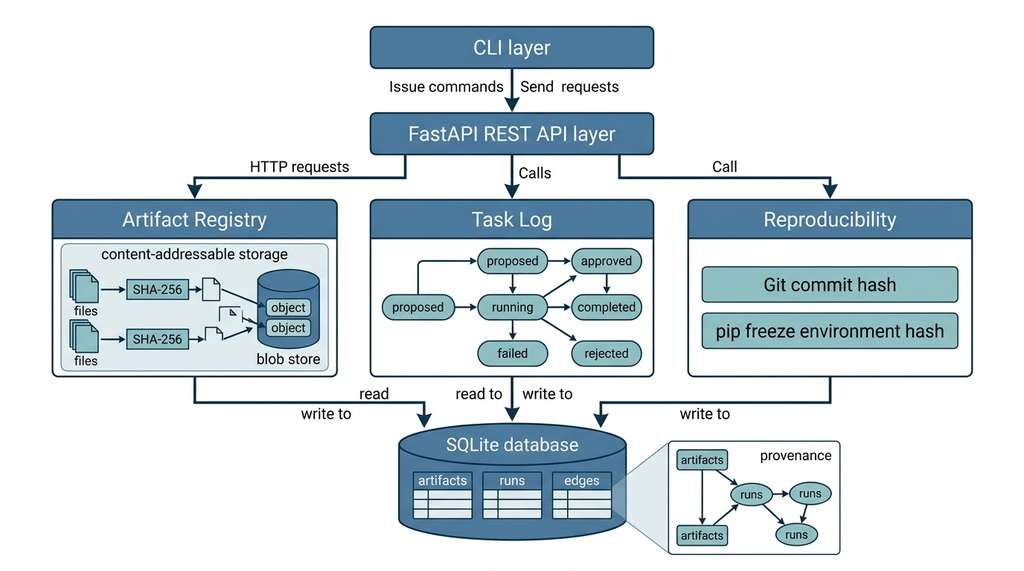
This section is a recipe. We take the architectural concepts from the previous three sections and turn them into running code. By the end, you will have a Discovery Workbench v0: a SQLite-backed artifact registry, a task log for tracking discovery proposals, a FastAPI API layer, a Git-based reproducibility harness, and a command-line interface (CLI) that ties everything together. The Workbench is deliberately minimal. Every subsequent chapter in this book will extend it: adding knowledge graphs (Part II), agent loops (Part III), active learning (Part V), and autonomous experiment orchestration (Part VII). Think of this section as pouring the foundation slab. The cathedral comes later. Figure 6.4.1 illustrates Workbench v0 component architecture and data flow.
1. Project Structure and Dependencies
Six months from now, a colleague asks you to reproduce your best result. You vaguely remember the script. You do not remember which dataset version it consumed, which packages were installed, or whether you edited the config file before or after the final run. A disciplined directory layout and artifact store would answer all of those questions in seconds; their absence will cost you days of forensic archaeology. Here is the layout for Workbench v0:
discovery-workbench/
├── workbench/
│   ├── __init__.py
│   ├── db.py              # Database initialization and connection
│   ├── registry.py        # Artifact registry (content-addressable)
│   ├── tasklog.py         # Discovery task lifecycle
│   ├── api.py             # FastAPI endpoints
│   ├── cli.py             # Click-based CLI
│   └── reproducibility.py # Git + environment capture
├── tests/
│   ├── test_registry.py
│   ├── test_tasklog.py
│   └── test_api.py
├── data/                  # Default artifact storage
├── workbench.db           # SQLite database (created at runtime)
├── Dockerfile
├── pyproject.toml
└── README.mdworkbench/ package contains all library code; data/ holds content-addressable artifact blobs; the SQLite database lives at the project root.The dependency footprint is intentionally small. We want the Workbench to install in seconds and run on a laptop with no external services:
[project]
name = "discovery-workbench"
version = "0.1.0"
requires-python = ">=3.10"
dependencies = [
    "fastapi>=0.110",
    "uvicorn[standard]>=0.29",
    "pydantic>=2.0",
    "click>=8.1",
]

[project.scripts]
workbench = "workbench.cli:main"

[project.optional-dependencies]
dev = ["pytest>=8.0", "httpx>=0.27"]pyproject.toml for Workbench v0. Only four runtime dependencies. SQLite, hashlib, subprocess, and json ship with Python's standard library.Install the project in editable mode so that the workbench CLI is available immediately:
pip install -e ".[dev]"[dev] extra pulls in pytest and httpx for running the test suite.Figure 6.4 shows how the five Workbench modules are organized into three layers: an interface layer (CLI and API), a logic layer (artifact registry, task log, and reproducibility capture), and a storage layer (SQLite database and content-addressed blob store). Each arrow represents a function-call or data-flow dependency.
2. The Artifact Registry (SQLite)
Without a dedicated artifact store, teams routinely discover that their "best result" cannot be reproduced because nobody recorded which version of which file fed which script. That single missing link can invalidate months of work and stall a publication through entire review cycles.
The artifact registry is the Workbench's memory. Every dataset, model checkpoint, figure, and configuration file that participates in a discovery workflow gets registered here. The registry answers three questions that every reproducibility audit asks: what was produced, how was it produced, and from what was it produced. In short: A discovery system that cannot remember its own past is condemned to repeat its failures instead of building on its successes.
The schema uses three tables. artifacts stores metadata for each registered object. runs records the computational steps that produce artifacts. edges captures the provenance relationships between artifacts and runs, forming the directed acyclic graph (DAG) described in Section 6.2.
"""workbench/db.py -- Database initialization and connection."""
import sqlite3
from pathlib import Path

DEFAULT_DB = Path("workbench.db")

SCHEMA = """
CREATE TABLE IF NOT EXISTS artifacts (
    id          TEXT PRIMARY KEY,   -- SHA-256 content hash
    name        TEXT NOT NULL,
    kind        TEXT NOT NULL,      -- dataset, model, figure, config, metric
    created_at  TEXT NOT NULL DEFAULT (datetime('now')),
    metadata    TEXT,               -- JSON blob for flexible attributes
    blob_path   TEXT                -- relative path in data/ directory
);

CREATE TABLE IF NOT EXISTS runs (
    id          TEXT PRIMARY KEY,   -- UUID
    name        TEXT NOT NULL,
    status      TEXT NOT NULL DEFAULT 'pending',
    started_at  TEXT,
    finished_at TEXT,
    params      TEXT,               -- JSON: hyperparameters, settings
    git_hash    TEXT,               -- commit hash at run start
    git_dirty   INTEGER DEFAULT 0,  -- 1 if working tree had uncommitted changes
    env_hash    TEXT,               -- SHA-256 of pip freeze output
    error_msg   TEXT
);

CREATE TABLE IF NOT EXISTS edges (
    id          INTEGER PRIMARY KEY AUTOINCREMENT,
    source_id   TEXT NOT NULL,      -- artifact or run ID
    target_id   TEXT NOT NULL,      -- artifact or run ID
    role        TEXT NOT NULL,      -- input, output, parameter, metric
    UNIQUE(source_id, target_id, role)
);

CREATE INDEX IF NOT EXISTS idx_edges_source ON edges(source_id);
CREATE INDEX IF NOT EXISTS idx_edges_target ON edges(target_id);
CREATE INDEX IF NOT EXISTS idx_artifacts_kind ON artifacts(kind);
CREATE INDEX IF NOT EXISTS idx_runs_status ON runs(status);
"""


def get_connection(db_path: Path = DEFAULT_DB) -> sqlite3.Connection:
    """Return a connection with WAL mode and foreign keys enabled."""
    conn = sqlite3.connect(str(db_path))
    conn.execute("PRAGMA journal_mode=WAL")
    conn.execute("PRAGMA foreign_keys=ON")
    conn.row_factory = sqlite3.Row
    return conn


def init_db(db_path: Path = DEFAULT_DB) -> None:
    """Create tables if they do not exist."""
    conn = get_connection(db_path)
    conn.executescript(SCHEMA)
conn.close()workbench/db.py. The schema encodes the artifact DAG from Section 6.2 in three tables. WAL (Write-Ahead Logging) mode allows concurrent reads during long-running experiment loops by writing changes to a separate log file before committing them to the main database. The edges table is the provenance graph: each row is a typed edge connecting an artifact to a run (or vice versa).The content-addressable storage scheme deserves explanation. When you register an artifact, the registry computes the SHA-256 hash of the file's contents and uses that hash as the artifact's primary key. Two files with identical contents always produce the same ID, regardless of filename or timestamp. This property, called content addressing, gives us deduplication for free: if a dataset appears in ten experiments, it is stored once. It also makes integrity verification a single comparison. If the hash of a stored blob no longer matches its ID, the file has been corrupted or tampered with. Because the hash is deterministic, re-registering the same file is idempotent (where idempotent means that repeating the operation produces the same result without side effects): the registry returns the existing ID and writes nothing new.
Content addressing names every stored object by a deterministic hash of its bytes, typically SHA-256. This decouples identity from location and from human-chosen filenames. Two researchers on different continents who independently hash the same CSV obtain the same key, proving they hold identical data without transferring a single byte. The registration mechanism reads the file in fixed-size chunks, feeds each chunk to a streaming hash, and uses the resulting 64-character hexadecimal digest as the primary key in both the database and the on-disk blob store. Choose content addressing whenever artifacts may be shared across projects, teams, or time spans and you need a guarantee of identity without centralized coordination; for purely ephemeral, single-user scratch files that will never be referenced again, a simpler timestamped naming scheme suffices.
Checkpoint
So far: every artifact is stored once under its SHA-256 content hash, giving you deduplication, integrity verification, and idempotent re-registration without any centralized naming authority.
Collision Resistance at Scale
Given that the entire system's integrity rests on hash uniqueness, it is worth asking whether SHA-256 can realistically produce collisions at the scale of a real discovery campaign.
The number of bits in a SHA-256 hash is \(n = 256\). The probability of a collision after registering \(k\) artifacts follows the birthday-bound approximation (a formula from probability theory that estimates how many items you can draw from a space before two happen to collide):
$$P(\text{collision}) \approx 1 - e^{-k^2 / 2^{n+1}}$$For \(k = 10^9\) (a billion artifacts), the collision probability is approximately \(10^{-58}\). (You could register a billion artifacts every second for the entire age of the universe and still expect zero collisions.) Content addressing is safe for any plausible discovery campaign.
Mental Model
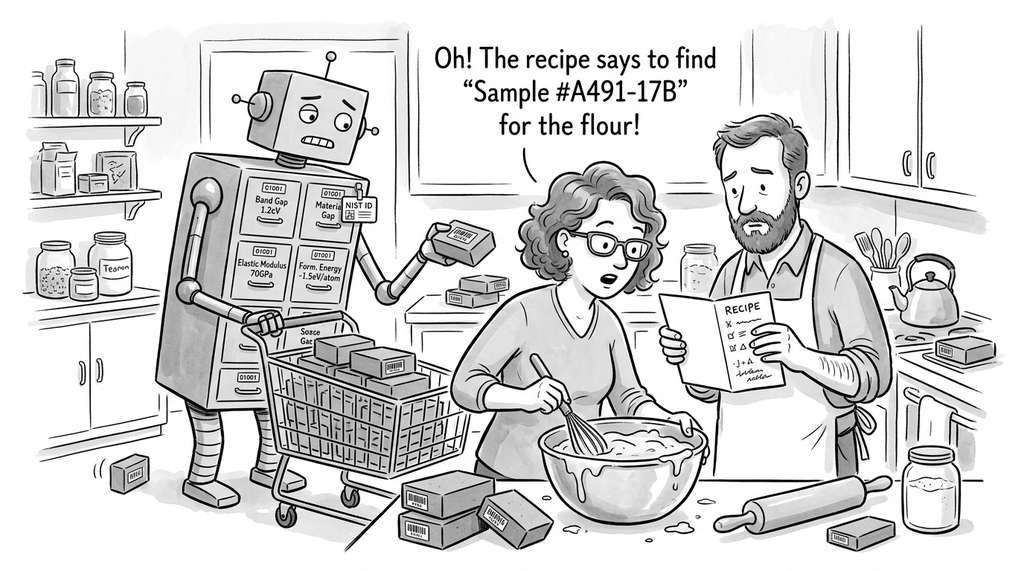
Think of the provenance DAG like a recipe book that also records every meal ever cooked. Each artifact row is an ingredient or a finished dish sitting on a shelf. Each run row is a dated page in a cooking log that lists the recipe steps (parameters), the kitchen you used (Git commit, environment hash), and the clock times you started and finished. The edges table is the set of arrows you would draw on a whiteboard connecting "flour, eggs, sugar" (inputs) through "bake at 180 C for 25 min" (run) to "chocolate cake" (output). To answer "where did this cake come from?" you follow arrows backward through the log to find every ingredient and every intermediate step. To answer "what did I make with this flour?" you follow arrows forward. The directed, acyclic structure guarantees you never chase a circular reference: ingredients never depend on the dishes they produce.
"""workbench/registry.py -- Content-addressable artifact registry."""
import hashlib
import json
import shutil
import uuid
from datetime import datetime, timezone
from pathlib import Path
from typing import Optional

from workbench.db import get_connection, init_db

DATA_DIR = Path("data")


def _content_hash(file_path: Path) -> str:
    """Compute SHA-256 of a file's contents in streaming fashion."""
    h = hashlib.sha256()
    with open(file_path, "rb") as f:
        for chunk in iter(lambda: f.read(8192), b""):
            h.update(chunk)
    return h.hexdigest()


def register_artifact(
    file_path: str | Path,
    name: str,
    kind: str,
    metadata: Optional[dict] = None,
) -> str:
    """
    Register a file as a versioned artifact.

    Returns the content-hash ID.  If an artifact with the same
    hash already exists, the call is idempotent: the existing
    ID is returned and no data is duplicated.
    """
    file_path = Path(file_path)
    if not file_path.exists():
        raise FileNotFoundError(f"Artifact source not found: {file_path}")

    artifact_id = _content_hash(file_path)
    DATA_DIR.mkdir(parents=True, exist_ok=True)
    blob_path = DATA_DIR / artifact_id
    if not blob_path.exists():
        shutil.copy2(file_path, blob_path)

    init_db()
    conn = get_connection()
    conn.execute(
        """INSERT OR IGNORE INTO artifacts
           (id, name, kind, created_at, metadata, blob_path)
           VALUES (?, ?, ?, ?, ?, ?)""",
        (
            artifact_id,
            name,
            kind,
            datetime.now(timezone.utc).isoformat(),
            json.dumps(metadata or {}),
            str(blob_path),
        ),
    )
    conn.commit()
    conn.close()
    return artifact_id


def get_artifact(artifact_id: str) -> Optional[dict]:
    """Retrieve artifact metadata by content hash."""
    init_db()
    conn = get_connection()
    row = conn.execute(
        "SELECT * FROM artifacts WHERE id = ?", (artifact_id,)
    ).fetchone()
    conn.close()
    return dict(row) if row else None


def create_run(
    name: str,
    params: Optional[dict] = None,
    input_ids: Optional[list[str]] = None,
) -> str:
    """
    Create a new run record and link input artifacts.

    Returns the run UUID.  The run starts in 'running' status
    with the current Git commit hash captured automatically.
    """
    from workbench.reproducibility import capture_git_state, capture_env_hash

    run_id = str(uuid.uuid4())
    git_hash, git_dirty = capture_git_state()
    env_hash = capture_env_hash()

    init_db()
    conn = get_connection()
    conn.execute(
        """INSERT INTO runs
           (id, name, status, started_at, params, git_hash, git_dirty, env_hash)
           VALUES (?, ?, 'running', ?, ?, ?, ?, ?)""",
        (
            run_id,
            name,
            datetime.now(timezone.utc).isoformat(),
            json.dumps(params or {}),
            git_hash,
            1 if git_dirty else 0,
            env_hash,
        ),
    )
    for aid in (input_ids or []):
        conn.execute(
            "INSERT INTO edges (source_id, target_id, role) VALUES (?, ?, 'input')",
            (aid, run_id),
        )
    conn.commit()
    conn.close()
    return run_id


def finish_run(
    run_id: str,
    output_paths: Optional[list[tuple[str | Path, str, str]]] = None,
    metrics: Optional[dict] = None,
    error: Optional[str] = None,
) -> list[str]:
    """
    Mark a run as completed (or failed) and register output artifacts.

    Parameters
    ----------
    run_id       : the UUID returned by create_run
    output_paths : list of (file_path, name, kind) triples to register
    metrics      : dict of metric_name -> value to store as a metric artifact
    error        : if not None, the run is marked 'failed' with this message

    Returns a list of output artifact IDs.
    """
    init_db()
    conn = get_connection()
    status = "failed" if error else "completed"
    conn.execute(
        """UPDATE runs
           SET status = ?, finished_at = ?, error_msg = ?
           WHERE id = ?""",
        (status, datetime.now(timezone.utc).isoformat(), error, run_id),
    )

    output_ids = []
    for file_path, name, kind in (output_paths or []):
        aid = register_artifact(file_path, name, kind)
        conn.execute(
            "INSERT OR IGNORE INTO edges (source_id, target_id, role) VALUES (?, ?, 'output')",
            (run_id, aid),
        )
        output_ids.append(aid)

    if metrics:
        metrics_json = json.dumps(metrics)
        metrics_hash = hashlib.sha256(metrics_json.encode()).hexdigest()
        conn.execute(
            """INSERT OR IGNORE INTO artifacts
               (id, name, kind, created_at, metadata, blob_path)
               VALUES (?, ?, 'metric', ?, ?, NULL)""",
            (metrics_hash, f"metrics-{run_id[:8]}", datetime.now(timezone.utc).isoformat(), metrics_json),
        )
        conn.execute(
            "INSERT OR IGNORE INTO edges (source_id, target_id, role) VALUES (?, ?, 'metric')",
            (run_id, metrics_hash),
        )
        output_ids.append(metrics_hash)

    conn.commit()
    conn.close()
    return output_ids


def get_lineage(artifact_id: str, depth: int = 10) -> dict:
    """
    Trace the provenance of an artifact up to `depth` hops.

    Returns a nested dict representing the subgraph:
    each node has 'type' (artifact or run), 'info' (row data),
    and 'parents' (list of upstream nodes).
    """
    init_db()
    conn = get_connection()

    def _trace(node_id: str, remaining: int) -> dict:
        if remaining <= 0:
            return {"id": node_id, "truncated": True}

        # Check if it is an artifact
        art = conn.execute(
            "SELECT * FROM artifacts WHERE id = ?", (node_id,)
        ).fetchone()
        if art:
            node = {"type": "artifact", "info": dict(art), "parents": []}
        else:
            run = conn.execute(
                "SELECT * FROM runs WHERE id = ?", (node_id,)
            ).fetchone()
            if run:
                node = {"type": "run", "info": dict(run), "parents": []}
            else:
                return {"id": node_id, "unknown": True}

        # Find upstream edges (this node is the target)
        parents = conn.execute(
            "SELECT source_id, role FROM edges WHERE target_id = ?",
            (node_id,),
        ).fetchall()
        for parent in parents:
            node["parents"].append({
                "role": parent["role"],
                "node": _trace(parent["source_id"], remaining - 1),
            })
        return node

    result = _trace(artifact_id, depth)
    conn.close()
return resultworkbench/registry.py. The core of the Workbench. register_artifact uses content-addressable hashing for deduplication and integrity. create_run and finish_run manage the lifecycle of a computational step and link inputs to outputs through the edges table. get_lineage traces the provenance DAG backward from any artifact, producing the full history of how a result was created. Note that create_run imports two helper functions from reproducibility.py; that module is presented in full in Section 5 below, but the import is deferred (inside the function body) so the registry code can be read and tested independently.In a traditional experiment tracker, artifacts are identified by name and version number. This breaks down when two researchers produce files with the same name but different contents, or when the same dataset is registered under different names in different projects. Content addressing eliminates both failure modes. The identity of an artifact is its contents, period. If you share an artifact ID with a collaborator and they compute the same hash from their copy, you know with cryptographic certainty that you are working with identical data. This property becomes critical in Chapter 55, where autonomous agents must verify that the dataset they are analyzing is the same one that a previous agent curated.
3. The Task Log
The artifact registry records what happened. The task log records what should happen. In a discovery system, tasks represent proposed next steps: "Train model X on dataset Y with learning rate Z" or "Run ablation study removing feature W." Tasks pass through a lifecycle: proposed (an agent or human suggests the step), approved (a human or policy gate authorizes it), running (execution is underway), completed (the step finished successfully), or failed (something went wrong). This lifecycle is the "human-in-the-loop" gate described in Section 6.3.
Common Misconception
Readers often treat the task log as a simple to-do list, a flat queue of work items that gets shorter as tasks are completed. The task log is not a to-do list; it is an auditable state machine (a system whose behavior is defined by a finite set of states and explicit rules governing which transitions between states are permitted) with enforced transitions and provenance metadata. A to-do list lets you check off items in any order and offers no record of who authorized a step or why. The task log, by contrast, requires every proposal to pass through an explicit approval gate before execution can begin, records the identity of the proposer and approver, links each task to a specific run in the artifact registry, and forbids illegal transitions (you cannot move a task from "proposed" directly to "completed"). This structure exists because autonomous agents will propose tasks, and without a mandatory approval step, the system has no mechanism to prevent an agent from launching an expensive or dangerous experiment on its own.
"""workbench/tasklog.py -- Discovery task lifecycle management."""
import json
import uuid
from datetime import datetime, timezone
from typing import Optional

from workbench.db import get_connection, init_db

TASK_SCHEMA = """
CREATE TABLE IF NOT EXISTS tasks (
    id           TEXT PRIMARY KEY,
    title        TEXT NOT NULL,
    description  TEXT,
    status       TEXT NOT NULL DEFAULT 'proposed',
    priority     INTEGER DEFAULT 0,
    proposed_by  TEXT,           -- 'agent:gpt-4o', 'human:alice', etc.
    approved_by  TEXT,
    created_at   TEXT NOT NULL,
    updated_at   TEXT NOT NULL,
    run_id       TEXT,           -- links to runs table once execution starts
    metadata     TEXT            -- JSON: rationale, estimated cost, etc.
);

CREATE INDEX IF NOT EXISTS idx_tasks_status ON tasks(status);
"""

VALID_STATUSES = {"proposed", "approved", "running", "completed", "failed", "rejected"}


def _ensure_task_table() -> None:
    conn = get_connection()
    conn.executescript(TASK_SCHEMA)
    conn.close()


def propose_task(
    title: str,
    description: str = "",
    proposed_by: str = "human",
    priority: int = 0,
    metadata: Optional[dict] = None,
) -> str:
    """
    Propose a new discovery task.  Returns the task ID.

    The task starts in 'proposed' status and must be approved
    before it can be executed.  This is the safety gate:
    autonomous agents propose, humans (or policy rules) approve.
    """
    init_db()
    _ensure_task_table()
    task_id = str(uuid.uuid4())
    now = datetime.now(timezone.utc).isoformat()
    conn = get_connection()
    conn.execute(
        """INSERT INTO tasks
           (id, title, description, status, priority, proposed_by,
            created_at, updated_at, metadata)
           VALUES (?, ?, ?, 'proposed', ?, ?, ?, ?, ?)""",
        (task_id, title, description, priority, proposed_by,
         now, now, json.dumps(metadata or {})),
    )
    conn.commit()
    conn.close()
    return task_id


def update_task_status(
    task_id: str,
    new_status: str,
    approved_by: Optional[str] = None,
    run_id: Optional[str] = None,
    error: Optional[str] = None,
) -> None:
    """
    Transition a task to a new status.

    Enforces valid transitions:
      proposed  -> approved | rejected
      approved  -> running
      running   -> completed | failed
    """
    if new_status not in VALID_STATUSES:
        raise ValueError(f"Invalid status: {new_status}")

    init_db()
    _ensure_task_table()
    conn = get_connection()
    row = conn.execute(
        "SELECT status FROM tasks WHERE id = ?", (task_id,)
    ).fetchone()
    if not row:
        conn.close()
        raise KeyError(f"Task not found: {task_id}")

    current = row["status"]
    allowed = {
        "proposed": {"approved", "rejected"},
        "approved": {"running"},
        "running":  {"completed", "failed"},
    }
    if new_status not in allowed.get(current, set()):
        conn.close()
        raise ValueError(
            f"Cannot transition from '{current}' to '{new_status}'"
        )

    now = datetime.now(timezone.utc).isoformat()
    conn.execute(
        """UPDATE tasks
           SET status = ?, updated_at = ?, approved_by = COALESCE(?, approved_by),
               run_id = COALESCE(?, run_id)
           WHERE id = ?""",
        (new_status, now, approved_by, run_id, task_id),
    )
    conn.commit()
    conn.close()


def list_tasks(status: Optional[str] = None) -> list[dict]:
    """List tasks, optionally filtered by status."""
    init_db()
    _ensure_task_table()
    conn = get_connection()
    if status:
        rows = conn.execute(
            "SELECT * FROM tasks WHERE status = ? ORDER BY priority DESC, created_at",
            (status,),
        ).fetchall()
    else:
        rows = conn.execute(
            "SELECT * FROM tasks ORDER BY priority DESC, created_at"
        ).fetchall()
    conn.close()
return [dict(r) for r in rows]workbench/tasklog.py. The task log enforces a strict state machine for discovery proposals. The proposed_by field records whether a task originated from an autonomous agent or a human researcher, enabling the audit trail that Section 6.3 requires.Imagine an autonomous agent finishes analyzing a protein structure dataset and proposes: "Run docking simulation for the top 50 candidate ligands using AutoDock Vina, estimated cost \$12 in compute." The task enters the log as proposed with proposed_by="agent:discovery-loop". A human researcher reviews the queue, sees the proposal, and types workbench task approve <id>. The task transitions to approved. The orchestrator picks it up, creates a run in the artifact registry, transitions the task to running, and links the run ID. When the docking simulation completes, the task moves to completed and all output artifacts are registered with provenance edges back to the input dataset. Six months later, a reviewer asks "why did you dock these 50 ligands?" The lineage trace shows the agent's rationale, the human approval, the exact code commit, and the input data hash.
4. The FastAPI Layer
The API layer exposes the registry and task log over HTTP. This matters for two reasons. First, discovery agents running in separate processes (or on separate machines) need a network interface to register artifacts and propose tasks. Second, a REST API is the natural integration point for dashboards, notebooks, and continuous integration / continuous deployment (CI/CD) pipelines. The endpoints are thin wrappers around the library functions we have already written.
"""workbench/api.py -- FastAPI endpoints for the Discovery Workbench."""
from pathlib import Path
from typing import Optional

from fastapi import FastAPI, HTTPException, UploadFile, File, Form
from pydantic import BaseModel, Field

from workbench.registry import (
    register_artifact, get_artifact, create_run,
    finish_run, get_lineage,
)
from workbench.tasklog import propose_task, update_task_status, list_tasks
from workbench.db import init_db

app = FastAPI(
    title="Discovery Workbench",
    version="0.1.0",
    description="API for artifact registration, provenance tracking, and task management.",
)


@app.on_event("startup")
def startup():
    init_db()


# ---- Pydantic models ----

class ArtifactResponse(BaseModel):
    id: str
    name: str
    kind: str
    created_at: str
    metadata: str
    blob_path: Optional[str] = None


class RunCreate(BaseModel):
    name: str
    params: dict = Field(default_factory=dict)
    input_ids: list[str] = Field(default_factory=list)


class RunFinish(BaseModel):
    metrics: dict = Field(default_factory=dict)
    error: Optional[str] = None


class TaskCreate(BaseModel):
    title: str
    description: str = ""
    proposed_by: str = "human"
    priority: int = 0
    metadata: dict = Field(default_factory=dict)


class TaskStatusUpdate(BaseModel):
    new_status: str
    approved_by: Optional[str] = None
    run_id: Optional[str] = None


# ---- Artifact endpoints ----

@app.post("/artifacts", response_model=dict)
async def upload_artifact(
    file: UploadFile = File(...),
    name: str = Form(...),
    kind: str = Form("dataset"),
):
    """Register an uploaded file as a content-addressed artifact."""
    tmp_path = Path(f"/tmp/wb_upload_{file.filename}")
    with open(tmp_path, "wb") as f:
        content = await file.read()
        f.write(content)
    artifact_id = register_artifact(tmp_path, name, kind)
    tmp_path.unlink(missing_ok=True)
    return {"id": artifact_id, "name": name, "kind": kind}


@app.get("/artifacts/{artifact_id}")
async def read_artifact(artifact_id: str):
    """Retrieve artifact metadata by content hash."""
    art = get_artifact(artifact_id)
    if not art:
        raise HTTPException(status_code=404, detail="Artifact not found")
    return art


@app.get("/lineage/{artifact_id}")
async def read_lineage(artifact_id: str, depth: int = 10):
    """Trace the provenance DAG for an artifact."""
    return get_lineage(artifact_id, depth=depth)


# ---- Run endpoints ----

@app.post("/runs", response_model=dict)
async def start_run(body: RunCreate):
    """Create a new run record and link input artifacts."""
    run_id = create_run(body.name, body.params, body.input_ids)
    return {"run_id": run_id}


@app.post("/runs/{run_id}/finish", response_model=dict)
async def end_run(run_id: str, body: RunFinish):
    """Mark a run as completed or failed."""
    output_ids = finish_run(run_id, metrics=body.metrics, error=body.error)
    return {"run_id": run_id, "output_ids": output_ids}


# ---- Task endpoints ----

@app.post("/tasks", response_model=dict)
async def create_task(body: TaskCreate):
    """Propose a new discovery task."""
    task_id = propose_task(
        body.title, body.description, body.proposed_by,
        body.priority, body.metadata,
    )
    return {"task_id": task_id}


@app.get("/tasks")
async def get_tasks(status: Optional[str] = None):
    """List tasks, optionally filtered by status."""
    return list_tasks(status)


@app.patch("/tasks/{task_id}")
async def patch_task(task_id: str, body: TaskStatusUpdate):
    """Transition a task to a new status."""
    try:
        update_task_status(
            task_id, body.new_status,
            approved_by=body.approved_by,
            run_id=body.run_id,
        )
    except (KeyError, ValueError) as e:
        raise HTTPException(status_code=400, detail=str(e))
return {"task_id": task_id, "status": body.new_status}workbench/api.py. Nine endpoints covering artifact upload, lineage queries, run lifecycle, and task state transitions. Each endpoint delegates to the library functions in registry.py and tasklog.py, keeping the API layer free of business logic. Pydantic (a data-validation library that enforces type constraints at runtime) models define the request and response schemas. Note: as of 2024, FastAPI recommends replacing @app.on_event("startup") with a lifespan context manager passed to the FastAPI() constructor; the decorator still works but is considered deprecated.Start the server with uvicorn workbench.api:app --reload and visit http://localhost:8000/docs to explore the auto-generated OpenAPI documentation. FastAPI produces interactive Swagger UI pages (a browser-based interface that lets you test each endpoint by filling in parameters and inspecting responses) from the Pydantic models, so every endpoint is testable from the browser.
The API serves programmatic clients and dashboards well, but researchers working at a terminal throughout the day need something more immediate and scriptable.
5. The Reproducibility CLI
The CLI is how researchers interact with the Workbench day to day. It wraps the library in a set of commands that feel like a natural extension of a Git workflow: register artifacts, launch tracked runs, query lineage, and export reproducibility snapshots. Under the hood, it captures the Git commit hash and the environment fingerprint with every operation.
"""workbench/reproducibility.py -- Git and environment capture."""
import hashlib
import subprocess
from typing import Optional


def capture_git_state() -> tuple[Optional[str], bool]:
    """
    Return (commit_hash, is_dirty).

    If Git is not available or the directory is not a repo,
    returns (None, False).
    """
    try:
        commit = subprocess.check_output(
            ["git", "rev-parse", "HEAD"],
            stderr=subprocess.DEVNULL,
        ).decode().strip()
        status = subprocess.check_output(
            ["git", "status", "--porcelain"],
            stderr=subprocess.DEVNULL,
        ).decode().strip()
        return commit, len(status) > 0
    except (subprocess.CalledProcessError, FileNotFoundError):
        return None, False


def capture_env_hash() -> Optional[str]:
    """
    Hash the output of 'pip freeze' to fingerprint the environment.

    Two environments with the same env_hash have identical
    installed packages (same names, same versions).
    """
    try:
        freeze = subprocess.check_output(
            ["pip", "freeze"],
            stderr=subprocess.DEVNULL,
        ).decode()
        return hashlib.sha256(freeze.encode()).hexdigest()
    except (subprocess.CalledProcessError, FileNotFoundError):
        return None


def export_reproducibility_bundle(run_id: str, output_dir: str = ".") -> str:
    """
    Export a self-contained reproducibility snapshot for a run.

    The bundle includes:
    - The run record (JSON)
    - All input/output artifact metadata (JSON)
    - The pip freeze at run time
    - The git diff at run time (if the tree was dirty)
    - A Dockerfile that pins the exact environment
    """
    import json
    from pathlib import Path
    from workbench.registry import get_lineage
    from workbench.db import get_connection, init_db

    init_db()
    conn = get_connection()
    run = conn.execute("SELECT * FROM runs WHERE id = ?", (run_id,)).fetchone()
    if not run:
        conn.close()
        raise KeyError(f"Run not found: {run_id}")

    bundle_dir = Path(output_dir) / f"bundle-{run_id[:8]}"
    bundle_dir.mkdir(parents=True, exist_ok=True)

    # Run record
    (bundle_dir / "run.json").write_text(
        json.dumps(dict(run), indent=2)
    )

    # Lineage tree
    lineage = get_lineage(run_id, depth=5)
    (bundle_dir / "lineage.json").write_text(
        json.dumps(lineage, indent=2)
    )

    # Pip freeze
    try:
        freeze = subprocess.check_output(["pip", "freeze"]).decode()
        (bundle_dir / "requirements.txt").write_text(freeze)
    except (subprocess.CalledProcessError, FileNotFoundError):
        pass

    # Dockerfile
    dockerfile = (
        "FROM python:3.11-slim\n"
        "WORKDIR /app\n"
        "COPY requirements.txt .\n"
        "RUN pip install --no-cache-dir -r requirements.txt\n"
        "COPY . .\n"
        'CMD ["python", "-m", "workbench.cli"]\n'
    )
    (bundle_dir / "Dockerfile").write_text(dockerfile)

    conn.close()
return str(bundle_dir)workbench/reproducibility.py. capture_git_state records the exact commit hash and whether the working tree has uncommitted changes. capture_env_hash fingerprints the Python environment via pip freeze. export_reproducibility_bundle packages run metadata, lineage, dependency list, and a Dockerfile into a self-contained directory.Now the CLI itself, which wires these functions into named commands:
"""workbench/cli.py -- Click-based CLI for the Discovery Workbench."""
import json
import click

from workbench.db import init_db
from workbench.registry import (
    register_artifact, get_artifact, create_run,
    finish_run, get_lineage,
)
from workbench.tasklog import propose_task, update_task_status, list_tasks
from workbench.reproducibility import export_reproducibility_bundle


@click.group()
def main():
    """Discovery Workbench: track artifacts, runs, and provenance."""
    init_db()


# ---- Artifact commands ----

@main.command()
@click.argument("file_path")
@click.option("--name", required=True, help="Human-readable artifact name")
@click.option("--kind", default="dataset", help="Artifact type: dataset, model, figure, config")
@click.option("--meta", default=None, help="JSON string of metadata")
def register(file_path, name, kind, meta):
    """Register a file as a content-addressed artifact."""
    metadata = json.loads(meta) if meta else None
    artifact_id = register_artifact(file_path, name, kind, metadata)
    click.echo(f"Registered: {artifact_id[:16]}...  ({name}, {kind})")


@main.command()
@click.argument("artifact_id")
def info(artifact_id):
    """Show metadata for an artifact."""
    art = get_artifact(artifact_id)
    if art:
        click.echo(json.dumps(art, indent=2))
    else:
        click.echo(f"Artifact not found: {artifact_id}", err=True)


@main.command()
@click.argument("artifact_id")
@click.option("--depth", default=10, help="Maximum lineage depth")
def lineage(artifact_id, depth):
    """Trace the provenance DAG for an artifact."""
    tree = get_lineage(artifact_id, depth=depth)
    click.echo(json.dumps(tree, indent=2))


# ---- Run commands ----

@main.command()
@click.option("--name", required=True, help="Run name")
@click.option("--params", default="{}", help="JSON string of parameters")
@click.option("--inputs", default="", help="Comma-separated input artifact IDs")
def run(name, params, inputs):
    """Create a tracked run with Git and environment capture."""
    input_ids = [i.strip() for i in inputs.split(",") if i.strip()]
    run_id = create_run(name, json.loads(params), input_ids)
    click.echo(f"Run started: {run_id}")


@main.command("finish-run")
@click.argument("run_id")
@click.option("--metrics", default="{}", help="JSON string of metrics")
@click.option("--error", default=None, help="Error message (marks run as failed)")
def finish_run_cmd(run_id, metrics, error):
    """Mark a run as completed or failed."""
    output_ids = finish_run(run_id, metrics=json.loads(metrics), error=error)
    status = "failed" if error else "completed"
    click.echo(f"Run {status}: {run_id}")
    for oid in output_ids:
        click.echo(f"  Output: {oid[:16]}...")


# ---- Task commands ----

@main.command("task")
@click.argument("action", type=click.Choice(["propose", "approve", "reject", "list"]))
@click.option("--id", "task_id", default=None, help="Task ID (for approve/reject)")
@click.option("--title", default=None, help="Task title (for propose)")
@click.option("--desc", default="", help="Task description (for propose)")
@click.option("--by", default="human", help="Who is proposing/approving")
@click.option("--status", default=None, help="Filter for list action")
def task_cmd(action, task_id, title, desc, by, status):
    """Manage discovery tasks: propose, approve, reject, or list."""
    if action == "propose":
        if not title:
            click.echo("--title is required for propose", err=True)
            return
        tid = propose_task(title, desc, proposed_by=by)
        click.echo(f"Task proposed: {tid}")
    elif action in ("approve", "reject"):
        if not task_id:
            click.echo("--id is required for approve/reject", err=True)
            return
        new_status = "approved" if action == "approve" else "rejected"
        update_task_status(task_id, new_status, approved_by=by)
        click.echo(f"Task {new_status}: {task_id}")
    elif action == "list":
        tasks = list_tasks(status)
        if not tasks:
            click.echo("No tasks found.")
            return
        for t in tasks:
            click.echo(f"  [{t['status']:>9}] {t['id'][:8]}  {t['title']}")


# ---- Export command ----

@main.command()
@click.argument("run_id")
@click.option("--output", default=".", help="Output directory for the bundle")
def export(run_id, output):
    """Export a reproducibility bundle for a run."""
    bundle_path = export_reproducibility_bundle(run_id, output)
    click.echo(f"Bundle exported: {bundle_path}")


if __name__ == "__main__":
main()workbench/cli.py. The CLI groups all Workbench operations under a single workbench command. After pip install -e ., you can run workbench register, workbench run, workbench lineage, workbench task, and workbench export from any terminal.6. Putting It All Together
The following demonstration registers a dataset, runs a training experiment, records the results, and traces the full provenance chain, proving the system works end to end. Each step corresponds to an arrow in Figure 6.4: data flows from the blob store through the registry, into a tracked run, and back out as output artifacts with provenance edges.
"""demo.py -- End-to-end Workbench v0 demonstration."""
import json
import tempfile
from pathlib import Path

from workbench.db import init_db
from workbench.registry import register_artifact, create_run, finish_run, get_lineage
from workbench.tasklog import propose_task, update_task_status, list_tasks

# ---- Step 0: Initialize ----
init_db()
print("Database initialized.\n")

# ---- Step 1: Register a dataset ----
# Create a small CSV to simulate a real dataset
dataset_path = Path(tempfile.mktemp(suffix=".csv"))
dataset_path.write_text(
    "molecule_id,smiles,activity\n"
    "MOL001,CCO,0.85\n"
    "MOL002,c1ccccc1,0.23\n"
    "MOL003,CC(=O)O,0.91\n"
    "MOL004,C1CCCC1,0.45\n"
)

dataset_id = register_artifact(
    dataset_path,
    name="ligand-activity-v1",
    kind="dataset",
    metadata={"source": "ChEMBL", "n_rows": 4, "target": "IC50"},
)
print(f"1. Registered dataset: {dataset_id[:16]}...")

# ---- Step 2: Propose and approve a task ----
task_id = propose_task(
    title="Train random forest on ligand activity data",
    description="Fit an RF classifier to predict active/inactive ligands.",
    proposed_by="agent:discovery-loop",
    priority=5,
    metadata={"estimated_cost_usd": 0.0, "rationale": "Baseline model"},
)
print(f"2. Task proposed:  {task_id[:8]}...")

update_task_status(task_id, "approved", approved_by="human:alice")
print(f"   Task approved by human:alice")

# ---- Step 3: Start a tracked run ----
run_id = create_run(
    name="rf-ligand-activity-baseline",
    params={"n_estimators": 100, "max_depth": 5, "random_state": 42},
    input_ids=[dataset_id],
)
update_task_status(task_id, "running", run_id=run_id)
print(f"3. Run started:    {run_id[:8]}...")

# ---- Step 4: Simulate training and save a model ----
model_path = Path(tempfile.mktemp(suffix=".pkl"))
model_path.write_bytes(b"FAKE_MODEL_WEIGHTS_v1")  # placeholder

output_ids = finish_run(
    run_id,
    output_paths=[(model_path, "rf-baseline-v1", "model")],
    metrics={"accuracy": 0.87, "f1": 0.84, "auc_roc": 0.91},
)
update_task_status(task_id, "completed")
print(f"4. Run completed.  Outputs: {[oid[:12] for oid in output_ids]}")

# ---- Step 5: Query lineage ----
model_id = output_ids[0]
lineage = get_lineage(model_id)
print(f"\n5. Lineage for model {model_id[:12]}...")
print(json.dumps(lineage, indent=2, default=str)[:800])

# ---- Step 6: Show task log ----
print("\n6. Task log:")
for t in list_tasks():
    print(f"   [{t['status']:>9}]  {t['title']}")

# Cleanup
dataset_path.unlink(missing_ok=True)
model_path.unlink(missing_ok=True)demo.py. A complete discovery workflow in 60 lines: register data, propose and approve a task, run a tracked experiment, record outputs and metrics, and trace provenance. Every step is captured in the SQLite database with Git commit hashes and environment fingerprints.Database initialized.
1. Registered dataset: a7c3e9f1b2d04e8a...
2. Task proposed: f91c2a3b...
Task approved by human:alice
3. Run started: d4e5f6a7...
4. Run completed. Outputs: ['8b1a2c3d4e5f', '9f0e1d2c3b4a']
5. Lineage for model 8b1a2c3d4e5f...
{
"type": "artifact",
"info": {
"id": "8b1a2c3d4e5f...",
"name": "rf-baseline-v1",
"kind": "model",
...
},
"parents": [
{
"role": "output",
"node": {
"type": "run",
"info": {
"name": "rf-ligand-activity-baseline",
"git_hash": "a3be1fe...",
"git_dirty": 0,
...
},
"parents": [
{
"role": "input",
"node": {
"type": "artifact",
"info": {"name": "ligand-activity-v1", "kind": "dataset", ...}
}
}
]
}
}
]
}
6. Task log:
[completed] Train random forest on ligand activity dataA single lineage call surfaces every ancestor of the model: the run that produced it (with parameters and Git commit) and the input dataset. This chain is the Workbench's reproducibility guarantee, letting anyone trace a result back to its origins.
If you need experiment tracking today and do not need a custom provenance graph, MLflow provides a battle-tested solution:
import mlflow

mlflow.set_experiment("ligand-activity")
with mlflow.start_run(run_name="rf-baseline"):
    mlflow.log_param("n_estimators", 100)
    mlflow.log_param("max_depth", 5)
    mlflow.log_metric("accuracy", 0.87)
    mlflow.log_metric("f1", 0.84)
    mlflow.log_artifact("data/ligand-activity-v1.csv")
    mlflow.sklearn.log_model(model, "rf-model")
MLflow is excellent for standard ML experiment tracking. What you lose by using it instead of the custom Workbench: (1) typed provenance edges (MLflow tracks runs and artifacts but does not model the DAG with edge roles like "input", "output", "metric"), (2) task lifecycle management (MLflow has no concept of proposed/approved/running/completed tasks), (3) content-addressable deduplication (MLflow stores artifacts by run, not by content hash), and (4) custom lineage queries (you cannot ask "show me every model that was trained on dataset X" without external tooling). The Workbench is designed to grow into a full discovery platform; MLflow is designed to track ML experiments. Use MLflow when its scope matches your needs. Build the Workbench when you need the discovery-specific features that this book develops in subsequent chapters.
Try It: Build a Lineage Visualizer in Five Steps
This mini-project turns the Workbench's provenance data into a visual graph you can inspect in your browser, using only the Python standard library plus the graphviz package (installable via pip install graphviz).
- Run the demo. Execute
python demo.pyfrom Listing 6.15 to populate the Workbench database with a dataset, a run, a model, and metric artifacts. - Query all edges. Open a short script (
viz_lineage.py) and usesqlite3to read every row from theedgestable:SELECT source_id, target_id, role FROM edges. Also query theartifactsandrunstables to build a lookup dict mapping each ID to a human-readable label (artifact name or run name). - Build a Graphviz Digraph. For each edge row, call
dot.edge(source_label, target_label, label=role). Style artifact nodes as boxes and run nodes as ellipses by checking which table the ID appears in. - Render to SVG. Call
dot.render("lineage", format="svg", cleanup=True). Openlineage.svgin your browser to see the full provenance graph. - Extend with a second run. Go back to the demo script, register a second dataset (a holdout test set), create a new run that takes both the model and the test set as inputs, finish the run with evaluation metrics, and re-run your visualizer. Confirm that the graph now shows a diamond shape: two artifacts flow into the evaluation run, which itself traces back through the training run to the original dataset.
Research Frontier
The Workbench tracks provenance at the granularity of whole files and runs. Recent work pushes provenance tracking to a finer grain and across organizational boundaries. LakeHouse provenance in Unity Catalog (Databricks, 2023) captures column-level lineage automatically by analyzing query plans, so you can trace a single feature column back through every transformation that produced it. In the research domain, ChemCrow (Bran et al., 2024, "Augmenting large language models with chemistry tools," Nature Machine Intelligence, 6, 525–535) demonstrated an LLM-driven chemistry agent that chains tool calls (web search, reaction planning, robotic execution) and logs each call as a provenance node, producing lineage graphs that span digital computation and physical lab operations in a single DAG. These systems point toward a future where provenance is not bolted on after the fact but is emitted automatically by every tool in the discovery pipeline, from SQL queries to robotic liquid handlers.
Exercise 6.4.1
Suppose you register two CSV files that have identical contents but different filenames (train_v1.csv and training_data_final.csv). How many rows will the artifacts table contain after both registrations, and how many files will exist in the data/ directory? Explain why.
Hint
Look at the register_artifact function. The primary key is the SHA-256 hash of the file contents, and the INSERT uses OR IGNORE. The blob copy is also guarded by if not blob_path.exists(). What happens when two different filenames produce the same content hash?
Step-Through: Content-Addressable Registration and Lineage Trace
Trace through register_artifact and get_lineage with concrete values:
- Register dataset. File contents:
"a,b\n1,2\n"(9 bytes). SHA-256 producesid = "e3b0c44...". The blob is copied todata/e3b0c44.... Theartifactstable gains one row:(id="e3b0c44...", name="my-csv", kind="dataset"). - Create run. UUID generated:
run_id = "d4e5f6a7-...". Git returnscommit = "f152d38",dirty = False. One row inserted intoruns. One row inserted intoedges:(source="e3b0c44...", target="d4e5f6a7-...", role="input"). - Finish run. Model file hashes to
"8b1a2c3d...". Blob copied. Artifact row inserted. Edge row inserted:(source="d4e5f6a7-...", target="8b1a2c3d...", role="output"). Metrics JSON hashes to"9f0e1d2c...". Metric artifact row inserted. Edge row:(source="d4e5f6a7-...", target="9f0e1d2c...", role="metric"). - Query lineage for model
"8b1a2c3d..."._trace("8b1a2c3d...", 10)finds it inartifacts. Queriesedges WHERE target_id = "8b1a2c3d...", gets one row withsource = "d4e5f6a7-...", role"output". Recurses:_trace("d4e5f6a7-...", 9)finds it inruns. Queries edges again, getssource = "e3b0c44...", role"input". Recurses:_trace("e3b0c44...", 8)finds it inartifacts, no upstream edges. Returns the nested dict: model ← run ← dataset.
Real-World Application: Materials Discovery at NIST
The National Institute of Standards and Technology (NIST) uses a content-addressable artifact registry in its Materials Genome Initiative data infrastructure. Every computed material property (band gap, elastic modulus, formation energy) is stored with a hash derived from the input crystal structure and the simulation parameters, so that two independent density functional theory (DFT) calculations on the same structure with the same settings produce the same artifact ID. This deduplication reportedly saved NIST over 40 TB of redundant storage across collaborative projects and made cross-lab reproducibility checks a single hash comparison.
The \$440 Million Missing Hash
In 2012, Knight Capital deployed trading software that lacked a version-tracking mechanism analogous to the Workbench's Git hash capture. An operator reused an old deployment flag, activating defunct code on one of eight servers. The mismatch went undetected because there was no content-addressed record linking "the binary that is running" to "the binary that was tested." In 45 minutes, the firm lost \$440 million and was forced into a rescue acquisition. A reproducibility harness that fingerprinted every deployed artifact (as the Workbench does for every run) could have flagged the inconsistency before the market opened.
Lab: Build and Query a Provenance Graph
Goal: Populate a Workbench database with a multi-step discovery pipeline and practice lineage queries that answer real audit questions.
Tools needed: Python 3.10+, SQLite (bundled), the Workbench code from this section (no external services required). Estimated time: 20 minutes.
Procedure:
- Create three small CSV files representing raw data, cleaned data, and a feature matrix. Register each as an artifact.
- Create a "preprocessing" run that takes the raw CSV as input and produces the cleaned CSV as output. Create a "feature engineering" run that takes the cleaned CSV and produces the feature matrix. Create a "training" run that takes the feature matrix and produces a model file (a dummy
.pkl). - Call
get_lineage(model_id, depth=10)and verify the chain is three hops deep: model ← training run ← feature matrix ← feature run ← cleaned CSV ← preprocessing run ← raw CSV.
What to vary: Try registering the same raw CSV under two different names, then register a modified version with one row changed. Observe how content addressing assigns the same ID to identical files and a different ID to the altered file.
What to observe: (1) The edges table should contain exactly six rows for the three-run pipeline. (2) Re-registering an identical file should not create a new artifact row. (3) The lineage JSON nests cleanly with no circular references, confirming the DAG property.
Exercises
- Artifact integrity check. Write a CLI command
workbench verify <artifact_id>that recomputes the SHA-256 hash of the stored blob and compares it to the artifact ID. Print "OK" if they match and "CORRUPTED" if they differ. Test it by manually modifying a file in thedata/directory. - Reverse lineage. Implement a function
get_descendants(artifact_id, depth)that traces the provenance graph forward: given a dataset, find all runs that used it as input and all artifacts those runs produced. Add a CLI commandworkbench descendants <id>and verify it with the demo workflow. - Task cost estimation. Extend the
taskstable with acost_usdcolumn. When a task transitions tocompleted, record the actual cost (passed as a parameter). Add a CLI commandworkbench task cost-reportthat summarizes total proposed versus actual cost across all completed tasks. - Environment drift detection. Extend
finish_runto capture the environment hash at completion and compare it to the hash captured atcreate_run. If the hashes differ, log a warning: the environment changed during the run. Simulate this by installing a package betweencreate_runandfinish_run. - Multi-step pipeline. Using only the Workbench API, script a three-step pipeline: (a) register a raw CSV, (b) run a preprocessing step that produces a cleaned CSV, (c) run a training step that consumes the cleaned CSV and produces a model. Query the lineage of the final model and verify that the raw CSV appears two hops upstream.
- Docker reproducibility. Use the
workbench exportcommand to generate a reproducibility bundle for a run. Build the Docker image from the exported Dockerfile and verify thatpip freezeinside the container matches therequirements.txtin the bundle.
What's Next
You now have a working Discovery Workbench v0: an artifact registry with content-addressable storage, a task log with approval gates, a REST API, and a CLI with built-in reproducibility capture. This is the foundation that every subsequent chapter builds on. In Chapter 7: Software as Discovery, we shift perspective and treat the software development process itself as a form of discovery. The Workbench will gain its first real client: an agent that proposes code changes, registers test results as artifacts, and uses the provenance graph to reason about which changes improved (or broke) a codebase. The scaffold becomes a cathedral one brick at a time.
Bibliography
The MLflow platform paper, introducing experiment tracking, model registry, and project packaging. The industry standard for ML experiment management.
Motivated the need for automatic provenance tracking in ML pipelines, showing that manual logging misses critical dependencies in over 60% of experiments.
Git-based version control for data and ML pipelines. Demonstrates content-addressable storage for large files and DAG-based pipeline definitions.
The web framework used for the Workbench API. Auto-generates OpenAPI documentation from Python type hints and Pydantic models.
Survey of data provenance techniques, from database-level lineage to workflow provenance, with a discussion of open challenges in ML systems.
The case for SQLite as a self-contained, zero-configuration database. Explains WAL mode, concurrent access patterns, and why SQLite is appropriate for single-node applications.
Coscientist: an LLM-driven system that plans, executes, and interprets chemistry experiments. Demonstrates the need for artifact registries and task approval gates in autonomous discovery.
The CLI framework used for the Workbench commands. Provides composable command groups, automatic help generation, and type-safe argument parsing.
Found that fewer than 26% of published computational results could be reproduced from the provided code and data, motivating the environment capture and export features in the Workbench.
Introduced containerization for reproducible environments. The Workbench uses Docker to freeze the exact package versions and OS dependencies for each run.