Prerequisites
This section brings together everything from the chapter. You will need the component graph representation and fitness functions (quantitative scoring functions that measure quality attributes such as maintainability, performance, and scalability) from Section 14.1, the large language model (LLM) generation pipeline and Pareto analysis from Section 14.2, and the validated requirements from Chapter 13. The section also connects to the Discovery Workbench architecture introduced in Chapter 6.
An architecture that exists only as code and diagrams is incomplete. Without a record of why the architecture looks the way it does, every future developer must reverse-engineer the rationale from the structure itself. Architecture Decision Records (ADRs) capture the context, alternatives, tradeoffs, and rationale behind each significant architectural choice. This section builds a complete Architecture Discovery Assistant that generates candidates, evaluates them, selects the Pareto-optimal choice (the candidate that no other alternative outperforms on every quality metric simultaneously), and produces a fully documented ADR. The ADR becomes a living artifact in the Discovery Workbench, linking architectural decisions to the requirements they address and the quality attributes they optimize.
1. What Is an Architecture Decision Record?
An ADR is the answer to a question every team eventually faces: when a critical production outage forces you to re-evaluate a two-year-old database choice, who remembers whether the team picked PostgreSQL over DynamoDB for latency, cost, or simply because the lead developer knew it best? An Architecture Decision Record is a short document that captures a single architectural decision along with its context and consequences. Michael Nygard proposed the format in 2011, and it has since become widely adopted in software engineering. Each ADR contains five sections:
Architectural decisions rank among the most expensive to reverse, yet their rationale is the first knowledge lost as teams change. When a decision is made, the team writes a short, structured text file in version control that records the context, options evaluated, choice made, and expected consequences. Use an ADR whenever a decision would be costly to undo (component boundaries, communication protocols, data storage strategies); for easily reversible choices, code comments or commit messages suffice.
- Title: A short noun phrase describing the decision ("Use event-driven communication between ingestion and analysis services").
- Status: One of Proposed, Accepted, Deprecated, or Superseded. An ADR is immutable once accepted; if the decision changes, a new ADR supersedes the old one.
- Context: The forces at play, including the requirements driving the decision, the quality attributes at stake, and any constraints (technical, organizational, regulatory).
- Decision: The architectural choice made, stated clearly and concisely.
- Consequences: What follows from the decision, both positive (quality attributes improved) and negative (quality attributes sacrificed, new complexity introduced).
The power of ADRs comes from their cumulative effect. A project with 20 ADRs has a largely complete decision history: anyone can trace the evolution of the architecture by reading them in order. Looking up an ADR takes minutes; without one, the NASA Curiosity rover team estimated that a single anomaly review during Entry, Descent, and Landing would have consumed weeks of reverse-engineering under mission-critical time pressure. When a new team member asks "why do we use Kafka instead of direct HTTP calls?", the answer is ADR-007, not a tribal memory that evaporates when people change teams. In short: the architecture is the decision; the ADR is the proof that the decision was rational.
The Decision That Saved a Space Mission
When NASA's Jet Propulsion Laboratory developed the Mars Science Laboratory (Curiosity rover) flight software, the team maintained a formal decision log that recorded why they chose a particular fault-protection architecture over three alternatives. Years later, when an anomaly occurred during the Entry, Descent, and Landing sequence, engineers were able to trace back through the decision log to confirm that the observed behavior was a known, accepted consequence of the original architectural choice, not a new bug. Without that record, the team estimated they would have spent weeks reverse-engineering the rationale under extreme time pressure. Practices like these, common in aerospace and safety-critical engineering, are often cited as precursors to the lightweight decision records that Michael Nygard popularized for commercial software in 2011.
Common Misconception
A frequent mistake is treating ADRs as design documents or architectural specifications that describe how the system works. An ADR is not a design spec; it records why a particular choice was made at a particular point in time, including what alternatives were rejected and what tradeoffs were accepted. If you find yourself writing paragraphs about component interfaces or data schemas, you are writing a design document, not an ADR.
Mental Model
Think of ADRs like a lab notebook in a chemistry course. When you run an experiment, you do not just record the final compound you synthesized; you note what reagents you considered, why you chose a particular solvent over the alternatives, what temperature you selected and why, and what side reactions you expected. Months later, if the compound degrades, you can open the notebook, trace back to the original reasoning, and understand whether the problem stems from the solvent choice, the temperature, or something else entirely. Without the notebook, you would have to re-derive every decision from scratch. ADRs serve the same role for software architecture: they preserve the reasoning so that future changes are informed rather than blind.
In scientific research, provenance tracks how a result was derived: which data, which methods, which parameters. ADRs provide the same function for software architecture. Each ADR records the "experiment" (the alternatives considered), the "results" (the quality-attribute scores), and the "conclusion" (the selected architecture). This connection between software engineering and scientific methodology is not accidental. The experiment registries in Chapter 47 apply the same provenance concept to computational experiments. Architecture discovery and scientific discovery share the same epistemic structure: explore alternatives, evaluate evidence, document the reasoning.
2. Structuring ADRs in Python
With the structure and purpose of ADRs established, the next step is to encode that structure in code so the discovery pipeline can generate and validate records automatically.
To generate ADRs programmatically, we define a Pydantic model that enforces the standard ADR structure. This model serves as both a validation schema for LLM-generated ADRs and a data structure for the Discovery Workbench.
from pydantic import BaseModel, Field
from datetime import date
from enum import Enum
from typing import Optional


class ADRStatus(str, Enum):
    PROPOSED = "Proposed"
    ACCEPTED = "Accepted"
    DEPRECATED = "Deprecated"
    SUPERSEDED = "Superseded"


class QualityImpact(BaseModel):
    """Impact of a decision on a single quality attribute."""
    attribute: str = Field(description="Quality attribute name")
    direction: str = Field(description="'improved', 'degraded', or 'neutral'")
    explanation: str = Field(description="Why this attribute is affected")


class AlternativeConsidered(BaseModel):
    """A candidate architecture that was evaluated but not selected."""
    name: str
    style: str
    summary: str = Field(description="One-sentence description")
    reason_rejected: str = Field(
        description="Why this alternative was not selected"
    )
    metrics: dict[str, float] = Field(
        description="Quality attribute scores for this alternative"
    )


class ArchitectureDecisionRecord(BaseModel):
    """A complete Architecture Decision Record."""
    adr_id: str = Field(description="Unique identifier, e.g. 'ADR-001'")
    title: str = Field(description="Short noun phrase describing the decision")
    date: date = Field(default_factory=date.today)
    status: ADRStatus = Field(default=ADRStatus.PROPOSED)
    context: str = Field(
        description="The forces at play: requirements, constraints, "
        "quality priorities"
    )
    decision: str = Field(
        description="The architectural choice, stated clearly"
    )
    alternatives: list[AlternativeConsidered] = Field(
        description="Other candidates that were evaluated"
    )
    quality_impacts: list[QualityImpact] = Field(
        description="How the decision affects each quality attribute"
    )
    consequences_positive: list[str] = Field(
        description="Benefits of this decision"
    )
    consequences_negative: list[str] = Field(
        description="Costs and risks of this decision"
    )
    related_requirements: list[str] = Field(
        default_factory=list,
        description="Requirement IDs addressed by this decision"
    )
    supersedes: Optional[str] = Field(
        default=None,
        description="ADR ID this record supersedes, if any"
    )
    mermaid_diagram: str = Field(
        default="",
        description="Mermaid diagram of the selected architecture"
) # Mermaid is a text-based diagramming language rendered by tools like GitHub and Log4brainsExercise 14.3.1
You receive the following partial ADR data for a decision about a notification service:
the selected style is event_driven, and three alternatives were evaluated with
these maintainability/performance/scalability scores: EventBus (0.82, 0.91, 0.75),
PollingWorker (0.88, 0.60, 0.80), DirectRPC (0.70, 0.95, 0.55). Using the
AlternativeConsidered model from Listing 14.12, which of the three candidates
is Pareto-dominated (i.e., another candidate scores equal or better on every metric and
strictly better on at least one)? Write the reason_rejected string for that
candidate.
Hint
Compare DirectRPC against EventBus metric by metric. DirectRPC has lower maintainability (0.70 vs 0.82) and lower scalability (0.55 vs 0.75). Its only advantage is performance (0.95 vs 0.91), so it is not dominated by EventBus. Now compare DirectRPC against PollingWorker: PollingWorker beats DirectRPC on maintainability (0.88 vs 0.70) and scalability (0.80 vs 0.55) but loses on performance (0.60 vs 0.95). No single candidate dominates DirectRPC on all three metrics. Check whether any candidate is dominated by another by testing all pairs systematically.
3. Generating ADRs from Pipeline Results
Teams that skip this step pay for it later: when a post-incident review demands justification for a two-year-old storage decision, the only evidence is a Slack thread whose key participants have moved on, and the review stalls for days while engineers reconstruct rationale from code archaeology.
The architecture discovery pipeline from Section 14.2 produces all the raw material for an ADR: candidates with metrics, the Pareto frontier (the set of candidates where no single alternative scores better on every quality metric simultaneously), and the selected architecture. The next step transforms this output into a structured ADR. The LLM generates the narrative sections (context, decision statement, consequence explanations), while the pipeline data populates the quantitative sections (metrics, alternatives) directly.
from anthropic import Anthropic

client = Anthropic()


def generate_adr(
    pipeline_result: dict,
    requirements: list[str],
    quality_weights: dict[str, float],
    adr_number: int = 1,
) -> ArchitectureDecisionRecord:
    """Generate an ADR from architecture discovery pipeline results.

    Combines LLM-generated narrative with pipeline-computed metrics
    to produce a complete, validated ADR.
    """
    selected = pipeline_result["candidates"][pipeline_result["selected_index"]]
    non_selected = [
        c for i, c in enumerate(pipeline_result["candidates"])
        if i != pipeline_result["selected_index"]
    ]

    # Build alternatives from non-selected candidates
    alternatives = [
        AlternativeConsidered(
            name=c["name"],
            style=c["style"],
            summary=c.get("rationale", "")[:200],
            reason_rejected=(
                "Dominated on the Pareto frontier"
                if not c["on_frontier"]
                else "On Pareto frontier but further from stakeholder "
                     "preference weights"
            ),
            metrics=c["metrics"],
        )
        for c in non_selected
    ]

    # Use LLM for narrative sections
    narrative_prompt = f"""Write the narrative sections of an Architecture
Decision Record for the following selection.

## Selected Architecture
Name: {selected['name']}
Style: {selected['style']}
Metrics: {json.dumps(selected['metrics'], indent=2)}

## Requirements Addressed
{chr(10).join(f'- {r}' for r in requirements)}

## Quality Priorities
{chr(10).join(f'- {k}: {v}' for k, v in quality_weights.items())}

## Alternatives Considered
{chr(10).join(f'- {a.name} ({a.style}): {a.reason_rejected}'
              for a in alternatives)}

Write:
1. A CONTEXT paragraph (3-4 sentences) explaining the forces at play.
2. A DECISION statement (1-2 sentences) stating the choice clearly.
3. A list of 3-4 POSITIVE consequences.
4. A list of 2-3 NEGATIVE consequences (honest tradeoffs).
5. A list of QUALITY IMPACTS: for each of maintainability, performance,
   scalability, deployability, state whether it is improved, degraded,
   or neutral, with a one-sentence explanation.

Return as JSON with keys: context, decision, positive, negative, impacts."""

    message = client.messages.create(
        model="claude-sonnet-4-20250514",
        max_tokens=2048,
        messages=[{"role": "user", "content": narrative_prompt}],
    )

    # Parse narrative response
    response_text = message.content[0].text
    if "```json" in response_text:
        json_str = response_text.split("```json")[1].split("```")[0]
    elif "```" in response_text:
        json_str = response_text.split("```")[1].split("```")[0]
    else:
        json_str = response_text

    narrative = json.loads(json_str)

    # Build quality impacts from LLM response
    quality_impacts = [
        QualityImpact(
            attribute=impact.get("attribute", "unknown"),
            direction=impact.get("direction", "neutral"),
            explanation=impact.get("explanation", ""),
        )
        for impact in narrative.get("impacts", [])
    ]

    # Assemble the complete ADR
    adr = ArchitectureDecisionRecord(
        adr_id=f"ADR-{adr_number:03d}",
        title=f"Use {selected['style']} architecture for "
              f"{pipeline_result['system_name']}",
        status=ADRStatus.PROPOSED,
        context=narrative.get("context", ""),
        decision=narrative.get("decision", ""),
        alternatives=alternatives,
        quality_impacts=quality_impacts,
        consequences_positive=narrative.get("positive", []),
        consequences_negative=narrative.get("negative", []),
        related_requirements=[f"REQ-{i+1:03d}" for i in range(len(requirements))],
        mermaid_diagram=selected.get("mermaid", ""),
    )

return adrStep-Through: ADR Generation from Pipeline Data
Trace through generate_adr() with a concrete three-candidate pipeline result.
Input: pipeline_result has selected_index = 1 and
three candidates:
- Candidate 0: "Layered" with metrics {maintainability: 0.85, performance: 0.60, scalability: 0.50}, on_frontier = False
- Candidate 1: "Microservices" with metrics {maintainability: 0.72, performance: 0.78, scalability: 0.91}, on_frontier = True
- Candidate 2: "Hexagonal" with metrics {maintainability: 0.90, performance: 0.70, scalability: 0.65}, on_frontier = True
Step 1 (select): selected = candidates[1] picks "Microservices".
non_selected = [Candidate 0 ("Layered"), Candidate 2 ("Hexagonal")].
Step 2 (build alternatives): For Candidate 0, on_frontier is False,
so reason_rejected = "Dominated on the Pareto frontier". For Candidate 2,
on_frontier is True, so reason_rejected = "On Pareto frontier but further
from stakeholder preference weights". Result: two AlternativeConsidered
objects with their full metrics attached.
Step 3 (LLM narrative): The prompt embeds "Microservices" as the selected architecture, lists both alternatives with their rejection reasons, and asks for JSON with keys context, decision, positive, negative, impacts. The LLM returns structured narrative text; the function parses it into five fields.
Step 4 (assemble): The final ArchitectureDecisionRecord gets
adr_id = "ADR-001", title = "Use microservices architecture for ...",
status = Proposed, two alternatives with full metrics, and the LLM-generated
narrative fields. Every quantitative value (scores, frontier membership, rejection reasons)
comes from the pipeline; only the prose comes from the LLM.
4. Rendering ADRs to Markdown and HTML
ADRs need to be readable by humans, not just parseable by machines. We render each
ADR to Markdown (for version control in a Git repository) and to HTML (for the
Discovery Workbench dashboard). The Markdown format follows the widely adopted
convention (the five-section structure described above, attributed to Michael Nygard) of storing ADRs in a docs/decisions/ directory with
sequential numbering.
from pathlib import Path


def render_adr_markdown(adr: ArchitectureDecisionRecord) -> str:
    """Render an ADR to Markdown following the Nygard format."""
    lines = [
        f"# {adr.adr_id}: {adr.title}",
        "",
        f"**Date**: {adr.date.isoformat()}",
        f"**Status**: {adr.status.value}",
        "",
    ]

    if adr.supersedes:
        lines.append(f"**Supersedes**: {adr.supersedes}")
        lines.append("")

    # Context
    lines.extend(["## Context", "", adr.context, ""])

    # Decision
    lines.extend(["## Decision", "", adr.decision, ""])

    # Alternatives Considered
    lines.extend(["## Alternatives Considered", ""])
    for alt in adr.alternatives:
        lines.append(f"### {alt.name} ({alt.style})")
        lines.append("")
        lines.append(alt.summary)
        lines.append("")
        lines.append(f"**Rejected because**: {alt.reason_rejected}")
        lines.append("")
        # Metrics table
        lines.append("| Attribute | Score |")
        lines.append("|-----------|-------|")
        for attr, score in sorted(alt.metrics.items()):
            lines.append(f"| {attr} | {score:.3f} |")
        lines.append("")

    # Quality Impacts
    lines.extend(["## Quality Impacts", ""])
    lines.append("| Attribute | Impact | Explanation |")
    lines.append("|-----------|--------|-------------|")
    for impact in adr.quality_impacts:
        emoji = {"improved": "+", "degraded": "-", "neutral": "="}
        symbol = emoji.get(impact.direction, "?")
        lines.append(
            f"| {impact.attribute} | {symbol} {impact.direction} "
            f"| {impact.explanation} |"
        )
    lines.append("")

    # Consequences
    lines.extend(["## Consequences", ""])
    lines.append("### Positive")
    for pos in adr.consequences_positive:
        lines.append(f"- {pos}")
    lines.append("")
    lines.append("### Negative")
    for neg in adr.consequences_negative:
        lines.append(f"- {neg}")
    lines.append("")

    # Related Requirements
    if adr.related_requirements:
        lines.extend(["## Related Requirements", ""])
        for req_id in adr.related_requirements:
            lines.append(f"- {req_id}")
        lines.append("")

    # Architecture Diagram
    if adr.mermaid_diagram:
        lines.extend([
            "## Architecture Diagram", "",
            "```mermaid",
            adr.mermaid_diagram,
            "```", "",
        ])

    return "\n".join(lines)


def save_adr(adr: ArchitectureDecisionRecord, output_dir: str) -> Path:
    """Save an ADR as a Markdown file in the decisions directory."""
    path = Path(output_dir)
    path.mkdir(parents=True, exist_ok=True)

    filename = f"{adr.adr_id.lower().replace('-', '_')}.md"
    filepath = path / filename

    content = render_adr_markdown(adr)
    filepath.write_text(content, encoding="utf-8")

    return filepath


# Example usage
adr_path = save_adr(adr, "docs/decisions")
print(f"ADR saved to: {adr_path}")
# Output: ADR saved to: docs/decisions/adr_001.md
The from-scratch ADR rendering above takes about 70 lines. In production, two
tools handle ADR lifecycle management with minimal code.
adr-tools
is a command-line utility that creates, lists, and links ADRs using shell
scripts (adr new "Use microservices" creates a numbered template).
Log4brains
adds a web UI on top of ADRs stored in Git, rendering them as a searchable
knowledge base with timeline views and cross-references. Both tools store ADRs
as plain Markdown in the repository, making them version-controlled alongside
the code they describe. Our Pydantic model can export to either tool's format
by adjusting the Markdown template.
5. The Complete Architecture Discovery Assistant
The full Architecture Discovery Assistant is a single function that takes requirements and quality priorities as input and produces a complete set of evaluated, visualized, and documented architecture candidates with a recommended selection and ADR.
from dataclasses import dataclass


@dataclass
class ArchitectureDiscoveryResult:
    """Complete output of the Architecture Discovery Assistant."""
    pipeline_result: dict          # raw pipeline output
    selected_architecture: dict    # the chosen candidate
    adr: ArchitectureDecisionRecord  # the generated ADR
    adr_markdown: str              # rendered Markdown
    comparison_table: str          # formatted comparison
    frontier_summary: str          # Pareto frontier explanation


def discover_architecture(
    requirements: list[str],
    quality_weights: dict[str, float],
    num_candidates: int = 3,
    output_dir: str = "docs/decisions",
) -> ArchitectureDiscoveryResult:
    """Run the complete Architecture Discovery Assistant.

    This is the top-level entry point that orchestrates:
    1. Candidate generation (LLM)
    2. Quality evaluation (fitness functions)
    3. Pareto analysis (multi-objective optimization)
    4. Selection (using the weighted-distance-to-ideal method from Section 14.2, which picks the frontier candidate closest to a perfect score on all quality attributes, scaled by stakeholder weights)
    5. ADR generation (LLM + pipeline data)
    6. Rendering and persistence

    Args:
        requirements: Validated requirement strings from Chapter 13.
        quality_weights: Stakeholder priorities per quality attribute.
        num_candidates: Number of candidates to generate (2-5).
        output_dir: Directory for saving ADR files.

    Returns:
        ArchitectureDiscoveryResult with all outputs.
    """
    # Phase 1: Generate and evaluate
    pipeline_result = run_architecture_discovery(
        requirements, quality_weights, num_candidates
    )

    # Phase 2: Build comparison table
    candidates = pipeline_result["candidates"]
    header = f"{'Candidate':<25} {'Style':<15}"
    attrs = sorted(candidates[0]["metrics"].keys())
    header += "".join(f" {a:>14}" for a in attrs)
    header += "  Pareto?"

    rows = [header, "-" * len(header)]
    for c in candidates:
        row = f"{c['name']:<25} {c['style']:<15}"
        row += "".join(f" {c['metrics'][a]:>14.3f}" for a in attrs)
        row += f"  {'  YES' if c['on_frontier'] else '   no'}"
        rows.append(row)
    comparison_table = "\n".join(rows)

    # Phase 3: Summarize frontier
    frontier_candidates = [c for c in candidates if c["on_frontier"]]
    frontier_summary = (
        f"The Pareto frontier contains {len(frontier_candidates)} "
        f"candidate(s): "
        + ", ".join(c["name"] for c in frontier_candidates)
        + ". "
    )
    selected = candidates[pipeline_result["selected_index"]]
    frontier_summary += (
        f"Based on stakeholder weights, '{selected['name']}' "
        f"({selected['style']}) is the recommended architecture."
    )

    # Phase 4: Generate ADR
    adr = generate_adr(
        pipeline_result, requirements, quality_weights
    )
    adr_markdown = render_adr_markdown(adr)

    # Phase 5: Save ADR to disk
    save_adr(adr, output_dir)

    return ArchitectureDiscoveryResult(
        pipeline_result=pipeline_result,
        selected_architecture=selected,
        adr=adr,
        adr_markdown=adr_markdown,
        comparison_table=comparison_table,
        frontier_summary=frontier_summary,
)Let us run the full assistant on the lab data platform from Section 14.1. The requirements come from the Chapter 13 pipeline; the quality weights reflect the stakeholders' priorities (scalability and deployability weighted highest because the platform must support a growing number of instruments and allow independent team releases).
# Requirements from the Chapter 13 pipeline
lab_requirements = [
    "Ingest experimental data from 15+ instrument types at up to 10 GB/hour",
    "Run configurable analysis pipelines that researchers update weekly",
    "Serve results through a web dashboard with sub-second query response",
    "Enforce Institutional Review Board (IRB) access controls on sensitive datasets",
    "Scale to 3x current instrument count within 12 months",
    "Support independent deployment of ingestion and analysis components",
]

# Stakeholder quality priorities
lab_weights = {
    "maintainability": 0.20,
    "performance": 0.20,
    "scalability": 0.35,
    "deployability": 0.25,
}

# Run the assistant
result = discover_architecture(
    requirements=lab_requirements,
    quality_weights=lab_weights,
    num_candidates=3,
    output_dir="docs/decisions",
)

# Display results
print("=== Comparison Table ===")
print(result.comparison_table)
print()
print("=== Pareto Frontier ===")
print(result.frontier_summary)
print()
print("=== ADR Preview ===")
print(result.adr_markdown[:500])

# Output (representative):
# === Comparison Table ===
# Candidate                 Style           deployability   maintainability
#     performance     scalability  Pareto?
# -------------------------------------------------------------------------
# Event-Driven Pipeline     event_driven            0.833         0.767
#           0.750           0.633     no
# Microservices Platform    microservices            0.906         0.839
#           0.725           0.821    YES
# Hexagonal Monolith        hexagonal               0.917         0.833
#           0.875           0.800    YES
#
# === Pareto Frontier ===
# The Pareto frontier contains 2 candidate(s): Microservices Platform,
# Hexagonal Monolith. Based on stakeholder weights, 'Microservices Platform'
# (microservices) is the recommended architecture.6. ADR Lifecycle and Evolution
The pipeline above produces a single ADR for a single moment in time, but real architectures do not stay frozen; requirements shift, teams grow, and the forces that shaped the original decision change.
An ADR is immutable once accepted. When the architecture evolves (as it inevitably will), the team writes a new ADR that supersedes the old one. The superseding ADR references the original by ID, explains what changed, and documents the new decision with fresh context and metrics. This creates an audit trail of architectural evolution.
def supersede_adr(
    original_adr: ArchitectureDecisionRecord,
    new_pipeline_result: dict,
    new_requirements: list[str],
    new_weights: dict[str, float],
    adr_number: int,
) -> ArchitectureDecisionRecord:
    """Create a new ADR that supersedes an existing one.

    Marks the original as Deprecated and creates a new ADR
    with a reference to the superseded record.
    """
    # Mark original as superseded
    original_adr.status = ADRStatus.SUPERSEDED

    # Generate new ADR
    new_adr = generate_adr(
        new_pipeline_result, new_requirements, new_weights, adr_number
    )
    new_adr.supersedes = original_adr.adr_id
    new_adr.context = (
        f"This decision supersedes {original_adr.adr_id} "
        f"('{original_adr.title}'). " + new_adr.context
    )

    return new_adr


# Example: requirements changed, re-run discovery
updated_requirements = lab_requirements + [
    "Support real-time streaming analytics on incoming instrument data",
    "Enable cross-instrument correlation queries across all data stores",
]

updated_weights = {
    "maintainability": 0.15,
    "performance": 0.30,  # increased: real-time streaming
    "scalability": 0.35,
    "deployability": 0.20,
}

# The new pipeline might select a different architecture
# because performance weight increased
new_result = run_architecture_discovery(
    updated_requirements, updated_weights, num_candidates=3
)

superseding_adr = supersede_adr(
    result.adr, new_result, updated_requirements, updated_weights, adr_number=2
)
print(f"New ADR: {superseding_adr.adr_id}, supersedes {superseding_adr.supersedes}")
# Output: New ADR: ADR-002, supersedes ADR-001Real-World Application: Spotify's Decentralized ADR Practice
Spotify has publicly described adopting Architecture Decision Records across its autonomous squads to address a coordination problem: with hundreds of independent teams, architectural choices in one squad (such as adopting gRPC for inter-service communication) could silently conflict with choices in another (such as relying on REST-based service meshes). Each squad maintains its own ADR repository in Git, and a lightweight aggregation tool indexes all ADRs into a searchable catalog. When a squad proposes a new ADR, it can query the catalog for related decisions across the organization, reducing duplicated evaluation effort and catching architectural incompatibilities before they reach production.
7. Integration with the Discovery Workbench
Individual ADRs and their evolution chains gain their full value when connected to the larger system that tracks requirements, implementations, and tests.
The Architecture Discovery Assistant becomes a component of the Discovery Workbench that was introduced in Chapter 6 and has been growing across Part II. The integration connects three flows:
- Requirements to Architecture: The requirement traceability matrix from Chapter 13 feeds directly into the architecture generation prompt. Each ADR references the requirement IDs it addresses, extending the traceability chain.
- Architecture to Implementation: The selected architecture's component graph defines the scaffolding for Chapter 15 (Algorithm Discovery) and Chapter 16 (AI-Assisted Implementation). Each component becomes a site where algorithm selection and code generation occur.
- Architecture to Testing: The fitness functions defined in this chapter become architectural fitness tests (see Chapter 18: AI-Assisted Testing), running in CI/CD to detect architectural drift.
Checkpoint
So far: the ADR captures why a decision was made, the lifecycle mechanism keeps the record current as requirements change, and the three integration flows (requirements in, components out, fitness tests as guards) anchor the ADR within the broader Discovery Workbench.
class ArchitectureDiscoveryWorkbench:
    """Discovery Workbench component for architecture discovery.

    Manages the lifecycle of architecture candidates, evaluations,
    and ADRs, connecting to the requirement and implementation pipelines.
    """

    def __init__(self, project_name: str, decisions_dir: str = "docs/decisions"):
        self.project_name = project_name
        self.decisions_dir = decisions_dir
        self.adrs: list[ArchitectureDecisionRecord] = []
        self.current_architecture: Optional[dict] = None
        self._adr_counter = 0

    def discover(
        self,
        requirements: list[str],
        quality_weights: dict[str, float],
        num_candidates: int = 3,
    ) -> ArchitectureDiscoveryResult:
        """Run architecture discovery and record the result."""
        self._adr_counter += 1
        result = discover_architecture(
            requirements, quality_weights, num_candidates, self.decisions_dir
        )
        self.adrs.append(result.adr)
        self.current_architecture = result.selected_architecture
        return result

    def evolve(
        self,
        new_requirements: list[str],
        new_weights: dict[str, float],
    ) -> ArchitectureDiscoveryResult:
        """Re-run discovery with updated requirements, superseding
        the current ADR."""
        if not self.adrs:
            return self.discover(new_requirements, new_weights)

        self._adr_counter += 1
        new_pipeline = run_architecture_discovery(
            new_requirements, new_weights, num_candidates=3
        )
        new_adr = supersede_adr(
            self.adrs[-1], new_pipeline,
            new_requirements, new_weights, self._adr_counter
        )
        self.adrs.append(new_adr)
        save_adr(new_adr, self.decisions_dir)

        selected = new_pipeline["candidates"][new_pipeline["selected_index"]]
        self.current_architecture = selected

        return ArchitectureDiscoveryResult(
            pipeline_result=new_pipeline,
            selected_architecture=selected,
            adr=new_adr,
            adr_markdown=render_adr_markdown(new_adr),
            comparison_table="",
            frontier_summary="",
        )

    def get_component_list(self) -> list[str]:
        """Return component names from the current architecture.

        Used by downstream pipeline stages (algorithm discovery,
        implementation) to know what components to populate.
        """
        if not self.current_architecture:
            return []
        return [
            c["name"]
            for c in self.current_architecture.get("components", [])
            if isinstance(c, dict)
        ]

    def get_decision_history(self) -> list[dict]:
        """Return a summary of all ADRs for the project timeline."""
        return [
            {
                "id": adr.adr_id,
                "title": adr.title,
                "date": adr.date.isoformat(),
                "status": adr.status.value,
                "supersedes": adr.supersedes,
            }
            for adr in self.adrs
        ]


# Usage in the Discovery Workbench
workbench = ArchitectureDiscoveryWorkbench("Lab Data Platform")

# Initial discovery
initial_result = workbench.discover(lab_requirements, lab_weights)
print(f"Components: {workbench.get_component_list()}")
print(f"ADR count: {len(workbench.adrs)}")

# Later: requirements evolve, architecture evolves with them
evolved_result = workbench.evolve(updated_requirements, updated_weights)
print(f"Decision history: {workbench.get_decision_history()}")The ADR-plus-fitness-function approach in this chapter captures architecture decisions at discrete points in time. Recent work pushes toward continuous, automated architecture governance. Sridhara et al. (2023), in their study "ChatGPT for Architecture Conformance Checking" presented at the European Conference on Software Architecture, demonstrated that large language models can detect architectural violations by analyzing source code against documented architectural rules, achieving precision comparable to purpose-built static analysis tools. Building on this direction, tools like ArchUnit (Java) and Deal (Python) enable executable architecture constraints that run as part of continuous integration and continuous delivery (CI/CD). The frontier is combining LLM-based conformance checking with automated ADR generation: detect drift, generate alternatives, evaluate tradeoffs, and propose a superseding ADR, all without human initiation. This vision connects to the autonomous software organizations explored in Chapter 24.
Try It: Build a Personal ADR Repository
Create a lightweight ADR system for a project of your choice using only Python and the standard library. This exercise reinforces the ADR structure without requiring the full pipeline from earlier sections.
- Create a directory called
docs/decisions/in any project you maintain (or a fresh test project). Write a Python script calledadr_tool.pythat defines adataclasswith fields for the five standard ADR sections: title, status, context, decision, and consequences. - Add a
create_adr()function that takes the five sections as arguments, assigns a sequential ADR number by counting existing.mdfiles in the decisions directory, and writes a Markdown file using the Nygard format (title as H1, each section as H2, status in bold). - Add a
supersede_adr(old_id, new_title, new_context, new_decision, new_consequences)function that reads the old ADR file, prepends "Superseded by ADR-NNN" to its status line, and creates a new ADR whose context references the old one. - Write three ADRs for a hypothetical web application: ADR-001 choosing SQLite for the database, ADR-002 superseding ADR-001 to switch to PostgreSQL (because the team grew and needed concurrent writes), and ADR-003 choosing REST over GraphQL for the API layer.
- Write a
list_adrs()function that reads all Markdown files in the decisions directory, extracts the title and status from each, and prints a summary table. Verify that ADR-001 shows as "Superseded" and ADR-002 and ADR-003 show as "Accepted".
Lab: ADR Generator with Pydantic and Jinja2
Goal: Build a working ADR generator that accepts candidate architecture data as JSON, validates it with Pydantic, and renders publication-ready Markdown files.
Tools needed: Python 3.10+, pydantic, jinja2,
and optionally rich for terminal table output (~15 minutes to set up,
~15 minutes to experiment).
Procedure: (1) Copy the ArchitectureDecisionRecord model from
Listing 14.12 into a file called adr_models.py. (2) Create a Jinja2 Markdown
template (adr_template.md.j2) that renders all five ADR sections plus the
quality impact table and alternatives comparison. (3) Write a script that reads a JSON file
containing three candidate architectures with metrics, identifies the Pareto-dominant
candidates using pairwise comparison, and generates an ADR for the selected candidate.
(4) Run the script with two different JSON inputs: one where all three candidates are on
the Pareto frontier, and one where only one candidate is non-dominated.
What to vary: Change the quality weight vector between runs and observe how the selected candidate changes even when the raw metrics stay the same. Try equal weights (0.25 each across four attributes), then extreme weights (0.70 on performance, 0.10 on everything else).
What to observe: Compare the generated ADRs side by side. Notice how the
rejection reasons for alternatives differ depending on whether they were Pareto-dominated or
simply further from the weighted ideal. Verify that the Pydantic model rejects malformed
input (e.g., a missing context field or an invalid status value).
8. Summary: The Architecture Discovery Pipeline
Figure 14.5 shows the end-to-end flow of the architecture discovery pipeline, from validated requirements through candidate generation, evaluation, selection, and ADR production. Each stage feeds its output into the next, and the final ADR links back to the requirements that initiated the process.
This chapter has built a complete architecture discovery pipeline that transforms requirements into documented, evaluated, Pareto-analyzed architectural decisions. The pipeline consists of five stages. Figure 14.3.1 illustrates Architecture Discovery Pipeline end-to-end flow.
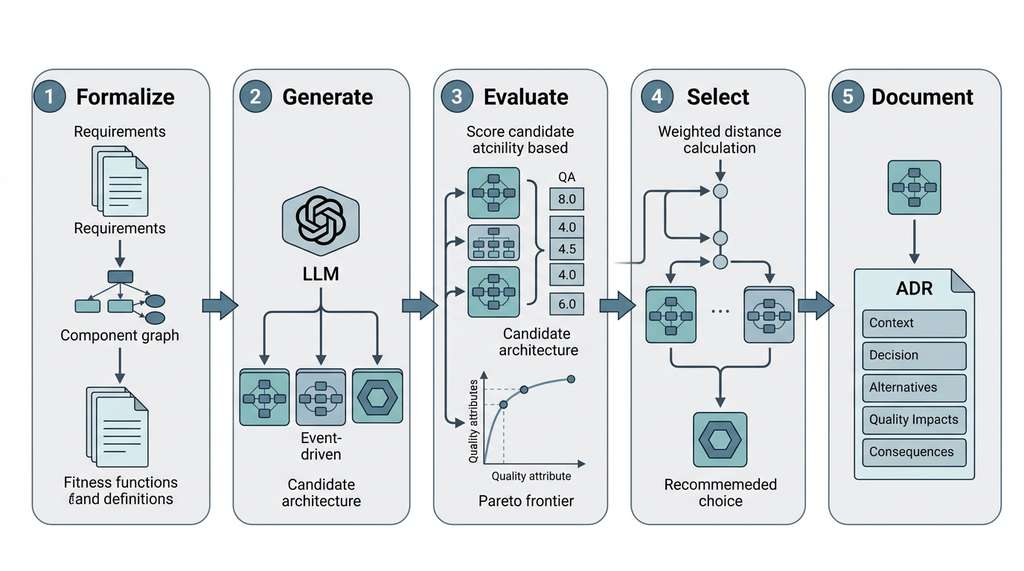
- Formalize (Section 14.1): Represent architectural styles as graph topologies and quality attributes as measurable fitness functions.
- Generate (Section 14.2): Use LLMs with structured output schemas to produce diverse candidate architectures from requirements.
- Evaluate (Section 14.2): Convert candidates to component graphs, compute quality metrics, and identify the Pareto frontier.
- Select (Section 14.2): Use stakeholder-weighted distance to the ideal point to recommend a candidate from the frontier.
- Document (Section 14.3): Generate an ADR that captures context, alternatives, metrics, tradeoffs, and rationale, persisted as version-controlled Markdown.
Each stage produces artifacts that feed into downstream chapters: component graphs for Chapter 15, deployment topologies for Chapter 21, fitness functions for Chapter 18, and ADRs for the project knowledge base queried by the research agents in Chapter 40.
Exercises
- Conceptual: An ADR states "we chose microservices for scalability" but the fitness function shows the hexagonal architecture scored equally well on scalability. What is wrong with this ADR, and how would you fix it? What does this reveal about the importance of quantitative evidence in architectural documentation?
-
Coding: Extend the
ArchitectureDiscoveryWorkbenchto include avalidate_conformancemethod that takes a codebase path, uses static analysis (e.g., import graph extraction withastmodule) to recover the actual architecture, and compares it against the architecture in the most recent accepted ADR. Report any edges in the actual graph that violate the intended architecture's style constraints. - Analysis: Generate ADRs for two different systems: a real-time trading platform (performance and reliability weighted highest) and a content management system (maintainability and deployability weighted highest). Compare the selected architectures and their ADRs. Do the fitness functions correctly reflect the different priorities? Where do the metrics fail to capture important quality attributes?