Prerequisites
This section synthesizes everything from the chapter. You need the agent roles and workflow graphs from Section 17.1 and the coordination patterns, debate protocols, and human gates from Section 17.2. You should have a working Python environment with access to a large language model (LLM) API (OpenAI or Anthropic). Familiarity with GitHub's API (creating branches, committing files, opening PRs) is helpful; the Model Context Protocol (MCP) server patterns from Chapter 12 show how to wrap such APIs as agent tools.
This section is a recipe. We build a complete multi-agent team that takes a GitHub issue as input and produces a reviewed pull request (PR) as output. The pipeline flows through four agents: a planner (combines the PM and architect roles for simplicity), a developer, a tester, and a reviewer, connected by a cyclic workflow with human approval at the end. We implement this pipeline three times (OpenAI Agents SDK, LangGraph, and CrewAI), with AutoGen covered in the framework comparison table, so you can compare their programming models side by side. The recipe integrates with the Discovery Workbench as a reusable component that later chapters extend for scientific workflows.
1. The Recipe: Issue to Pull Request
Imagine filing a GitHub issue at 9 AM and finding a reviewed, tested pull request waiting for your approval by lunch, planned, coded, tested, and critiqued by four AI agents without a single human keystroke in between. The concrete steps that make this possible are:
Without a structured pipeline, a single agent attempting to plan, code, test, and review its own work tends to skip steps, lose context halfway through, and produce changes that pass no tests and miss the original requirements entirely. Splitting those responsibilities across specialized agents, each with its own prompt and tools, is what turns a fragile demo into a pipeline that reliably closes issues.
A multi-agent pipeline chains specialized LLM-powered agents, each handling one stage of a larger task. Typed data contracts connect them so that one agent's output feeds directly into the next. This design lets you decompose complex, open-ended work (like resolving a GitHub issue end to end) into focused subtasks. You can prompt, tool, and evaluate each agent independently. A shared state object flows through the pipeline. Each agent reads the fields it needs, calls its tools, and writes output fields for downstream agents. Use a multi-agent pipeline when the task requires distinct competencies (planning, coding, testing, reviewing) that benefit from separate prompts and tool sets. For single-step tasks, a single agent with the right tools is faster and cheaper.
- Plan: Read the issue, analyze the codebase, produce requirements and a technical design.
- Implement: Write the code changes according to the plan.
- Test: Generate tests for the new code and run them.
- Review: Check the implementation against the plan, look for bugs, verify test coverage.
- Revise (conditional): If the reviewer finds blockers, return to step 2 with feedback.
- Approve (human gate): Present the final diff to a human for approval before opening the PR.
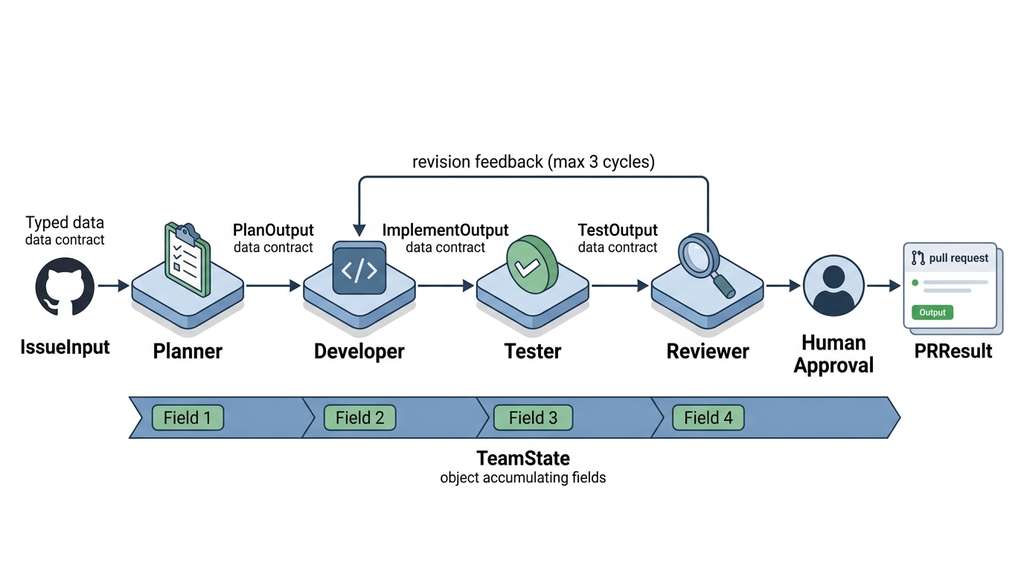
Figure 17.3 below shows these six steps as a workflow graph. Notice the conditional back-edge from the review node to the implement node: this is the revision cycle that runs up to three times before the pipeline terminates, whether or not the reviewer has approved. Figure 17.3.1 illustrates multi-agent pipeline state flow from GitHub issue to pull request.
The shared state that flows through all four implementations: In short: Define the contract between agents as typed data (using Pydantic, a Python library that enforces type constraints and serializes objects to JSON), wire them into a graph with a review loop, and let the framework handle the rest.
from pydantic import BaseModel, Field

class IssueInput(BaseModel):
    """Input: a GitHub issue to resolve."""
    title: str
    body: str
    labels: list[str] = []
    repo_owner: str
    repo_name: str
    base_branch: str = "main"

class PlanOutput(BaseModel):
    """Output from the planner agent."""
    summary: str = Field(description="One-paragraph summary of the change")
    requirements: list[str] = Field(description="Testable acceptance criteria")
    files_to_modify: list[dict] = Field(
        description="List of {path, action, description} for each file"
    )
    branch_name: str = Field(description="Git branch name for the PR")

class ImplementOutput(BaseModel):
    """Output from the developer agent."""
    files: dict[str, str] = Field(description="Map of file path to new content")
    commit_message: str
    implementation_notes: str

class TestOutput(BaseModel):
    """Output from the tester agent."""
    test_files: dict[str, str] = Field(description="Map of test file path to content")
    results: list[dict] = Field(description="List of {name, passed, error} dicts")
    all_passed: bool
    coverage_summary: str

class ReviewOutput(BaseModel):
    """Output from the reviewer agent."""
    approved: bool
    blockers: list[dict] = Field(description="Must-fix issues with file, line, message")
    warnings: list[dict] = Field(description="Should-fix issues")
    summary: str

class PRResult(BaseModel):
    """Final output: the pull request."""
    pr_url: str
    pr_number: int
    title: str
    files_changed: int
    iterations: int
    total_tokens: int
Checkpoint
So far: the pipeline takes a GitHub issue through six steps (plan, implement, test, review, revise, approve), each handled by a specialized agent, and all agents communicate through typed Pydantic models that define exactly what data flows between them.
2. Implementation: OpenAI Agents SDK
Each framework wires agents together and routes data through them differently.
The OpenAI Agents SDK provides a lightweight framework built around three concepts: agents (LLM configurations with tools), handoffs (transfer control between agents), and guardrails (input/output validators). The SDK uses Python's native async patterns and traces every agent invocation for observability.
from agents import Agent, Runner, handoff
from agents import function_tool

# --- Tools (simplified; production versions wrap MCP servers) ---

@function_tool
def read_file(path: str) -> str:
    """Read a file from the repository."""
    return repo.read_file(path)

@function_tool
def write_file(path: str, content: str) -> str:
    """Write content to a file in the working branch."""
    repo.write_file(path, content)
    return f"Written {len(content)} bytes to {path}"

@function_tool
def run_tests(test_dir: str = "tests") -> dict:
    """Run the test suite and return results."""
    return repo.run_pytest(test_dir)

@function_tool
def search_code(query: str, max_results: int = 10) -> list[dict]:
    """Search the codebase for a pattern."""
    return repo.grep(query, max_results=max_results)

# --- Agents ---

planner = Agent(
    name="planner",
    instructions="""You are a senior tech lead. Given a GitHub issue, analyze the
codebase and produce a structured plan with:
1. A summary of the required change
2. Testable acceptance criteria
3. A list of files to modify with descriptions
4. A git branch name

Use search_code and read_file to understand the codebase.""",
    tools=[read_file, search_code],
    output_type=PlanOutput,
    model="gpt-4o",
)

developer = Agent(
    name="developer",
    instructions="""You are a senior developer. Given a plan, implement the changes.
Write clean, well-commented code that follows existing patterns in the codebase.
If you received review feedback, address every blocker before resubmitting.""",
    tools=[read_file, write_file, search_code],
    output_type=ImplementOutput,
    model="gpt-4o",
)

tester = Agent(
    name="tester",
    instructions="""You are a QA engineer. Given implementation files, write
comprehensive tests covering:
1. Happy path for each acceptance criterion
2. Edge cases (empty input, large input, unicode)
3. Error paths (invalid input, missing dependencies)

Run the tests and report results.""",
    tools=[read_file, write_file, run_tests],
    output_type=TestOutput,
    model="gpt-4o",
)

reviewer = Agent(
    name="reviewer",
    instructions="""You are a senior code reviewer. Review the implementation
against the plan. Check for:
1. Correctness: does the code do what the plan says?
2. Tests: are all acceptance criteria covered?
3. Security: any injection, path traversal, or secret exposure?
4. Style: does it follow codebase conventions?

Set approved=true ONLY if there are zero blockers.""",
    tools=[read_file, search_code],
    output_type=ReviewOutput,
    model="gpt-4o",
)

# --- Handoff-based pipeline ---

# the reviewer hands off back to developer if not approved
reviewer_with_handoff = Agent(
    name="reviewer",
    instructions=reviewer.instructions,
    tools=[read_file, search_code],
    output_type=ReviewOutput,
    handoffs=[handoff(
        agent=developer,
        tool_name="request_revision",
        tool_description="Send the code back to the developer with feedback",
    )],
    model="gpt-4o",
)


async def run_issue_to_pr(issue: IssueInput) -> PRResult:
    """Run the full pipeline using OpenAI Agents SDK."""
    # step 1: plan
    plan_result = await Runner.run(planner, input=issue.model_dump_json())
    plan = plan_result.final_output_as(PlanOutput)

    # step 2-4: implement -> test -> review (with cycle)
    context = {"plan": plan.model_dump(), "issue": issue.model_dump()}
    max_iterations = 3
    for iteration in range(max_iterations):
        # implement
        impl_result = await Runner.run(developer, input=str(context))
        impl = impl_result.final_output_as(ImplementOutput)

        # test
        test_input = {**context, "implementation": impl.model_dump()}
        test_result = await Runner.run(tester, input=str(test_input))
        tests = test_result.final_output_as(TestOutput)

        # review
        review_input = {
            **context,
            "implementation": impl.model_dump(),
            "tests": tests.model_dump(),
            "iteration": iteration,
        }
        review_result = await Runner.run(
            reviewer_with_handoff, input=str(review_input)
        )
        review = review_result.final_output_as(ReviewOutput)

        if review.approved:
            break

        # feed review back into context for next iteration
        context["review_feedback"] = review.model_dump()

    # step 5: create PR (after human approval in production)
    pr = repo.create_pull_request(
        branch=plan.branch_name,
        title=f"Fix: {issue.title}",
        body=plan.summary,
        files={**impl.files, **tests.test_files},
    )
    return PRResult(
        pr_url=pr["url"],
        pr_number=pr["number"],
        title=pr["title"],
        files_changed=len(impl.files) + len(tests.test_files),
        iterations=iteration + 1,
        total_tokens=sum(r.usage.total_tokens for r in [
            plan_result, impl_result, test_result, review_result
        ]),
    )
The OpenAI Agents SDK uses handoffs to transfer control between agents. A handoff is a tool call that the current agent makes when it decides another agent should take over. This is a decentralized coordination model: the reviewer decides whether to hand off to the developer, not a central orchestrator. The advantage is simplicity (no separate workflow graph); the disadvantage is that control flow is embedded in agent behavior, making it harder to visualize, debug, and enforce invariants (like maximum iteration counts). For production systems, the centralized orchestration pattern (LangGraph, next subsection) is more predictable.
3. Implementation: LangGraph
LangGraph models workflows as state graphs: nodes are functions that transform a typed state object, edges define the flow between nodes, and conditional edges enable branching. LangGraph provides built-in checkpointing (where checkpointing means saving the workflow's state at each node so that a failed or paused run can resume from the last saved point rather than restarting), streaming, and graph visualization.
Mental Model
Think of a state graph like a commercial kitchen preparing a banquet dish. The typed state object is a ticket clipped to a tray: it accumulates notes as the tray moves from station to station. The prep cook (planner) writes the recipe on the ticket; the line cook (developer) adds the prepared ingredients; the garnish station (tester) plates and checks presentation; the head chef (reviewer) tastes and either sends the dish out or routes the tray back to the line cook with corrections. Conditional edges are the head chef's decision: "send it out" versus "redo the sauce." Checkpointing is the snapshot a manager takes of every tray's position so that if the kitchen loses power, service can resume from the last recorded state rather than starting every dish over.
from langgraph.graph import StateGraph, END
from langgraph.checkpoint.memory import MemorySaver
from typing import TypedDict, Annotated
import operator

class TeamState(TypedDict):
    """Typed state flowing through the LangGraph pipeline."""
    issue: dict
    plan: dict | None
    implementation: dict | None
    tests: dict | None
    review: dict | None
    iteration: int
    messages: Annotated[list[str], operator.add]  # reducer: operator.add appends new items to the existing list

async def plan_node(state: TeamState) -> dict:
    """Planner node: analyze issue, produce plan."""
    # call_llm is a helper that sends a chat completion request
    # and parses the response into the given output_type; see the
    # mock version in Section 7 for testing without an API key.
    result = await call_llm(
        system="You are a senior tech lead...",
        user=f"Issue: {state['issue']}",
        output_type=PlanOutput,
        tools=[read_file, search_code],
    )
    return {
        "plan": result.model_dump(),
        "messages": [f"Plan: {result.summary}"],
    }

async def implement_node(state: TeamState) -> dict:
    """Developer node: implement the plan."""
    context = {"plan": state["plan"]}
    if state.get("review") and not state["review"].get("approved"):
        context["feedback"] = state["review"]
    result = await call_llm(
        system="You are a senior developer...",
        user=f"Context: {context}",
        output_type=ImplementOutput,
        tools=[read_file, write_file, search_code],
    )
    return {
        "implementation": result.model_dump(),
        "messages": [f"Implemented: {result.commit_message}"],
    }

async def test_node(state: TeamState) -> dict:
    """Tester node: write and run tests."""
    result = await call_llm(
        system="You are a QA engineer...",
        user=f"Implementation: {state['implementation']}",
        output_type=TestOutput,
        tools=[read_file, write_file, run_tests],
    )
    return {
        "tests": result.model_dump(),
        "messages": [f"Tests: {result.results}"],
    }

async def review_node(state: TeamState) -> dict:
    """Reviewer node: review code and tests."""
    result = await call_llm(
        system="You are a senior code reviewer...",
        user=f"Plan: {state['plan']}\nImpl: {state['implementation']}\n"
             f"Tests: {state['tests']}",
        output_type=ReviewOutput,
        tools=[read_file, search_code],
    )
    return {
        "review": result.model_dump(),
        "iteration": state["iteration"] + 1,
        "messages": [f"Review (round {state['iteration'] + 1}): "
                     f"{'approved' if result.approved else 'needs revision'}"],
    }

def should_continue(state: TeamState) -> str:
    """Conditional edge: continue revising or finish."""
    if state["review"]["approved"]:
        return "approved"
    if state["iteration"] >= 3:
        return "max_iterations"
    return "revise"

# Build the graph
workflow = StateGraph(TeamState)
workflow.add_node("plan", plan_node)
workflow.add_node("implement", implement_node)
workflow.add_node("test", test_node)
workflow.add_node("review", review_node)

workflow.set_entry_point("plan")
workflow.add_edge("plan", "implement")
workflow.add_edge("implement", "test")
workflow.add_edge("test", "review")

workflow.add_conditional_edges("review", should_continue, {
    "approved": END,
    "max_iterations": END,
    "revise": "implement",  # cycle back
})

# Compile with checkpointing
checkpointer = MemorySaver()
app = workflow.compile(checkpointer=checkpointer)

# Run
async def run_langgraph_pipeline(issue: IssueInput):
    config = {"configurable": {"thread_id": f"issue-{issue.title}"}}
    initial_state = {
        "issue": issue.model_dump(),
        "plan": None,
        "implementation": None,
        "tests": None,
        "review": None,
        "iteration": 0,
        "messages": [],
    }
    result = await app.ainvoke(initial_state, config=config)
    return result
LangGraph can render the compiled graph as a Mermaid diagram, which is invaluable for
documentation and debugging. Calling app.get_graph().draw_mermaid() produces a
diagram showing the four nodes (plan, implement, test, review), the forward edges, the
conditional back-edge from review to implement, and the two terminal conditions
(approved, max_iterations). When a production workflow hangs at the review node on its
third iteration, the diagram immediately shows the cycle and the termination condition.
This visual debugging connects to the
observability patterns in Chapter 22, where
workflow traces become a first-class monitoring concern.
4. Implementation: CrewAI
CrewAI models agents as crew members with roles, goals, and backstories. You assign tasks to crew members for sequential or parallel execution; the framework routes tools, parses outputs, and delegates automatically.
from crewai import Agent, Task, Crew, Process

# Define crew members
planner_agent = Agent(
    role="Senior Tech Lead",
    goal="Analyze GitHub issues and produce implementation plans",
    backstory="You have 15 years of experience leading engineering teams. "
              "You excel at breaking complex issues into clear, actionable plans.",
    tools=[read_file_tool, search_code_tool],
    verbose=True,
)

developer_agent = Agent(
    role="Senior Developer",
    goal="Implement code changes according to the technical plan",
    backstory="You write clean, well-tested Python code. You follow existing "
              "patterns in the codebase and never introduce unnecessary complexity.",
    tools=[read_file_tool, write_file_tool, search_code_tool],
    verbose=True,
)

tester_agent = Agent(
    role="QA Engineer",
    goal="Write comprehensive tests and verify implementation correctness",
    backstory="You think in edge cases. Every untested branch is a future bug. "
              "You write tests that document behavior, not just verify it.",
    tools=[read_file_tool, write_file_tool, run_tests_tool],
    verbose=True,
)

reviewer_agent = Agent(
    role="Senior Code Reviewer",
    goal="Find bugs, security issues, and design violations in code changes",
    backstory="You are the last line of defense before code reaches production. "
              "You have caught three critical security vulnerabilities this quarter.",
    tools=[read_file_tool, search_code_tool],
    verbose=True,
)

# Define tasks
plan_task = Task(
    description="Analyze issue '{issue_title}': {issue_body}\n"
                "Produce a plan with acceptance criteria and files to modify.",
    expected_output="A structured plan with summary, requirements, and file list.",
    agent=planner_agent,
)

implement_task = Task(
    description="Implement the changes described in the plan. "
                "Write clean code following existing codebase patterns.",
    expected_output="Implementation files with a commit message.",
    agent=developer_agent,
    context=[plan_task],  # receives planner's output
)

test_task = Task(
    description="Write tests for the implementation. Cover happy paths, "
                "edge cases, and error paths. Run them and report results.",
    expected_output="Test files and pass/fail results.",
    agent=tester_agent,
    context=[plan_task, implement_task],
)

review_task = Task(
    description="Review the implementation against the plan. Look for "
                "correctness bugs, security issues, and missing test coverage.",
    expected_output="Review with approved/rejected status and specific comments.",
    agent=reviewer_agent,
    context=[plan_task, implement_task, test_task],
)

# Assemble the crew
crew = Crew(
    agents=[planner_agent, developer_agent, tester_agent, reviewer_agent],
    tasks=[plan_task, implement_task, test_task, review_task],
    process=Process.sequential,
    verbose=True,
)

# Run
result = crew.kickoff(inputs={
    "issue_title": "Add CSV export to dashboard",
    "issue_body": "Users need to download experiment results as CSV files.",
})
5. Framework Comparison
Each framework makes different trade-offs. Five dimensions matter most for production multi-agent systems: (Early benchmarks on CodeArena show that teams using explicit state graphs waste 30 to 40 percent fewer coordination tokens than teams using free-form conversation, suggesting that structured workflows pay for themselves at scale.)
| Dimension | OpenAI Agents SDK | LangGraph | AutoGen | CrewAI |
|---|---|---|---|---|
| Coordination model | Handoffs (decentralized) | State graph (centralized) | Conversations (peer-to-peer) | Task queue (sequential/hierarchical) |
| State management | Implicit (in conversation) | Typed state dict with reducers (where a reducer is a function that merges updates into the current state, such as appending to a list) | Conversation history | Task context chain |
| Cyclic workflows | Via handoff loops | Conditional edges (first-class) | Conversation turn limits | Manual (not built-in) |
| Human-in-the-loop | Guardrails + custom | Interrupt nodes | UserProxyAgent (built-in) | human_input=True flag |
| Observability | Built-in tracing | LangSmith integration | Logging + callbacks | Verbose mode + callbacks |
| Best for | Simple pipelines, OpenAI ecosystem | Complex stateful workflows | Flexible conversations, research | Rapid prototyping, role-based teams |
Common Misconception
A frequent mistake is assuming that splitting a task across more agents always improves output quality. In practice, each agent boundary introduces serialization overhead, potential information loss (the downstream agent only sees the upstream agent's structured output, not its full reasoning), and additional LLM calls that increase cost and latency. For straightforward, single-file changes, a single well-prompted agent with the right tools will outperform a four-agent pipeline that spends most of its token budget on inter-agent coordination rather than on solving the actual problem.
For a linear pipeline (plan, implement, test, review) with no cycles, any framework works and CrewAI or the OpenAI Agents SDK will get you there fastest. For workflows with conditional branches, cycles, parallel fan-out, and human gates, LangGraph's explicit state graph is the most maintainable choice. For research explorations where you want agents to freely debate and the conversation topology may change, AutoGen's flexible conversation model is the best fit (as of 2025, AutoGen 0.4 replaced the original conversation-based API with an event-driven, modular architecture; a community fork called AG2 continues the earlier design). The choice is not permanent: most teams start with CrewAI for prototyping and migrate to LangGraph when the workflow becomes complex enough to need explicit state management and visualization.
6. Adding Human Approval
None of the implementations above include the human approval gate from Section 17.2. In production, the final step before opening a PR must be human review. LangGraph makes this cleanest with its interrupt mechanism:
from langgraph.graph import StateGraph, END

async def human_approval_node(state: TeamState) -> dict:
    """This node is an interrupt point. LangGraph pauses here
    and waits for external input before continuing."""
    # in production, this sends a Slack message or email
    # and resumes when the human responds
    return {
        "messages": ["Waiting for human approval..."],
    }

# add to the graph between review and END
workflow.add_node("human_approval", human_approval_node)

# modify the conditional edges
workflow.add_conditional_edges("review", should_continue, {
    "approved": "human_approval",  # go to human gate, not END
    "max_iterations": "human_approval",
    "revise": "implement",
})
workflow.add_edge("human_approval", END)

# compile with interrupt_before to pause at the gate
app = workflow.compile(
    checkpointer=checkpointer,
    interrupt_before=["human_approval"],
)

# the workflow pauses at human_approval; to resume:
async def approve_and_continue(thread_id: str):
    config = {"configurable": {"thread_id": thread_id}}
    # resume from checkpoint, the human_approval node executes
    result = await app.ainvoke(None, config=config)
    return result
7. Testing Multi-Agent Pipelines
A complete pipeline with human approval gates is only trustworthy if you can verify that every path through the workflow graph, including rejection cycles and budget limits, behaves as designed.
Three Strategies for Testable Pipelines
Multi-agent systems are particularly difficult to test because LLM outputs are non-deterministic. Three strategies make testing tractable:
Mock the LLM. Replace the LLM with deterministic functions that return predefined outputs. This lets you test the workflow logic (routing, state updates, gate triggers) without paying for API calls or dealing with stochastic outputs.
import pytest

class MockLLM:
    """Deterministic LLM replacement for testing workflow logic."""

    def __init__(self, responses: dict[str, dict]):
        self.responses = responses  # agent_name -> response dict
        self.call_log = []

    async def __call__(self, agent_name: str, input_data: dict) -> dict:
        self.call_log.append({"agent": agent_name, "input": input_data})
        return self.responses[agent_name]


@pytest.fixture
def mock_team():
    return MockLLM(responses={
        "planner": {
            "summary": "Add CSV export",
            "requirements": ["Export current view as CSV"],
            "files_to_modify": [{"path": "app/export.py", "action": "create"}],
            "branch_name": "feat/csv-export",
        },
        "developer": {
            "files": {"app/export.py": "def export_csv(): ..."},
            "commit_message": "Add CSV export functionality",
        },
        "tester": {
            "test_files": {"tests/test_export.py": "def test_csv(): ..."},
            "results": [{"name": "test_csv", "passed": True}],
            "all_passed": True,
        },
        "reviewer": {
            "approved": True,
            "blockers": [],
            "summary": "LGTM",
        },
    })


@pytest.mark.asyncio
async def test_happy_path(mock_team):
    """Test that a successful pipeline produces a PR."""
    result = await run_pipeline(mock_team, issue={
        "title": "Add CSV export",
        "body": "Users need CSV export",
    })
    assert result["status"] == "completed"
    assert result["iterations"] == 1  # no review cycles
    assert len(mock_team.call_log) == 4  # all four agents called


@pytest.mark.asyncio
async def test_review_rejection_cycle(mock_team):
    """Test that a review rejection triggers a developer revision."""
    # first review rejects, second approves
    mock_team.responses["reviewer"] = {
        "approved": False,
        "blockers": [{"message": "Missing input validation"}],
        "summary": "Needs revision",
    }
    # override to approve on second call
    call_count = {"reviewer": 0}
    original_call = mock_team.__call__

    async def counting_call(agent_name, input_data):
        if agent_name == "reviewer":
            call_count["reviewer"] += 1
            if call_count["reviewer"] >= 2:
                return {"approved": True, "blockers": [], "summary": "LGTM"}
        return await original_call(agent_name, input_data)

    mock_team.__call__ = counting_call

    result = await run_pipeline(mock_team, issue={
        "title": "Add CSV export",
        "body": "Users need CSV export",
    })
    assert result["iterations"] == 2
    assert call_count["reviewer"] == 2
Snapshot testing. Run the pipeline once with a real LLM, save the intermediate state at every checkpoint, and use those snapshots as regression tests. If a framework upgrade or prompt change alters the workflow routing, the snapshot test catches it.
Evaluation suites. Run the pipeline against a curated set of issues with known correct solutions (e.g., a subset of SWE-bench). Measure pass rate, number of review iterations, total token cost, and wall-clock time. This is the multi-agent analogue of the evaluation techniques in Chapter 23.
Both LangGraph and the OpenAI Agents SDK provide built-in tracing. LangGraph integrates
with LangSmith, which captures every
node execution, state transition, and LLM call in a visual timeline. The OpenAI Agents
SDK provides its own tracing via Runner.run() that logs agent handoffs, tool
calls, and guardrail evaluations. In either case, you get a complete audit trail of a
multi-agent workflow in about 2 lines of configuration (compared to the 50+ lines of
manual logging in our Blackboard.record_step() from Section 17.2):
# LangSmith: set env vars and tracing is automatic
import os
os.environ["LANGCHAIN_TRACING_V2"] = "true"
os.environ["LANGCHAIN_API_KEY"] = "ls_..."

# OpenAI Agents SDK: tracing is on by default
from agents import Runner, trace
with trace("issue-to-pr"):
    result = await Runner.run(planner, input=issue_json)
8. Integration with the Discovery Workbench
Once the pipeline is tested and observable, the final step is to package it so that other systems (and other agents) can invoke it without knowing its internal structure.
The multi-agent team pipeline becomes a component in the Discovery Workbench architecture from Chapter 6. The Workbench exposes the pipeline as an MCP tool that scientific users can invoke without understanding the multi-agent internals:
from mcp.server import Server
from mcp.types import Tool

server = Server("software-team")

@server.tool()
async def resolve_issue(
    repo_owner: str,
    repo_name: str,
    issue_number: int,
    base_branch: str = "main",
    max_review_rounds: int = 3,
) -> dict:
    """Resolve a GitHub issue by planning, implementing, testing,
    and reviewing code changes. Returns a PR URL.

    The multi-agent team handles the full software development lifecycle.
    A human approval gate fires before the PR is created.
    """
    # fetch issue from GitHub
    issue = await github.get_issue(repo_owner, repo_name, issue_number)

    # run the pipeline
    result = await run_langgraph_pipeline(IssueInput(
        title=issue["title"],
        body=issue["body"],
        labels=issue.get("labels", []),
        repo_owner=repo_owner,
        repo_name=repo_name,
        base_branch=base_branch,
    ))

    return {
        "pr_url": result.get("pr_url"),
        "iterations": result.get("iteration", 0),
        "status": "awaiting_approval" if not result.get("pr_url") else "created",
    }
Wrapping multi-agent workflows as MCP tools is how the Discovery Workbench grows. Each chapter adds a new capability (literature search in Chapter 36, experiment design in Chapter 46), and the Workbench integrates them all behind a uniform interface. By Chapter 53, the Workbench orchestrates multi-agent teams that build software, run experiments, and write papers.
SWE-bench (Jimenez et al., 2024) remains a foundational benchmark for AI software engineering, and SWE-bench Verified (Chowdhury et al., 2024) refined it with human-validated problem instances. More recently, CodeArena (Yang et al., 2025) introduced a competitive multi-agent benchmark where teams of agents collaborate on repository-level tasks with shared codebases, measuring not just correctness but coordination efficiency: how many tokens agents waste on redundant file reads, conflicting edits, and failed handoffs. Early CodeArena results show that teams using explicit state graphs (the LangGraph pattern) waste 30-40% fewer coordination tokens than teams using free-form conversation, suggesting that structured workflows can reduce overhead at scale. The frontier question is whether learned coordination protocols, where agents adapt their communication patterns based on task difficulty, can close the gap between structured and unstructured approaches without requiring hand-designed workflow graphs.
Try It: Build a Two-Agent Review Pipeline
You can build a minimal multi-agent pipeline on your laptop using only Python and an LLM API key. This project takes about 30 minutes and produces a working writer-reviewer loop.
1. Install dependencies: pip install openai pydantic. Create a file called
mini_pipeline.py and define two Pydantic models: DraftOutput (with
fields code: str and explanation: str) and ReviewOutput (with
fields approved: bool, feedback: str).
2. Write a call_agent(system_prompt, user_message, output_model) function that
sends a chat completion request with response_format set to your Pydantic model,
parses the JSON response, and returns the validated object.
3. Implement a writer_agent(task_description, feedback=None) function that calls
call_agent with a system prompt like "You are a Python developer. Write a
function that satisfies the task. If feedback is provided, revise accordingly." Pass the
task description (and any prior feedback) as the user message.
4. Implement a reviewer_agent(code, task_description) function that calls
call_agent with a system prompt like "You are a code reviewer. Check whether the
code correctly implements the task. Set approved to true only if the code is correct and
handles edge cases."
5. Write a run_pipeline(task, max_rounds=3) loop: call the writer, then the
reviewer. If approved, print the final code and exit. If not, pass the reviewer's feedback
back to the writer and repeat. After max_rounds, print a warning. Run it with a simple
task like "Write a function that checks whether a string is a valid email address" and
observe how the reviewer's feedback improves the code across iterations.
Exercise 17.3.1
You have a four-agent pipeline (planner, developer, tester, reviewer) where the reviewer
rejects the first implementation because the developer missed an acceptance criterion. On
the second iteration, the developer addresses the feedback but introduces a new test
failure. The reviewer rejects again. On the third iteration (the maximum), the developer
fixes the test failure, all tests pass, and the reviewer approves. Draw the sequence of
node activations and state transitions for this run through the LangGraph workflow. How
many total LLM calls are made (counting each node activation as one call)? What is the
final value of state["iteration"]?
Hint
The plan node runs once. Each review cycle activates implement, test, and review. Count
the nodes activated in each cycle: cycle 1 (reject), cycle 2 (reject), cycle 3 (approve).
The iteration counter increments inside review_node, so after three passes through
review it equals 3.
Step-Through: Review Loop State Transitions
Trace the LangGraph pipeline with a concrete example where the reviewer rejects once before approving.
Initial state: iteration=0, review=None.
Node 1 (plan): Reads the issue "Add CSV export." Outputs
plan.summary="Add CSV export to dashboard", plan.files_to_modify=[{path: "app/export.py"}].
Node 2 (implement, round 1): Reads plan. No review feedback yet.
Outputs files={"app/export.py": "def export_csv(): ..."}.
Node 3 (test, round 1): Reads implementation. Outputs
all_passed=True, results=[{name: "test_export", passed: True}].
Node 4 (review, round 1): Finds missing input validation. Sets
approved=False, blockers=[{message: "No input validation"}].
Updates iteration=1.
Conditional edge: approved=False and iteration=1 < 3,
so route to "revise" (back to implement).
Node 5 (implement, round 2): Reads review_feedback. Adds validation.
Outputs updated files.
Node 6 (test, round 2): all_passed=True with 3 tests now.
Node 7 (review, round 2): Sets approved=True, blockers=[].
Updates iteration=2.
Conditional edge: approved=True, route to END.
Final state: iteration=2, 7 total node activations, 2 complete
implement/test/review cycles.
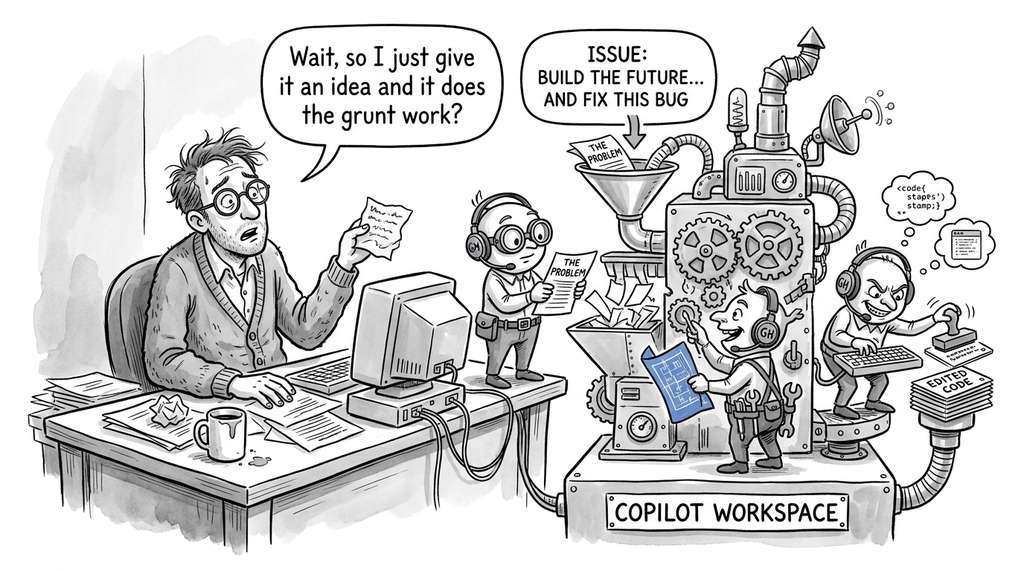
Real-World Application: GitHub Copilot Workspace
GitHub's Copilot Workspace (2024) uses a multi-agent pipeline structurally similar to the
one in this section, based on publicly available descriptions of its workflow. Given an issue, it generates a specification (planner), proposes file
edits (developer), and runs integrated tests (tester), with the user acting as the
reviewer in the loop. The system structures its internal state as a plan with file-level
edit descriptions, exactly mirroring the PlanOutput and
ImplementOutput schemas shown here.
The Agent That Refused to Ship
In early experiments with multi-agent coding teams (reported by researchers at Microsoft
in their AutoGen case studies), reviewer agents prompted to be "thorough and critical"
sometimes entered infinite rejection loops, finding new stylistic objections on every
iteration and never setting approved=True. The fix was counterintuitive: giving
the reviewer a "budget" of allowed objections per round (e.g., at most three blockers)
forced it to prioritize and approve once the serious issues were resolved. This is why
every production pipeline in this section enforces a max_iterations cap: without
one, a perfectionist reviewer agent can burn through your entire API budget rewriting
the same function.
Lab: Multi-Agent Pipeline with Mock LLMs
Goal: Build a working four-node LangGraph pipeline (plan, implement, test,
review) using deterministic mock functions instead of real LLM calls, then observe how
changing the reviewer's behavior alters pipeline dynamics.
Tools needed: Python 3.10+, pip install langgraph pydantic
(no API key required since you are mocking the LLM).
Setup (10 min): Copy the TeamState TypedDict and the four node
functions from this section. Replace each call_llm invocation with a
deterministic function that returns a hardcoded Pydantic model (use the
MockLLM pattern from Section 7). Build and compile the graph with
MemorySaver checkpointing.
What to vary (15 min): (1) Change the mock reviewer to reject on the first
round and approve on the second; verify that iteration reaches 2 and the
implement node is called twice. (2) Make the reviewer always reject; confirm the pipeline
terminates at max_iterations=3. (3) Add a fifth node
(human_approval) with interrupt_before; confirm the graph pauses
and resumes correctly.
What to observe: Print state["messages"] after each run to see the
full trace of node activations. Call app.get_graph().draw_mermaid() and paste
the output into a Mermaid renderer to visualize your workflow, including the conditional
back-edge from review to implement.
Exercises
- Conceptual: You are tasked with adding a "documentation writer" agent to the team. Where should this agent appear in the workflow graph? What is its input schema (which agents' outputs does it read)? What is its output schema? Should it run in parallel with any existing agent, or must it be sequential? Justify your design with reference to the role design principles from Section 17.1.
- Coding: Implement the full issue-to-PR pipeline using one framework of your choice (OpenAI Agents SDK, LangGraph, AutoGen, or CrewAI). Use mock LLMs for testing. The pipeline should support at least two review iterations and include a human approval gate. Write three tests: happy path (approved on first review), one revision cycle (rejected then approved), and budget exceeded (max iterations reached). Bonus: add observability by logging every agent call with its token count and wall-clock time.
- Analysis: Run the same GitHub issue through a single-agent pipeline (one agent handles plan, implement, test, review) and a four-agent pipeline. Compare the output quality (correctness, test coverage, code style), token cost, and wall-clock time. Does the multi-agent version produce a better PR? At what issue complexity does the multi-agent advantage appear? Document your methodology and results; this is the kind of empirical evaluation you will formalize in Chapter 23.
What's Next
The multi-agent software team you built in this chapter is a general-purpose pattern. Chapter 18: AI Assisted Testing and QA takes the tester role from our pipeline and expands it into a full testing framework: property-based testing, mutation testing, test generation from specifications, and the feedback loop between test failures and code repair. The tester was one node in our workflow graph; Chapter 18 gives it the depth it deserves.