Prerequisites
This section assumes familiarity with Git version control and basic command-line workflows. Readers who completed Chapter 22: MLOps, LLMOps, and AgentOps will recognize the model lifecycle concepts that registries formalize. Understanding of cryptographic hash functions (SHA-256) at the level covered in Chapter 6: Discovery System Architecture is helpful but not required; we introduce the necessary concepts here.
An experiment registry is the laboratory notebook of computational science. Where a bench scientist records reagent lot numbers, instrument settings, and procedural steps, a computational scientist must record code versions, data snapshots, hyperparameter values, random seeds, and environment specifications. This section designs a registry from first principles: we define what artifacts are, how to identify them unambiguously through content-addressable hashing, and how to version each artifact class (code, data, models, configurations) using tools that scale from a single researcher's laptop to a multi-team research organization.
1. What Is an Experiment Registry?
You trained a model last Tuesday that outperformed everything else by 12%, but when your collaborator asks which dataset version, learning rate, and preprocessing script produced that result, you realize the answer is scattered across three terminal sessions, a Slack message, and a Jupyter notebook you may have overwritten. An experiment registry exists to make that situation impossible: it is a structured store that records three categories of information about every computational experiment.
More precisely, an experiment registry is a metadata database layered on top of artifact storage. It does not merely archive files; it maintains a queryable graph of which code, data, configuration, and environment produced every result. Without such a registry, reproducing or comparing past experiments forces you to reconstruct the exact input combination from scattered files, commit logs, and personal notes. That reconstruction fails as soon as a single link is missing. The registry assigns each artifact a content-derived identifier (typically a cryptographic hash), then records the directed relationships between inputs, execution events, and outputs in a structured schema. Use a registry rather than ad-hoc folder naming or spreadsheets whenever your project involves more than a handful of experiment runs, whenever multiple people collaborate on the same pipeline, or whenever you need to demonstrate reproducibility to reviewers or regulators.
- Artifacts: the tangible objects produced and consumed by experiments (datasets, code, model weights, configuration files, evaluation reports).
- Runs: the execution events that transform input artifacts into output artifacts (a training run, a preprocessing step, an evaluation pass).
- Relationships: the directed edges connecting runs to their input and output artifacts, forming a directed acyclic graph (DAG), where DAG means a graph whose edges all flow in one direction with no cycles, that captures the complete lineage of every result.
The registry answers one question: given any artifact, how was it produced? The sub-questions grow more demanding with rigor. At the simplest level, you want to know which code and data produced a model. At the most rigorous, you want to regenerate it bit-for-bit from the registry's metadata alone.
Reproducibility is not binary; it exists on a spectrum from repeatability (same team, same setup, same result) through reproducibility (different team, same method, consistent result) to replicability (different team, different method, same conclusion). A registry that captures code and hyperparameters enables repeatability. Adding exact data versions and environment specifications enables reproducibility. Adding provenance metadata that documents why choices were made enables others to attempt replication with alternative approaches. The registry design in this section targets full reproducibility, with hooks for the richer metadata that supports replication.
2. Content-Addressable Storage
When an experiment fails to reproduce, the root cause is frequently not the algorithm itself but rather a missing or misidentified artifact. A team reruns training with what they believe is the same dataset, only to discover weeks later that a silent preprocessing update changed hundreds of rows, invalidating every comparison. Content-addressable storage eliminates this entire class of failure by binding each artifact's identity to its actual contents.
The foundation of artifact versioning is content-addressable storage (CAS): identifying every artifact by the cryptographic hash of its contents rather than by a human-assigned name or path. Git uses this principle for source code; Data Version Control (DVC) extends it to large binary files. The key property is that the identifier is deterministic and collision-resistant (meaning it is computationally infeasible to find two different inputs that produce the same hash): if two artifacts have the same hash, they have the same contents (with negligible probability of collision), and any change to the contents produces a completely different hash.
Mental Model
Think of content-addressable storage like a library that shelves books not by title or author, but by a unique fingerprint derived from scanning every page. If two copies are identical, page for page, they share the same fingerprint and occupy the same shelf slot; the library never stores a duplicate. If someone changes even a single comma on page 47, the fingerprint changes completely and the modified copy gets its own shelf. This is why content-addressable storage detects tampering automatically: retrieving a book means re-scanning its pages and confirming the fingerprint still matches. If it does not, you know something changed, even if the title on the spine looks the same.
For an artifact with byte content \(b\), the content address is:
$$\text{addr}(b) = \text{SHA-256}(b)$$This gives us a 256-bit identifier (typically displayed as a 64-character hexadecimal string) that serves as both a unique name and an integrity check. (With 2256 possible addresses, roughly 1077, the chance of two different artifacts colliding on the same hash is smaller than the odds of randomly picking the same atom twice from the entire observable universe.) When we store an artifact, we compute its hash; when we retrieve it, we recompute the hash and verify it matches. Any corruption, truncation, or tampering is detected automatically. In short: name every artifact by its content, and the name itself becomes the proof that nothing has changed.
"""Content-addressable artifact storage with hash verification."""
import hashlib
import json
import shutil
from pathlib import Path
from dataclasses import dataclass, field
from datetime import datetime, timezone
from typing import Optional


@dataclass
class ArtifactMetadata:
    """Metadata for a registered artifact."""
    artifact_type: str          # "dataset", "model", "config", "code", "report"
    sha256: str                 # Content hash
    size_bytes: int             # File size
    created_at: str             # ISO 8601 timestamp
    source_run_id: Optional[str] = None  # Run that produced this artifact
    tags: dict = field(default_factory=dict)
    parent_hashes: list = field(default_factory=list)  # Input artifact hashes


def compute_hash(file_path: Path, chunk_size: int = 8192) -> str:
    """Compute SHA-256 hash of a file, streaming to handle large files."""
    hasher = hashlib.sha256()
    with open(file_path, "rb") as f:
        while chunk := f.read(chunk_size):
            hasher.update(chunk)
    return hasher.hexdigest()


class ArtifactStore:
    """Content-addressable artifact store with metadata tracking."""

    def __init__(self, root: Path):
        self.root = root
        self.objects_dir = root / "objects"
        self.metadata_dir = root / "metadata"
        self.objects_dir.mkdir(parents=True, exist_ok=True)
        self.metadata_dir.mkdir(parents=True, exist_ok=True)

    def register(
        self,
        file_path: Path,
        artifact_type: str,
        source_run_id: Optional[str] = None,
        tags: Optional[dict] = None,
        parent_hashes: Optional[list] = None,
    ) -> ArtifactMetadata:
        """Register an artifact: hash it, copy to CAS, record metadata."""
        file_path = Path(file_path)
        sha = compute_hash(file_path)

        # Store the object using its hash as the filename
        # Use two-level directory structure (like Git) for filesystem scalability
        obj_dir = self.objects_dir / sha[:2]
        obj_dir.mkdir(exist_ok=True)
        obj_path = obj_dir / sha[2:]

        if not obj_path.exists():
            shutil.copy2(file_path, obj_path)

        metadata = ArtifactMetadata(
            artifact_type=artifact_type,
            sha256=sha,
            size_bytes=file_path.stat().st_size,
            created_at=datetime.now(timezone.utc).isoformat(),
            source_run_id=source_run_id,
            tags=tags or {},
            parent_hashes=parent_hashes or [],
        )

        # Persist metadata as JSON alongside the object
        meta_path = self.metadata_dir / f"{sha}.json"
        with open(meta_path, "w") as f:
            json.dump(metadata.__dict__, f, indent=2)

        return metadata

    def verify(self, sha: str) -> bool:
        """Verify that a stored artifact matches its content hash."""
        obj_path = self.objects_dir / sha[:2] / sha[2:]
        if not obj_path.exists():
            return False
        return compute_hash(obj_path) == sha

    def retrieve(self, sha: str, dest: Path) -> Path:
        """Retrieve an artifact by hash, verifying integrity."""
        if not self.verify(sha):
            raise ValueError(f"Artifact {sha[:12]}... failed integrity check")
        obj_path = self.objects_dir / sha[:2] / sha[2:]
        shutil.copy2(obj_path, dest)
        return dest


# Usage: register a trained model
store = ArtifactStore(Path("./artifact_store"))
meta = store.register(
    file_path=Path("outputs/model_v3.pt"),
    artifact_type="model",
    source_run_id="run_20260415_001",
    tags={"architecture": "transformer", "task": "property_prediction"},
    parent_hashes=["a1b2c3...", "d4e5f6..."],  # training data + config hashes
)
print(f"Registered: {meta.artifact_type} [{meta.sha256[:12]}...]")
print(f"Integrity check: {store.verify(meta.sha256)}")
The two-level directory structure (objects/a1/b2c3d4...) prevents any single
directory from containing millions of entries, which would degrade filesystem performance.
Git popularized this pattern; we reuse it here because it typically scales well from hundreds to millions
of artifacts.
A materials science team stored 50,000 crystal structure files on a shared Network File System (NFS) mount. After a storage migration, they discovered that 23 files had been silently truncated. Because they had registered every file in a content-addressable store, a batch verification script identified the corrupted files in seconds by comparing stored hashes against recomputed hashes. Without the registry, the corruption would have gone undetected until someone tried to use the damaged files in a downstream analysis, potentially months later, producing wrong results with no indication of the cause.
3. The Artifact Taxonomy
Not all artifacts are alike. A well-designed registry distinguishes artifact classes because they have different versioning characteristics, storage requirements, and lifecycle patterns. Table 47.1 summarizes the five primary artifact classes and their properties.
| Artifact Class | Examples | Typical Size | Versioning Tool | Change Frequency |
|---|---|---|---|---|
| Code | Training scripts, preprocessing pipelines, evaluation harnesses | KB to MB | Git | High (many commits/day) |
| Data | Raw datasets, processed features, train/test splits | MB to TB | DVC, LakeFS | Low (new versions on acquisition or reprocessing) |
| Models | Trained weights, checkpoints, Open Neural Network Exchange (ONNX) exports | MB to GB | MLflow Model Registry, DVC | Medium (new version per training run) |
| Configs | Hyperparameters, environment specs, pipeline definitions | KB | Git, MLflow params | High (tuned frequently) |
| Results | Metrics, plots, evaluation reports, predictions | KB to MB | MLflow metrics, Weights & Biases (W&B) | High (one per run) |
The key design decision is where each artifact class lives. Code and configs
are small and text-based; they belong in Git, where diff, blame, and branch operations
provide powerful inspection tools. Data and models are large and binary; they belong in a
content-addressable store (DVC, cloud object storage, or a dedicated artifact store like
the one in Figure 47.1) with only their hashes tracked in Git. This separation is the
core insight behind DVC's architecture: Git tracks .dvc pointer files (small
text files containing hashes), while the actual data lives elsewhere.
Common Misconception
A frequent mistake is believing that versioning code with Git is sufficient for experiment reproducibility. In practice, the same code run against a different version of the training data, a different set of hyperparameters, or a different library environment will produce different results. Full reproducibility requires versioning all five artifact classes (code, data, models, configs, and results) together, so that every result can be traced back to the exact combination of inputs that produced it.
4. Versioning Code with Git
Git is the foundation of all experiment versioning. Every experiment should be associated with a specific Git commit, so that the exact code that produced a result can be recovered. The minimum viable practice is to tag each experiment run with the current commit hash:
"""Capture Git state at experiment time."""
import subprocess


def get_git_info() -> dict:
    """Capture current Git state for provenance tracking."""

    def run_git(args: list[str]) -> str:
        result = subprocess.run(
            ["git"] + args,
            capture_output=True, text=True, check=True
        )
        return result.stdout.strip()

    # Check for uncommitted changes
    status = run_git(["status", "--porcelain"])
    is_dirty = len(status) > 0

    info = {
        "commit_hash": run_git(["rev-parse", "HEAD"]),
        "commit_short": run_git(["rev-parse", "--short", "HEAD"]),
        "branch": run_git(["rev-parse", "--abbrev-ref", "HEAD"]),
        "commit_message": run_git(["log", "-1", "--format=%s"]),
        "commit_timestamp": run_git(["log", "-1", "--format=%cI"]),
        "is_dirty": is_dirty,
        "dirty_files": status if is_dirty else None,
    }

    if is_dirty:
        # Record a diff patch for dirty files so the exact state
        # can be reconstructed even from uncommitted changes
        info["dirty_diff"] = run_git(["diff", "HEAD"])

    return info


# At the start of every experiment run
git_info = get_git_info()
if git_info["is_dirty"]:
    print(f"WARNING: Running from dirty working tree ({git_info['commit_short']}+)")
    print(f"  Modified files: {git_info['dirty_files']}")
    print("  Consider committing before running experiments.")
else:
    print(f"Clean commit: {git_info['commit_short']} on {git_info['branch']}")
One of the most common reproducibility failures is running an experiment from a dirty Git
working tree: the commit hash points to a previous state, but the actual code includes
uncommitted modifications. The get_git_info() function above captures this case
by recording both the dirty flag and the diff. The better practice is to enforce clean commits
before experiment runs, either through a pre-run check that refuses to start on a dirty tree,
or through an automatic "snapshot commit" that creates a temporary commit with all current
changes.
5. Versioning Data with DVC
DVC extends Git's versioning model to large files. The core idea
is simple: instead of storing a 10 GB dataset in Git (which would make the repository
unusable), DVC stores a small .dvc pointer file in Git that contains the
dataset's SHA-256 hash and storage location. The actual data lives in a configured remote
storage backend (S3, GCS, Azure Blob, SSH, or a local directory).
# Initialize DVC in an existing Git repository
dvc init

# Configure a remote storage backend
dvc remote add -d myremote s3://my-bucket/dvc-store

# Track a large dataset with DVC
dvc add data/crystal_structures.parquet

# This creates data/crystal_structures.parquet.dvc (pointer file)
# and adds data/crystal_structures.parquet to .gitignore
cat data/crystal_structures.parquet.dvc
.dvc file is a small YAML pointer containing the hash; Git tracks the pointer while DVC manages the actual data in remote storage.
The .dvc file that Git tracks looks like this:
outs:
- md5: a1b2c3d4e5f6a7b8c9d0e1f2a3b4c5d6
  size: 10737418240
  hash: md5
  path: crystal_structures.parquet
hash: sha256 in their pointer files.
Now Git commits form a timeline of code and data versions. Checking out a previous
commit restores both the code and the DVC pointer files, and dvc pull retrieves
the corresponding data versions from remote storage. This gives us the time-travel property
essential for reproducibility: any historical experiment state can be fully reconstructed.
"""Programmatic DVC operations for pipeline integration."""
import subprocess
import yaml
from pathlib import Path


class DVCManager:
    """Manage DVC-tracked artifacts programmatically."""

    @staticmethod
    def track(file_path: str) -> dict:
        """Add a file to DVC tracking and return its metadata."""
        subprocess.run(["dvc", "add", file_path], check=True)

        # Read the generated .dvc file to get the hash
        dvc_file = Path(f"{file_path}.dvc")
        with open(dvc_file) as f:
            dvc_meta = yaml.safe_load(f)

        return {
            "path": file_path,
            "hash": dvc_meta["outs"][0]["md5"],
            "size": dvc_meta["outs"][0]["size"],
            "dvc_file": str(dvc_file),
        }

    @staticmethod
    def push():
        """Push tracked data to remote storage."""
        subprocess.run(["dvc", "push"], check=True)

    @staticmethod
    def pull():
        """Pull tracked data from remote storage."""
        subprocess.run(["dvc", "pull"], check=True)

    @staticmethod
    def checkout(git_ref: str):
        """Restore code and data to a specific Git ref."""
        # First checkout the code (and .dvc pointer files)
        subprocess.run(["git", "checkout", git_ref], check=True)
        # Then pull the corresponding data versions
        subprocess.run(["dvc", "checkout"], check=True)


# Track a processed dataset
meta = DVCManager.track("data/processed/features.parquet")
print(f"Tracked {meta['path']} with hash {meta['hash'][:12]}...")
track method registers a file and returns its hash; checkout restores both code and data to a specific Git revision.
The manual subprocess calls in Figure 47.5 demonstrate the mechanism, but DVC also provides
a Python API (import dvc.api) that handles operations directly:
dvc.api.get_url() retrieves artifact URLs, dvc.api.read() loads
versioned files, and dvc.api.params_show() reads parameters for the current
workspace. The API reduces the DVCManager class to roughly 5 lines per method and eliminates
subprocess management.
6. Versioning Models with MLflow
DVC handles data versioning; MLflow, an open-source platform for managing the machine learning lifecycle, provides a Model Registry for lifecycle management of trained models. The registry assigns each model a name, tracks versions sequentially, and supports stage transitions (Staging, Production, Archived) that map to deployment workflows (as of 2024, MLflow 2.9+ has deprecated stage-based transitions in favor of model version aliases, which offer more flexible promotion semantics; the examples below work with both the legacy stages and the newer alias system). MLflow's experiment tracking logs parameters, metrics, and artifacts per run. Together, these features produce a complete record of how each model version was created.
"""Model versioning with MLflow's Model Registry."""
import mlflow
from mlflow.tracking import MlflowClient


def train_and_register(
    model_name: str,
    train_data_hash: str,
    config: dict,
    model,
    metrics: dict,
):
    """Train a model, log everything, and register in the Model Registry."""
    mlflow.set_tracking_uri("sqlite:///mlflow.db")
    mlflow.set_experiment("crystal_property_prediction")

    with mlflow.start_run() as run:
        # Log the provenance chain
        mlflow.set_tag("data_hash", train_data_hash)
        mlflow.set_tag("git_commit", get_git_info()["commit_hash"])

        # Log all hyperparameters
        mlflow.log_params(config)

        # Log evaluation metrics
        mlflow.log_metrics(metrics)

        # Log the model artifact with its signature
        mlflow.pytorch.log_model(
            model,
            artifact_path="model",
            registered_model_name=model_name,
        )

        run_id = run.info.run_id
        print(f"Run {run_id}: logged {len(config)} params, {len(metrics)} metrics")

    # The model is now registered; retrieve its version
    client = MlflowClient()
    versions = client.search_model_versions(f"name='{model_name}'")
    latest = max(versions, key=lambda v: int(v.version))
    print(f"Registered {model_name} v{latest.version}")

    return run_id, latest.version


# Example usage
run_id, version = train_and_register(
    model_name="CrystalPropertyPredictor",
    train_data_hash="a1b2c3d4...",
    config={"lr": 0.001, "epochs": 100, "hidden_dim": 256, "dropout": 0.1},
    model=trained_model,       # Your PyTorch model
    metrics={"mae": 0.042, "r2": 0.94, "rmse": 0.061},
)
7. Configuration Management
Versioning code with Git and data with DVC accounts for two of the five artifact classes, but the parameters that govern how code processes data are equally critical to reproducing a result.
The Lost Parameter Problem
Hyperparameters and configuration files are the most frequently changed and the most frequently lost artifacts. A training script might accept dozens of parameters (learning rate, batch size, architecture choices, data splits, augmentation settings), and the difference between a successful and failed experiment often comes down to a single parameter value that was changed in the command line but never recorded.
The solution is to make configuration files the primary interface to experiments, never raw command-line arguments. Every experiment run reads from a structured configuration file (YAML, TOML, or JSON); the file is versioned in Git; and the registry stores the content hash of the configuration alongside the run record.
"""Structured configuration management for experiments."""
import hashlib
import json
from dataclasses import dataclass, asdict
from pathlib import Path


@dataclass
class ExperimentConfig:
    """Typed, hashable experiment configuration."""
    # Data parameters
    dataset_path: str
    dataset_version: str       # DVC hash of the dataset
    train_split: float = 0.8
    random_seed: int = 42

    # Model parameters
    architecture: str = "transformer"
    hidden_dim: int = 256
    num_layers: int = 4
    dropout: float = 0.1

    # Training parameters
    learning_rate: float = 1e-3
    batch_size: int = 64
    max_epochs: int = 100
    early_stopping_patience: int = 10

    # Environment
    device: str = "cuda"
    num_workers: int = 4

    def content_hash(self) -> str:
        """Compute a deterministic hash of this configuration."""
        # Sort keys for deterministic serialization
        config_bytes = json.dumps(
            asdict(self), sort_keys=True
        ).encode("utf-8")
        return hashlib.sha256(config_bytes).hexdigest()

    def save(self, path: Path):
        """Save configuration to a JSON file."""
        with open(path, "w") as f:
            json.dump(asdict(self), f, indent=2, sort_keys=True)

    @classmethod
    def load(cls, path: Path) -> "ExperimentConfig":
        """Load configuration from a JSON file."""
        with open(path) as f:
            return cls(**json.load(f))


# Create and hash a configuration
config = ExperimentConfig(
    dataset_path="data/crystals.parquet",
    dataset_version="a1b2c3d4e5f6...",
    learning_rate=0.0005,
    num_layers=6,
)
config_hash = config.content_hash()
print(f"Config hash: {config_hash[:12]}...")

# Two configs with the same values produce the same hash
config2 = ExperimentConfig(
    dataset_path="data/crystals.parquet",
    dataset_version="a1b2c3d4e5f6...",
    learning_rate=0.0005,
    num_layers=6,
)
assert config.content_hash() == config2.content_hash()  # Deterministic
content_hash() method uses sort_keys=True to ensure identical parameter values always produce the same hash regardless of field ordering.Checkpoint
So far: we have established four artifact classes with dedicated versioning tools: code in Git (Section 4), data in DVC (Section 5), models in MLflow (Section 6), and configurations as hashed dataclasses in Git (Section 7). The remaining piece is the runtime environment that ties them together.
8. Environment Reproducibility with Docker
Even with code, data, and configurations pinned to exact hashes, one source of variation remains: the runtime environment itself.
Code, data, and config versioning capture what the experiment does, but not where it runs. Library version differences, CUDA toolkit versions, operating system patches, and even compiler flags can produce different results from identical code. Docker containers capture the complete runtime environment in a reproducible image.
# Dockerfile for reproducible experiment environments
FROM pytorch/pytorch:2.2.0-cuda12.1-cudnn8-runtime

# Pin exact library versions for reproducibility
COPY requirements.txt /app/requirements.txt
RUN pip install --no-cache-dir -r /app/requirements.txt

# Copy experiment code
COPY src/ /app/src/
COPY configs/ /app/configs/

WORKDIR /app

# Record the image hash for provenance
RUN echo "Build timestamp: $(date -u +%Y-%m-%dT%H:%M:%SZ)" > /app/BUILD_INFO
RUN pip freeze > /app/FROZEN_REQUIREMENTS.txt

ENTRYPOINT ["python", "-m", "src.train"]
The Docker image hash becomes another artifact in the registry, linked to the runs that used it. Combined with the Git commit hash (for code), DVC hash (for data), and config hash (for parameters), we now have a four-part identifier that fully specifies an experiment:
$$\text{Experiment} = (\text{code}_{\text{git}}, \; \text{data}_{\text{dvc}}, \; \text{config}_{\text{sha}}, \; \text{env}_{\text{docker}})$$Any two experiments that share this four-tuple should, in principle, produce the same results (subject to hardware-level non-determinism such as GPU floating-point operation ordering, thread scheduling, and non-deterministic library calls, which we discuss in Section 47.3).
9. The Artifact DAG
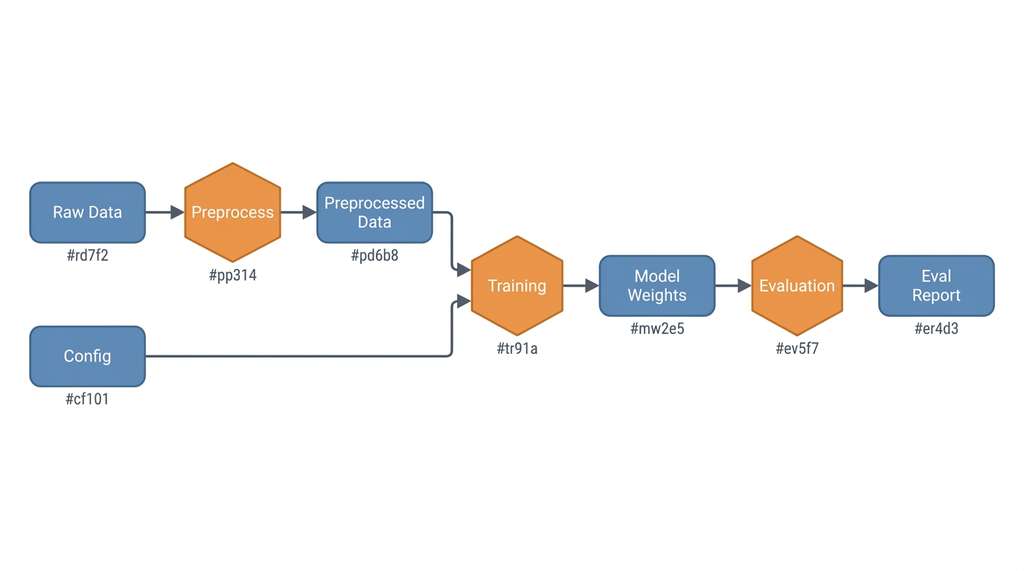
With all five artifact classes versioned and their identities pinned to content hashes, the next question is how to record the relationships between them so that any result can be traced back through the chain of inputs and transformations that produced it. We can now assemble the artifact DAG: a directed acyclic graph where nodes are artifacts and edges represent "produced by" relationships. Each edge passes through a run (an execution event), so the full graph is technically a bipartite DAG, where "bipartite" means the graph contains two distinct node types (artifacts and runs) with edges only between types, never within a type. Figure 47.10 illustrates a two-stage pipeline in this structure: raw data flows through a preprocessing run to produce processed data, which then flows through a training run to produce a model. Figure 47.1.1 illustrates Artifact DAG showing bipartite graph of artifacts and runs.
"""Artifact DAG construction and traversal."""
from dataclasses import dataclass, field
from collections import defaultdict


@dataclass
class RunRecord:
    """Record of a single experiment run."""
    run_id: str
    git_commit: str
    config_hash: str
    docker_image: str
    input_hashes: list[str]    # Hashes of input artifacts
    output_hashes: list[str]   # Hashes of output artifacts
    start_time: str
    end_time: str
    metrics: dict = field(default_factory=dict)


class ArtifactDAG:
    """Directed acyclic graph of artifacts and the runs that connect them."""

    def __init__(self):
        self.runs: dict[str, RunRecord] = {}
        self.produced_by: dict[str, str] = {}   # artifact_hash -> run_id
        self.consumed_by: dict[str, list[str]] = defaultdict(list)

    def add_run(self, run: RunRecord):
        """Register a run and its artifact relationships."""
        self.runs[run.run_id] = run
        for out_hash in run.output_hashes:
            self.produced_by[out_hash] = run.run_id
        for in_hash in run.input_hashes:
            self.consumed_by[in_hash].append(run.run_id)

    def trace_lineage(self, artifact_hash: str) -> list[RunRecord]:
        """Trace the complete lineage of an artifact back to raw inputs."""
        lineage = []
        visited = set()
        stack = [artifact_hash]

        while stack:
            current = stack.pop()
            if current in visited:
                continue
            visited.add(current)

            if current in self.produced_by:
                run_id = self.produced_by[current]
                run = self.runs[run_id]
                lineage.append(run)
                stack.extend(run.input_hashes)

        return lineage

    def regeneration_plan(self, artifact_hash: str) -> list[RunRecord]:
        """Produce an ordered list of runs needed to regenerate an artifact."""
        lineage = self.trace_lineage(artifact_hash)
        # Reverse to get execution order (inputs first)
        return list(reversed(lineage))


# Build an artifact DAG from experiment history
dag = ArtifactDAG()

# Stage 1: Data preprocessing
dag.add_run(RunRecord(
    run_id="preprocess_001",
    git_commit="abc123",
    config_hash="cfg_aaa",
    docker_image="exp:v1.0",
    input_hashes=["raw_data_hash"],
    output_hashes=["processed_data_hash"],
    start_time="2026-04-15T10:00:00Z",
    end_time="2026-04-15T10:05:00Z",
))

# Stage 2: Model training
dag.add_run(RunRecord(
    run_id="train_001",
    git_commit="abc123",
    config_hash="cfg_bbb",
    docker_image="exp:v1.0",
    input_hashes=["processed_data_hash"],
    output_hashes=["model_hash"],
    start_time="2026-04-15T10:10:00Z",
    end_time="2026-04-15T12:30:00Z",
    metrics={"val_loss": 0.023, "val_accuracy": 0.97},
))

# Trace lineage of the trained model
lineage = dag.trace_lineage("model_hash")
print(f"Model lineage: {len(lineage)} runs")
for run in lineage:
    print(f"  {run.run_id}: {len(run.input_hashes)} inputs -> "
          f"{len(run.output_hashes)} outputs")

# Generate a regeneration plan
plan = dag.regeneration_plan("model_hash")
print(f"\nRegeneration plan ({len(plan)} steps):")
for i, run in enumerate(plan, 1):
    print(f"  Step {i}: {run.run_id} (commit {run.git_commit[:7]})")
trace_lineage method walks backward from any artifact to discover every run and input involved in its production. The regeneration_plan method reverses this trace into a forward execution order for reproducing the artifact from scratch.
The artifact DAG is not just a provenance record; it is a computation graph. Given the DAG
and a content-addressable store, you can identify exactly which artifacts need to be
recomputed when an input changes. If you modify the preprocessing code but not the raw data,
only the preprocessing and downstream stages need re-execution; the raw data retrieval step
can be skipped. This is the same principle behind build systems like Make and Bazel (tools that track file dependencies and re-execute only the steps whose inputs have changed), applied
to scientific experiments. DVC pipelines (dvc.yaml) implement this pattern
directly, as we will see in Section 47.3.
10. Tool Comparison
Content-addressable storage, artifact taxonomy, and DAG-based lineage define what a registry must do; the remaining question is which existing tools implement these ideas so you do not have to build everything from scratch.
Table 47.2 compares the major experiment tracking and artifact versioning tools available as of 2026. No single tool covers all requirements; production registries typically combine two or three.
| Capability | MLflow | W&B | DVC | Git + CAS | DAGsHub |
|---|---|---|---|---|---|
| Experiment tracking | Yes (core) | Yes (core) | Via params/metrics | Manual | MLflow integration |
| Large artifact storage | Artifact store | Artifact store | Yes (core) | Custom | DVC integration |
| Model registry | Yes (core) | Model registry | No | No | MLflow integration |
| Pipeline DAG | No | No | Yes (dvc.yaml) |
No | DVC integration |
| Data versioning | Limited | Artifact versioning | Yes (core) | Manual hashing | DVC integration |
| Self-hosted option | Yes (open source) | Enterprise only | Yes (open source) | Yes | Cloud + self-hosted |
| Provenance standard | Custom | Custom | Custom | Custom | Custom |
The combination we build in Section 47.3 uses Git for code, DVC for data and pipeline definitions, and MLflow for experiment tracking and model registration. This combination is open-source, self-hostable, and covers all five artifact classes with content-addressable verification at every stage.
If you prefer a managed solution over the Git + DVC + MLflow stack, Weights & Biases
(W&B) provides experiment tracking, artifact versioning, and model registry in a single
API. A minimal integration takes three lines: wandb.init(project="my_project"),
wandb.config.update(config_dict), and wandb.log(metrics_dict).
W&B handles artifact hashing, storage, and UI automatically. The tradeoff is vendor
lock-in: your provenance data lives on W&B's servers (or your enterprise deployment)
rather than in portable open formats. For teams that prioritize speed of setup over data
sovereignty, this is often the right choice.
Research Frontier
The Croissant metadata format, introduced by MLCommons in 2024 (Akhtar et al., "Croissant: A Metadata Format for ML-Ready Datasets," published at KDD 2024), pushes artifact registries toward cross-platform interoperability. Croissant defines a JSON-LD (JSON for Linking Data), a W3C standard for embedding structured metadata in JSON using web identifiers, vocabulary that describes dataset structure, provenance, licensing, and responsible-AI properties in a machine-readable schema. Major platforms including Hugging Face, Kaggle, and OpenML have adopted Croissant as a standard metadata layer, enabling registries to exchange dataset descriptions without proprietary lock-in. This complements the per-artifact hashing covered in this section by adding a semantic layer: not just what the artifact contains (its hash), but what the artifact means (its fields, splits, intended uses, and known limitations) in a format that any compliant tool can parse.
Try It: Build a Mini Artifact Registry
Build a working content-addressable artifact store and use it to track a small experiment, using only the Python standard library.
(1) Create a directory called my_registry/ with subdirectories objects/ and metadata/. Write a Python function register(filepath) that computes the SHA-256 hash of any file, copies it into objects/ using the first two hex characters as a subdirectory name (e.g., objects/a1/b2c3d4...), and saves a JSON metadata file in metadata/ recording the hash, original filename, file size, and a timestamp.
(2) Create three small text files simulating experiment artifacts: a config file (config.json with a learning rate and batch size), a "dataset" file (a CSV with 10 rows of dummy data), and a "results" file (a JSON with dummy metrics). Register all three.
(3) Modify one value in config.json (change the learning rate) and register it again. Verify that the new registration produces a different hash and that both versions coexist in the store.
(4) Write a verify(sha256) function that re-reads the stored file, recomputes its hash, and confirms it matches. Run it on all registered artifacts.
(5) Write a lineage(sha256) function that reads the metadata JSON for a given hash and prints its parent artifact hashes. Manually set the results file's metadata to list the config and dataset hashes as parents, then call lineage() to reconstruct which inputs produced the result.
Exercise 47.1.1
Suppose you register two files in a content-addressable store: config_v1.json (containing {"lr": 0.001, "batch_size": 32}) and config_v2.json (containing {"batch_size": 32, "lr": 0.001}). The byte contents of these two files differ because the key order is different. Will they receive the same SHA-256 hash or different hashes? What does this imply for the ExperimentConfig.content_hash() method shown in Figure 47.7, and why does it use sort_keys=True?
Hint
SHA-256 operates on raw bytes, not on semantic content. Two JSON files with identical key-value pairs but different key ordering are different byte sequences, so they produce different hashes. The content_hash() method avoids this problem by serializing through json.dumps(..., sort_keys=True), which enforces a canonical key order before hashing. Without sort_keys=True, logically identical configurations could receive different hashes, causing the registry to treat them as distinct artifacts.
Step-Through: Content-Addressable Registration
Trace through the ArtifactStore.register() method with a tiny file whose contents are the 5 bytes hello.
Step 1: Compute SHA-256 of hello. Result: 2cf24dba5fb0a30e26e83b2ac5b9e29e1b161e5c1fa7425e73043362938b9824 (64 hex characters).
Step 2: Determine the storage path. First two hex characters are 2c, remainder is f24dba5fb0a30e.... The object is stored at objects/2c/f24dba5fb0a30e26e83b2ac5b9e29e1b161e5c1fa7425e73043362938b9824.
Step 3: Check whether obj_path already exists. It does not (first registration), so copy the file to that path.
Step 4: Create an ArtifactMetadata object with sha256="2cf24dba...", size_bytes=5, and the current UTC timestamp.
Step 5: Write the metadata JSON to metadata/2cf24dba5fb0a30e26e83b2ac5b9e29e1b161e5c1fa7425e73043362938b9824.json.
Deduplication check: Register a second file also containing hello. At Step 3, obj_path.exists() returns True, so the copy is skipped. The store never holds two copies of identical content.
Real-World Application: Hugging Face Hub
The Hugging Face Hub uses content-addressable storage (Git Large File Storage (LFS) with SHA-256 pointers) to version over one million public models and datasets as of early 2025. Every model revision is identified by its commit hash, and each large file (weights, tokenizer binaries) is tracked by its content hash in LFS pointer files. This design lets any user pin a model to an exact revision (revision="a1b2c3d" in the transformers API), guaranteeing byte-identical weights across all downloads, while the Hub deduplicates storage across forks that share identical weight files.
The \$10 Million Sticky Note
In 2019, a pharmaceutical company reportedly spent over six months attempting to reproduce a promising drug-interaction model whose hyperparameters had been recorded only in a researcher's personal notes, which were discarded after the researcher left the company. The inability to reproduce the result delayed a clinical trial by nearly a year. This incident, reportedly referenced in regulatory discussions on computational reproducibility, is one of several cases that motivated the pharmaceutical industry's adoption of formal experiment registries. The total cost of the delay was estimated at over \$10 million, making it perhaps the most expensive missing configuration file in history.
Lab: Hash Collision and Integrity Verification
Goal: Build intuition for how content-addressable storage detects corruption and handles large artifact collections.
Tools needed: Python 3.10+ (standard library only: hashlib, os, json, random, time).
Procedure (20 minutes):
(1) Generate 1,000 random binary files of varying sizes (1 KB to 1 MB) and register each in the ArtifactStore from Figure 47.1. Record the wall-clock time for registration.
(2) Verify all 1,000 artifacts using store.verify(). Record the verification time.
(3) Deliberately corrupt 10 random artifacts by flipping a single byte in each stored object file. Run verification again and confirm that exactly those 10 fail.
(4) Duplicate 50 of the original files (copy them under new filenames) and register the duplicates. Observe that no new objects appear in the store (deduplication).
What to vary: Try replacing SHA-256 with MD5 (hashlib.md5) and measure the speed difference. Try increasing the collection to 10,000 files and observe how the two-level directory structure keeps directory listing times constant.
What to observe: (a) The hash computation time scales linearly with total bytes, not file count. (b) Single-byte corruption is always detected. (c) Deduplication is automatic and requires no special logic beyond the "if not exists" check.